O2VEND Retail ERP
  • Getting Started
  • Ecommerce
  • Back Office
  • POS
  • Agent App
  • PIM
  • Communication
  • CMS
  • OMS
  • WMS
  • O2C
  • Accounting
  • Reports
  • Themes and Apps
Search Results for

    Show / Hide Table of Contents
    • Reports
    • Order Reports
      • Web Orders Progress Report
      • Back Order Items Report
      • Purchase Order Pending Item Report
      • Sales Order Pending Item Summary Report
      • Sales Shipping Status Report
      • Sales Order Summary
      • Sales Order Progress Report
      • Purchase Order Progress Report
      • Sales Order with Product Line Item Report
      • Sales Order Packing Sheet Report
      • Back Order Report
      • Purchase Order Summary
      • Sales Order Shipment Report
      • Sales Order Shipping Address Report
    • Sales/Purchase Reports
      • Sales Invoice Report
      • Sales Invoice Summary
      • Sales Items Summary
      • Purchase Invoice Report
      • Purchase Invoice Summary
      • Purchase Items Summary
      • Receipt Report
      • Daily Settlement Report
      • Contribution Margin Report
      • Agent Sales Report
      • Agent Report
      • Employee Sales Report
      • Employee Report
      • Employee Product Sales & Commission Report
    • Supplier Reports
      • Supplier Report
      • Supplier Purchase Report
      • Supplier Detail Report
    • Inventory Reports
      • Stock Summary
      • Stock Valuation Summary
      • Stock Ageing Report
      • Location Summary
      • Stock Ledger Report
      • Stock/Location Summary
      • Stock Movement And Valuation Summary
      • Stock Movement Summary Report
    • Products
      • Sold Product Categories
      • Product Category Summary
      • Product Sale Summary
      • Category Sale Summary
      • Brand Sale Summary
      • Reordering Stock Summary
      • Price Movement
      • Product Seasonal Demand
      • Product Stock Analysis Report
      • Stock Projection Report
    • Pos Reports
      • Cash Register Summary
      • Current Cash Registers
    • Account Reports
      • Day Book
      • Ledger
      • Cash Book
      • Sales Books
      • Purchase Books
      • Daily Sales and Payment Report
      • Balance Sheet
      • Profit and Loss Report
      • Trial Balance
    • Miscellaneous Reports
      • Output Detailed Tax Report
      • Output Tax Report Summary
      • Account Receivable Report
      • Gross Profit Report
      • Daily Tax Report
      • GSTR-1 Report
      • External API Logs
      • Benefit Usage
      • Offers Usage
      • Coupon Usage
      • Configuration Change History
      • VisitLog

    Web Order Progress Report

    Overview

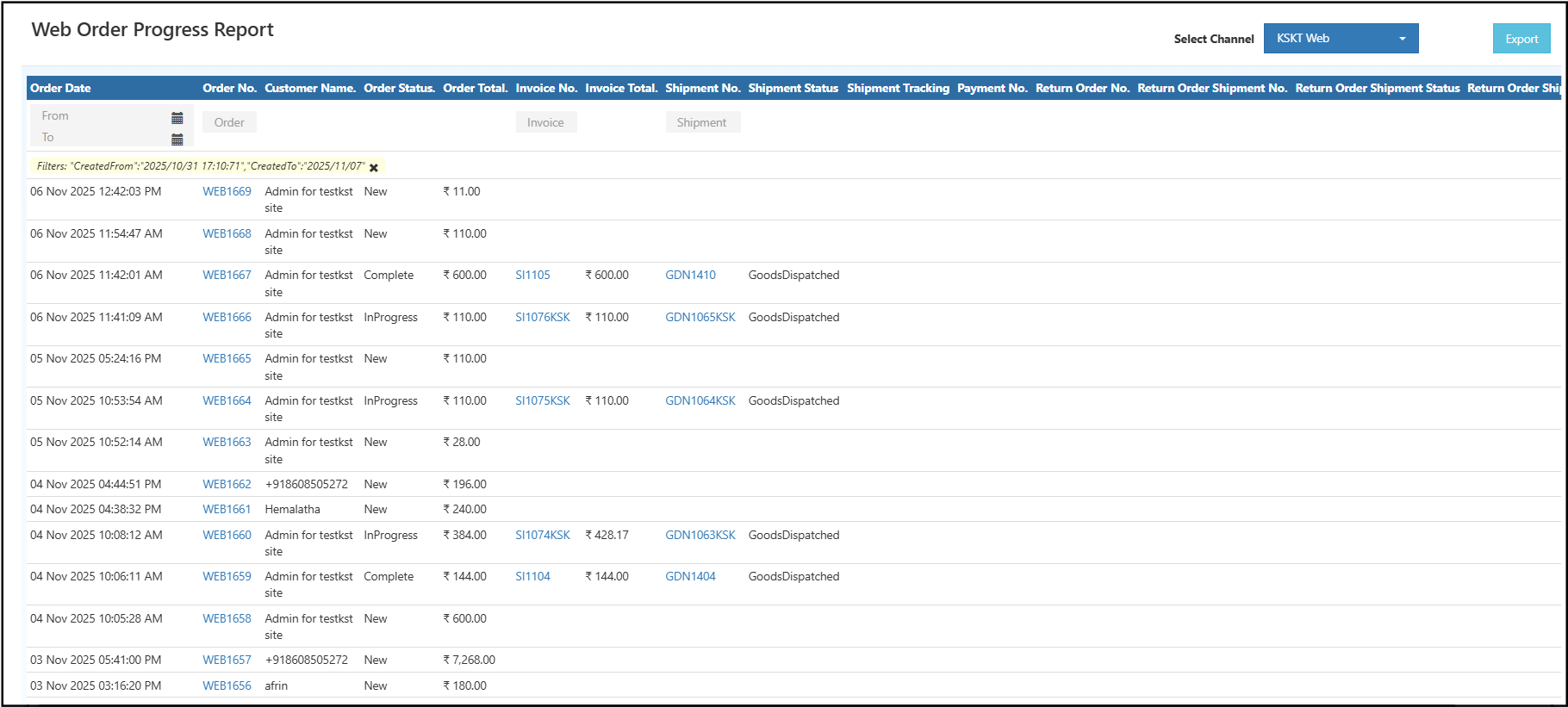
    The Web Order Progress Report in O2VEND Back Office displays the complete order processing flow for all online transactions.
    This report helps track each order from placement to delivery, providing full visibility of order status, invoice details, shipment progress, and payment information.
    It supports better decision-making and ensures accurate tracking of all online order activities.

    Web Order Progress Report Web Order Progress Report
    How to View Web Order Progress Report

    1. Open Back Office.
    2. Go to Reports on the left menu.
    3. Select Order Reports → Web Order Progress Report.
    4. Choose a Channel name.
    5. Set the From Date and To Date fields to define the report range.
    6. The system automatically displays all order data for the selected period.
    7. Use the Export button to obtain the report in your preferred format — Excel or CSV.

    Fields Description

    Field Name Description
    Order Date The date and time when the order was created.
    Order No. Unique order identification number.
    Customer Name Displays the registered customer or guest name.
    Order Status Indicates whether the order is New, In Progress, or Completed.
    Order Total The total value of the order.
    Invoice No. / Invoice Total Shows related invoice number and total invoice amount.
    Shipment No. / Shipment Status Displays shipment ID and dispatch status.
    Shipment Tracking Tracking details for shipped orders.
    Payment No. Displays the payment reference number.
    Return Order / Shipment No. Displays return order information if applicable.
    Return Shipment Status Indicates the progress or completion of return shipments.

    Benefits

    • Provides real-time tracking of online orders.
    • Displays the complete order journey from placement to return.
    • Enables accurate reconciliation between orders, invoices, and payments.
    • Helps identify pending shipments or unprocessed payments.
    • Supports export for accounting or reporting purposes.

    Pro Tip

    Click on Order No., Invoice No., or Shipment No. links to open detailed order information instantly.

    Suggested Internal Links

    • Sales Order Summary Report
    • Purchase Order Summary Report
    • Sales Order Shipment Report

    Related Blog Article

    Web Order Progress Report for Business

    Explore our detailed blog on how the Web Order Progress Report in O2VEND Back Office helps businesses track online orders, invoices, and shipments efficiently.

    In this article
    Back to top _includes/footer.html
    © 2019–2026 Jeyan Technologies Private Limited • www.o2vend.com • Create your own store