Stock Valuation Summary in O2VEND
The Stock Valuation Summary Report in O2VEND Back Office helps you determine the current value of your inventory across branches and locations. It evaluates each product based on cost, price, and MRP, ensuring precise valuation for accounting and business planning.
What Is a Stock Valuation Report?
A Stock Valuation Report is a financial document that estimates the total value of inventory in your business. It considers the cost price, market retail price (MRP), and selling price for each SKU to help you monitor stock worth and optimize purchasing decisions.
Why It’s Important
- Financial Planning – Provides accurate inventory valuation for balance sheets and forecasts.
- Cost Control – Identifies overstocked or slow-moving items for better cash flow management.
- Tax Planning – Helps calculate stock value for tax reporting, reducing financial discrepancies.
- Mergers & Acquisitions – Gives buyers and auditors a clear view of inventory worth.
How to View the Stock Valuation Summary Report
Follow these simple steps to access your report in O2VEND:
Open Back Office Log in to O2VEND Back Office portal.
Go to Reports Section Click the Reports tab or use shortcut Alt+R to open all reports.
Select “Stock Valuation Summary” Under Inventory Reports, choose Stock Valuation Summary.
Set Filters
Select your filters:
- Use Stock as on shows stock details up to a selected date.
- Branch / Warehouse
- Product / SKU / GTIN / Category / Brand
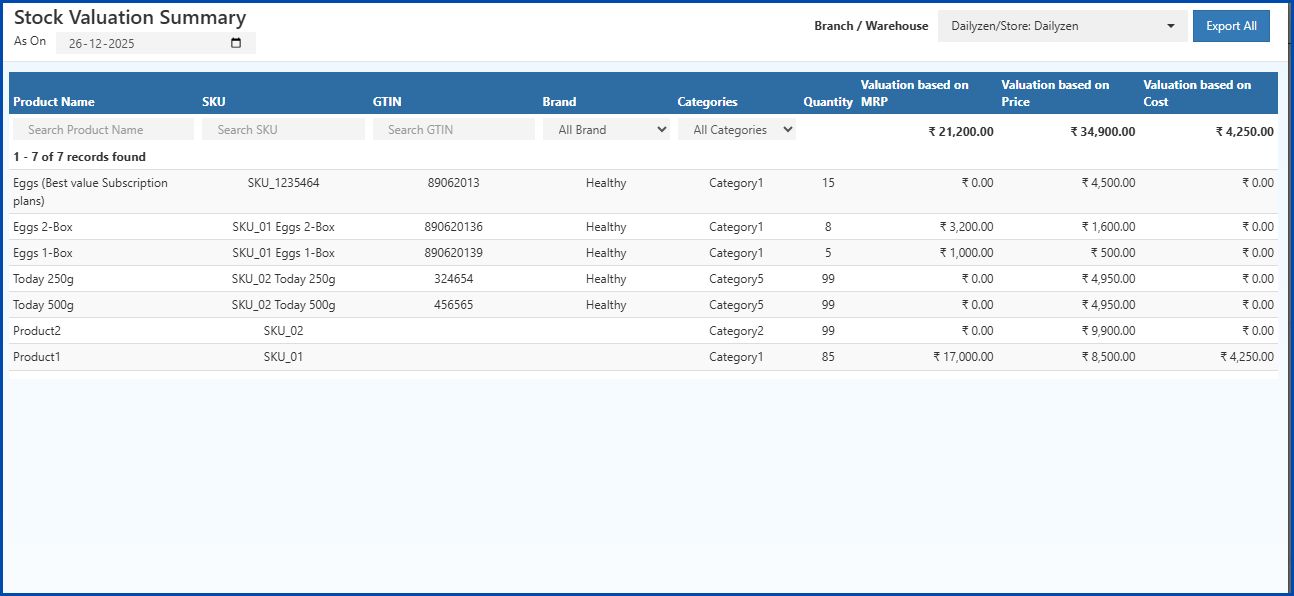
TheStock Valuation Summary Report will display the current stock.
View the Report The system displays values based on Cost, Price, and MRP, along with SKU and quantity.
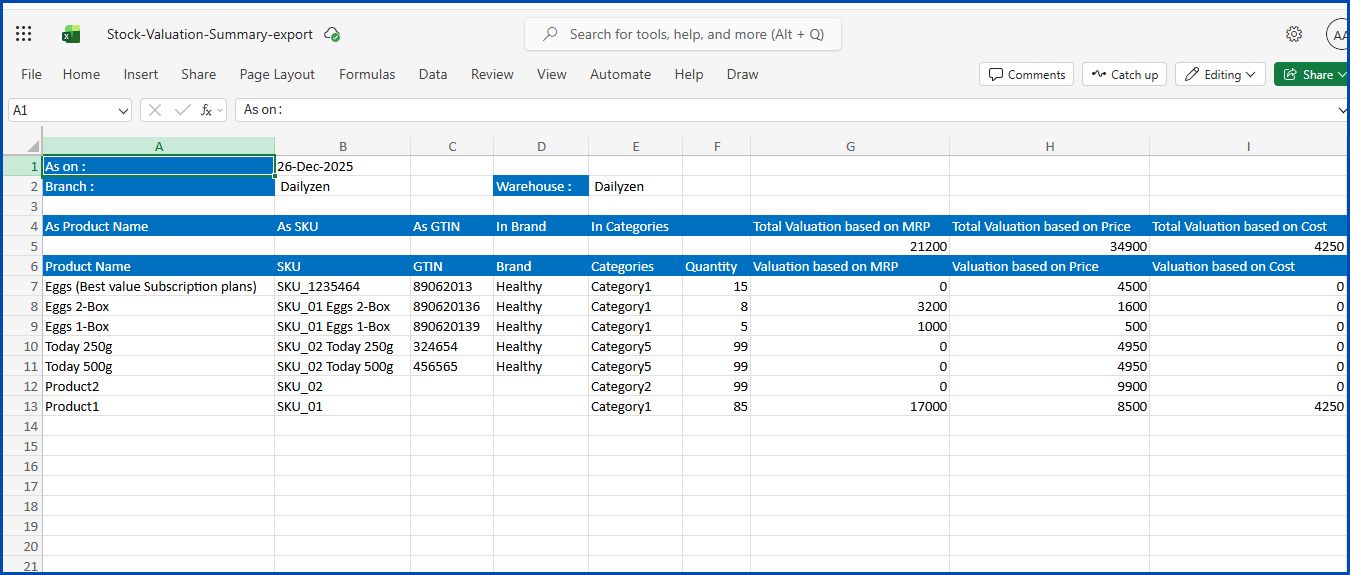
Export Report Use Export All or Export Current Page to download your data as a CSV file for record-keeping.
💡 Tip: Use the export options to save or share inventory valuation data in CSV format.
Understanding Report Columns
| Column Name | Description |
|---|---|
| Product Name | The name of the product available in inventory. |
| SKU | Stock Keeping Unit used to uniquely identify each product internally. |
| GTIN | Global Trade Item Number or barcode assigned to the product. |
| Brand | Brand associated with the product. |
| Category | Category under which the product is classified. |
| Branch / Warehouse | The store or warehouse where the stock is currently available. |
| Quantity | Total number of units available in stock. |
| Cost Value | Total inventory value calculated based on purchase cost (Quantity × Cost Price). |
| Price Value | Total inventory value based on the selling price (Quantity × Selling Price). |
| MRP Value | Total inventory value calculated using MRP (Quantity × MRP). |
| Valuation Based on Cost | Displays stock valuation considering only purchase cost. |
| Valuation Based on Price | Displays stock valuation considering selling price. |
| Valuation Based on MRP | Displays stock valuation considering MRP. |
| As On Date | Date on which the stock valuation is calculated. |
| Export All | Allows exporting the report in Excel or CSV format. |
How Stock Valuation Is Calculated
- Cost Valuation = Quantity × Purchase Cost
- Price Valuation = Quantity × Selling Price
- MRP Valuation = Quantity × MRP
Seasonal Demand Reports: A Retailer’s Guide to Smarter Inventory Planning
Discover how seasonal demand insights support accurate sales forecasting, balanced stock levels, and reduced overstock or stockout situations throughout the year.
Benefits of Using O2VEND Stock Valuation Summary
- Accurate Valuation: Real-time insight into stock worth.
- Multi-Branch Tracking: Compare valuation across multiple locations.
- Easy Export: One-click CSV report generation.
- Financial Control: Prevent overstocking and optimize purchasing.
- Retail-Ready: Designed for both online and offline store operations.
Related Articles
- Cash Book Report
- Sales Summary Report
- Inventory Aging Report
- Stock Summary Report
- Location Summary Report
- Stock / Location Summary Report
- Stock Valuation Summary Report
- Stock Movement and Valuation Summary Report
Understand Stock Value for Better Decisions
Use the O2VEND Stock Valuation Summary Report to track real-time inventory value by Cost, Selling Price, and MRP across all branches and locations.
Need Help Understanding Stock Valuation?
Get expert guidance to analyze stock value, inventory costs, and real-time valuation reports in O2VEND ERP.
📊 Visit O2VEND Support