Ledger Report in O2VEND ERP – Track Customer & Supplier Transactions & Balances
Missing payments, inaccurate balances, or GST errors?
The Ledger Report captures every customer and supplier transaction in one view—ensuring accurate balances and audit-ready statements.
- ✔ Accurate customer & supplier balances at a glance
- ✔ GST-ready export for audits and compliance
- ✔ Reduce manual reconciliation errors instantly
Explore Ledger Report in O2VEND →
Problem Statement
Many businesses struggle with:
- Payments and receivables not matching ledger balances
- Manual tracking errors in Excel or offline systems
- GST-compliance and audit readiness challenges
- Difficulty reconciling customer and supplier accounts
👉 Without a single source of truth, small errors turn into accounting headaches.
✅ What Will Be Gained
- ✔ View all customer and supplier transactions in one consolidated report
- ✔ Reconcile opening & closing balances instantly
- ✔ Detect missed payments or overpayments early
- ✔ Export GST-ready statements for audits or financial review
Trusted by finance teams to maintain accurate accounts and reduce reconciliation errors.
What Is the Ledger Report?
A Ledger Report is a critical account-level financial summary showing all transactions for a selected customer, supplier, or ledger account within a chosen date range.
Includes:
- Sales and purchase transactions
- Receipts and payments
- Returns and adjustments
- Opening and closing balances
Purpose: Provides a clear, audit-ready account summary for accurate decision-making.
How to View Ledger Report in O2VEND ERP
- Login to O2VEND Back Office
- Navigate to Reports → Account Books → Ledger Report
- Select Account Type (Customer or Supplier)
- Set Date Range
- Optionally select a Branch
- Click View Report
- Ledger shows opening balance, transactions, and closing balance
- Export or Print
- Use Export All (Excel / PDF) for GST-ready statements
- Use Print for a clean report
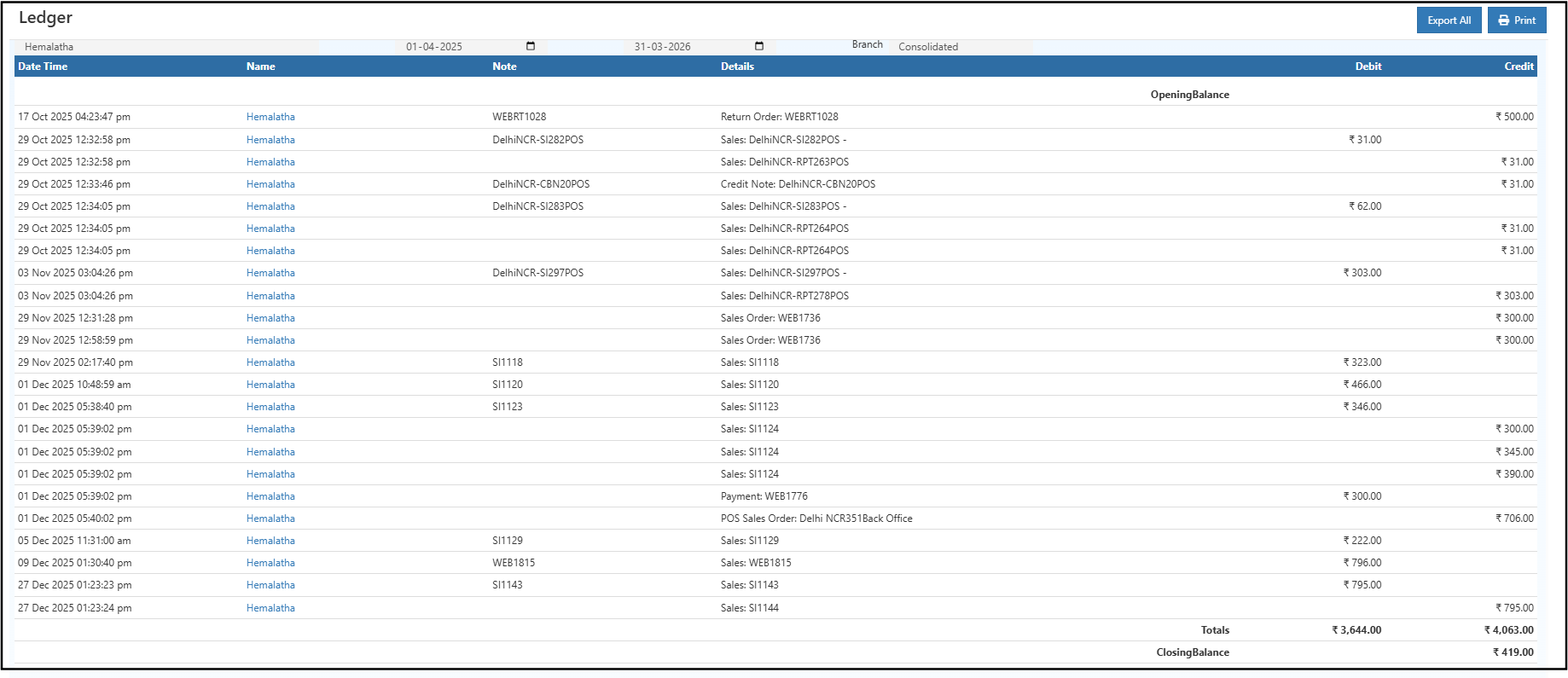 > 💡 Tip: Regular review prevents missed payments, ensures GST compliance, and avoids reconciliation errors.
🧾 Ledger Report Fields Explained
| Field | What It Means | Why It Matters |
|---|---|---|
| Date & Time | Timestamp of transaction | Audit trail & chronological order |
| Name | Customer or supplier | Identifies the account impacted |
| Note | Reference number (e.g., EP-SI_55_Delhi) |
Cross-verification with invoices/payments |
| Details | Transaction type & linked document | Clarifies nature of debit/credit |
| Debit | Outgoing amount | Reduces account balance |
| Credit | Incoming amount | Increases account balance |
| Opening Balance | Balance at period start | Provides starting point for reconciliation |
| Totals | Total debit & credit | Quick review of account activity |
| Closing Balance | Balance at period end | Confirms account status; matches statements |
Debit and Credit Overview
- Debit → Outgoing money or expenses recorded for the account
- Credit → Incoming payments or income credited
Understanding this ensures accurate assessment of customer dues and supplier payments.
Export GST-Ready Ledger Reports
- Export All → Excel/CSV for audits and financial analysis
- Print → Clean, printer-friendly GST-compliant copy
Regular exports support audits and reduce manual errors in accounting workflows.
Who Should Use Ledger Report?
- Business owners monitoring account balances
- Accountants preparing GST-compliant reports
- Finance teams reconciling customer and supplier accounts
- Auditors reviewing transaction history
- Managers tracking overdue or advance payments
Real-World Scenarios
Scenario 1: Customer Payment Mismatch
Compare invoice amounts, received payments, and ledger closing balance to identify missing or duplicate payments quickly.
Scenario 2: Audit Preparation
Export full ledger as Excel or PDF to provide a GST-ready transaction trail for compliance.
🔗 Related Reports
Frequently Asked Questions (FAQ)
Can the Ledger Report be filtered by branch or date range?
Yes, branch and custom date filters are available.How is the outstanding balance identified?
The Closing Balance shows payable or receivable amounts per account.Can the Ledger Report be exported or printed for audits?
Yes, Export All or Print options generate GST-ready statements.Is the Ledger Report GST compliant?
Yes, all entries align with GST accounting standards.Can customer ledgers be downloaded in Excel?
Yes, full ledger export is supported in Excel/CSV format.
Need Help with Ledger Reports?
Get expert guidance for tracking ledgers, resolving reconciliation issues, and generating GST-compliant reports in O2VEND ERP.
Contact Support →Track Customer & Supplier Balances Accurately with O2VEND
Export GST-ready ledgers, reconcile accounts, and ensure accurate financial tracking effortlessly.