Day Book Report: Track All Daily Transactions & Cash Flow in One View
One report. One day. Complete financial clarity.
Cash mismatches, missing entries, or unclear day-end balances? The Day Book Report captures every daily transaction—sales, receipts, payments, and balances—so day-end closing stays accurate and stress-free.
The Day Book Report provides a complete, chronological view of all daily transactions—sales, receipts, payments, and balances—supporting accurate and reliable day-end reconciliation.
- ✔ Consolidated view of daily financial activity
- ✔ Clear opening and closing balance visibility
- ✔ Early detection of transaction mismatches
Problem Statement
Many businesses face daily challenges such as:
- Cash not matching POS or counter balance
- Missing or duplicate entries during peak hours
- Confusion during day-end closing or audits
👉 Without a clear Day Book view, small errors turn into major accounting issues.
✅ What You’ll Gain
- ✔ View all daily transactions in one place (no manual cross-checking)
- ✔ Verify opening & closing balances within minutes
- ✔ Detect cash mismatches before day-end closing
- ✔ Prepare audit-ready data before ledger posting
Try Day Book Report in O2VEND →
What Is a Day Book?
A Day Book is the first and most critical accounting register used to verify daily financial accuracy before transactions move to the ledger.
Includes:
- Sales and purchases
- Receipts and payments
- Debit and credit movements
- Opening and closing balances Purpose: Provide a daily financial snapshot before posting to the general ledger.
How to View the Day Book Report in O2VEND
- Open O2VEND Back Office
- Go to Reports
- Select Account Books → Day Book
- Set Start Date and To Date
- View refreshed transaction details
💡 Tip: Click PRINT to download/export the report as PDF.
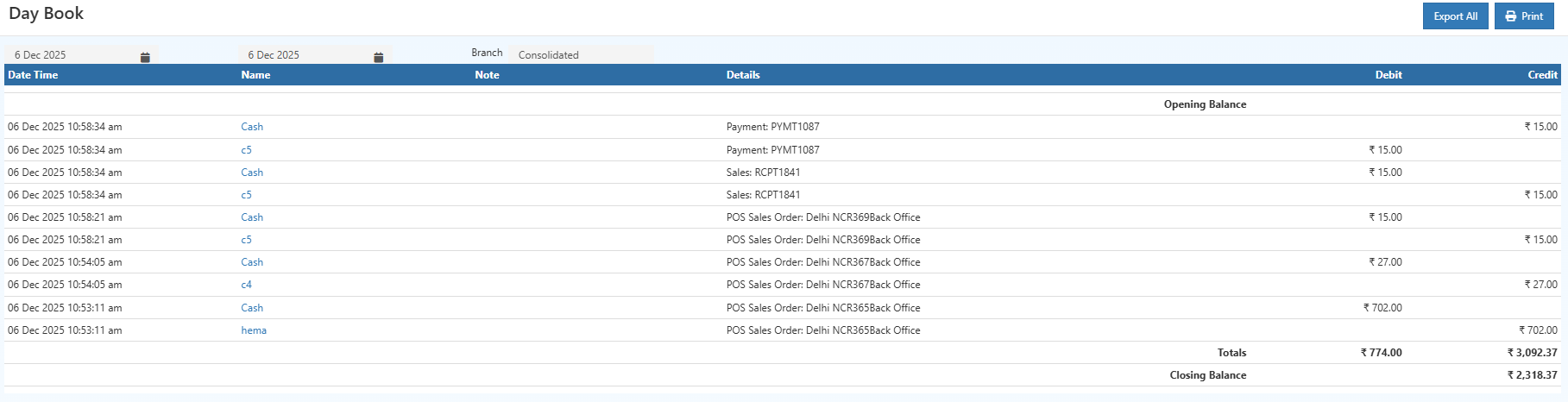
🧾 Day Book Fields Explained
| Field | What It Means | Why It Matters |
|---|---|---|
| Date & Time | When the transaction occurred | Audit trail & chronological order |
| Account Name | Cash, Customer, Supplier | Shows impacted account |
| Reference No | Invoice/Receipt/Payment ID | Easy cross-verification |
| Transaction Type | Sale, Payment, Receipt | Identifies inflow/outflow |
| Debit | Money spent | Reduces balance |
| Credit | Money received | Increases balance |
| Opening Balance | Start-of-day balance | Auto from previous day |
| Closing Balance | End-of-day balance | Must match actual cash/POS |
👥 Who Should Use This Report?
This report is especially useful for teams responsible for daily financial accuracy:
- Business owners checking daily cash flow
- Accountants verifying entries
- Store managers doing counter closing
- Auditors reviewing transaction history
- Finance teams preparing ledger postings
Why It Matters for Business
- Transparency: Every transaction is traceable
- Cash control: Know inflows and outflows daily
- Error prevention: Catch issues early
- Audit readiness: Clean, chronological records
- Branch reconciliation: Easier multi-location closing
Real-World Scenarios
Scenario 1: Cash Mismatch at Day End
Compare POS total, cash received, and Day Book closing balance to pinpoint the issue instantly.
Result: Faster issue identification without checking multiple reports.
Scenario 2: Audit or Compliance Check
Export the Day Book to provide a complete daily transaction trail on demand.
Result: Immediate compliance support with documented transaction history.
🔗 Related Reports
- Ledger Report – Verify Final Account Balances
- Cash Book Report – Cash Transactions Only
- Outstanding Report – Pending Receivables & Payables
- Payment Methods Setup
Need Help with Day Book Reports?
Get expert assistance for understanding Day Book entries, balancing transactions, exporting records, and resolving reconciliation issues in O2VEND ERP.
Visit O2VEND Support →Ensure Accurate Day-End Closing with O2VEND
Track daily transactions, eliminate cash mismatches, and reconcile accounts confidently using the Day Book Report.