How to Generate & Download GSTR-1 JSON in O2VEND (Step-by-Step GST Filing Guide)
Generate the GSTR-1 Report in O2VEND with complete B2B, B2C and HSN summary and download GST-ready JSON instantly. This report helps businesses prepare accurate monthly or quarterly GST returns with structured outward supply data.
The GSTR-1 Report automatically compiles taxable value, GST amount, invoice classification and HSN details into a filing-ready format. Review totals, validate tax data and export JSON for smooth GST portal upload.
Designed to support accurate GST compliance and simplified return preparation.
What is GSTR-1 Report in O2VEND?
The GSTR-1 Report is a GST outward supply summary that consolidates sales invoice data for a selected period.
It categorizes transaction data into:
- B2B Invoices (Registered Customers)
- B2C Large Invoices
- B2C Other Invoices
- Nil Rated / Exempt Supplies
- Credit & Debit Notes
- HSN-wise Summary
- Total Taxable Value & GST Amount
The report can be generated at branch level or consolidated level, making it suitable for single and multi-branch businesses.
Why GSTR-1 Report Is Important for GST Filing
Accurate GSTR-1 filing requires structured and validated outward supply data. This report ensures all sales transactions are properly summarized before submission.
- Maintains GST compliance
- Eliminates manual tax calculation errors
- Improves reconciliation accuracy
- Classifies invoices automatically (B2B/B2C)
- Keeps audit-ready documentation
Why use this report?
- Prepare monthly GSTR-1 return
- Download GST JSON file for portal upload
- Cross-check invoice tax totals
- Validate HSN-wise turnover
- Review branch-wise outward supply data
How to Access the GSTR-1 Report
Navigation Path:
Back Office → Reports → Miscellaneous → GSTR-1
After opening the report:
- Select required Date Range
- Choose Branch or Consolidated
- Review invoice summaries
- Click Export JSON to download GST-ready file
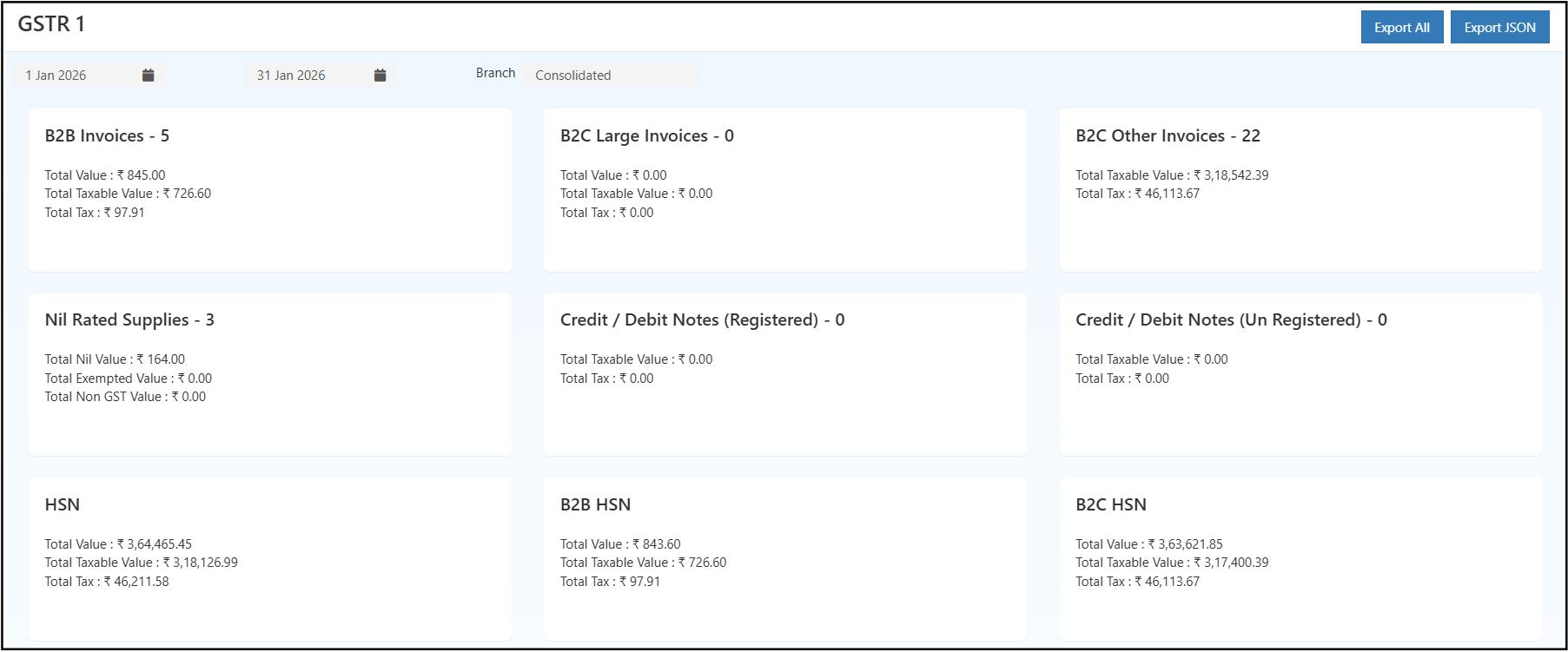
How to Download GSTR-1 JSON File in O2VEND
To generate GST portal upload file:
- Open Back Office
- Navigate to Reports → Miscellaneous → GSTR-1
- Select filing period (Monthly / Quarterly)
- Verify B2B, B2C and HSN summary
- Click Export JSON
- Upload the generated file to the GST portal
This ensures smooth GST return filing without manual data preparation.
Filters & Controls
The report includes:
- Date Range Filter – Select month, quarter or custom period
- Branch Selection – View specific branch or consolidated data
- Export Options – Export All / Export JSON
These filters help generate accurate outward supply data for the selected filing period.
GSTR-1 Report View Explained
The dashboard displays categorized GST sections in structured summary cards.
Summary Sections
- B2B Invoices – Registered customer sales with GST breakup
- B2C Large Invoices – High-value unregistered transactions
- B2C Other Invoices – Retail sales summary
- Nil Rated Supplies – Exempt or non-taxable transactions
- Credit/Debit Notes – Sales adjustments
- HSN Summary – HSN-wise taxable value and tax totals
Each section shows:
- Total Value
- Total Taxable Value
- Total GST Amount
This layout supports quick validation before GST filing.
Invoice Verification
The GSTR-1 Report allows invoice-level verification:
- Review detailed invoice data
- Validate tax breakdown per invoice
- Identify discrepancies before export
This minimizes filing corrections and improves submission accuracy.
How to Use the GSTR-1 Report Effectively
- Generate report for current filing month
- Compare totals with Sales Register
- Verify tax summary using Tax Summary Report
- Validate HSN breakup
- Download JSON file
- Upload to GST portal
For cross-verification, refer to:
Common Usage Scenarios
- Monthly GST return filing
- Quarterly GST submission
- Branch-wise tax reconciliation
- Internal audit preparation
- HSN turnover validation
Business Benefits
Accurate GST Compliance
Auto-classified outward supply data ensures structured filing.
Faster JSON Export
Generate GST-ready file instantly for portal submission.
Better Tax Visibility
Clear breakdown of B2B, B2C and HSN data improves financial monitoring.
Who Should Use This Report?
- Accountants
- GST Filing Executives
- Finance Managers
- Business Owners
- Auditors
Frequently Asked Questions (FAQs)
1. Can GSTR-1 JSON be downloaded directly from O2VEND?
Yes. The Export JSON option generates GST portal-ready file.
2. Does the report include HSN summary?
Yes. HSN-wise taxable and GST amounts are included.
3. Can data be viewed branch-wise?
Yes. Branch or consolidated view is available.
4. Can past filing periods be accessed?
Yes. Date range filter allows selection of previous months or quarters.
Export Options
- Export All – Downloads complete structured report data
- Export JSON – Generates GST-compliant JSON file
These export options support smooth GST portal upload and documentation.