Sales Order Packing Sheet Report in O2vend Back Office
The Sales Order Packing Sheet Report in O2VEND Back Office helps efficiently manage the order packing and dispatch process.
It provides detailed visibility of all sales orders along with each item, quantity, and payment status — ensuring accurate order fulfillment.
Navigation Path
Reports → Order Reports → Sales Order Packing Sheet Report
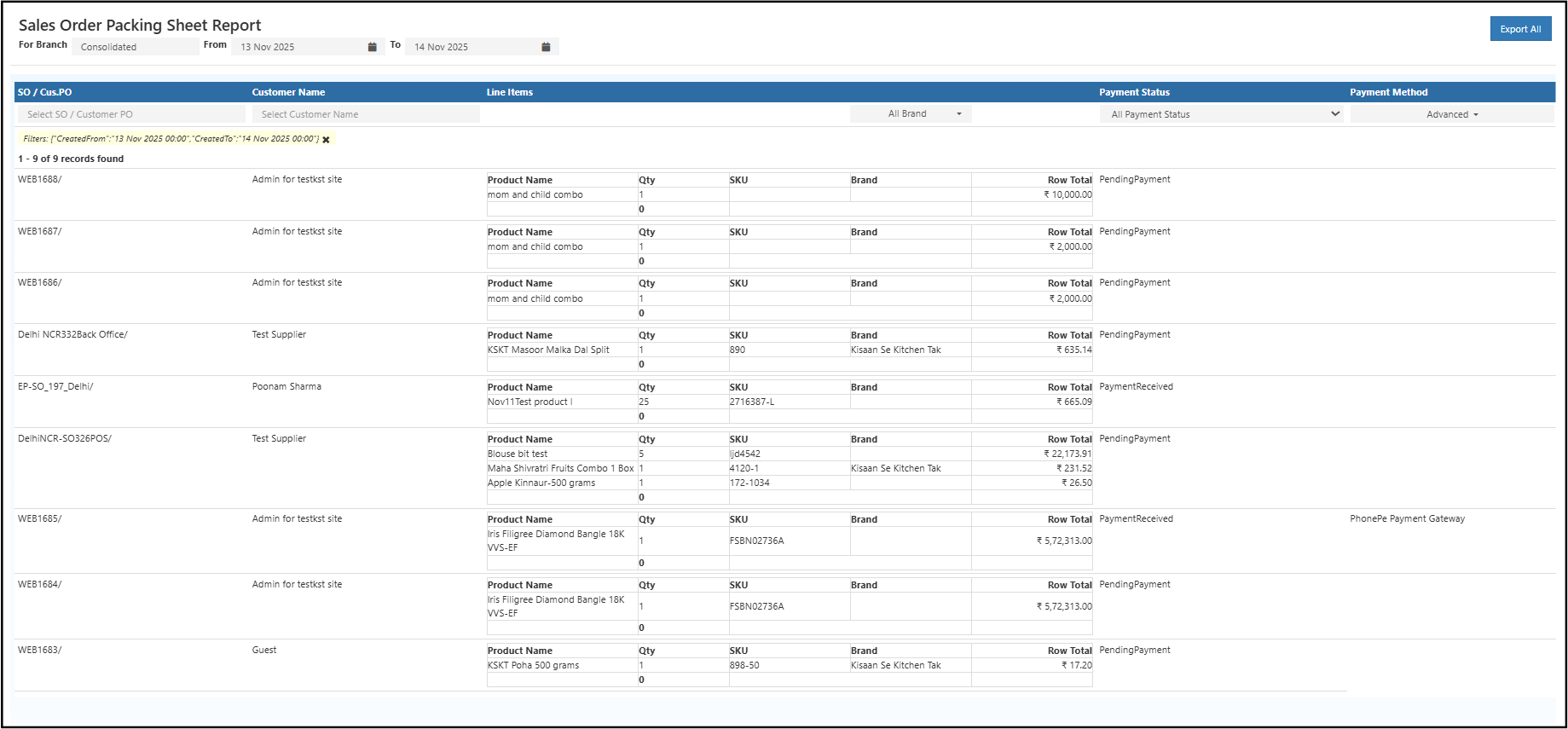
Overview
This report enables warehouse and logistics teams to view and verify all order details before dispatch.
It consolidates product-level data from multiple sales orders, helping improve accuracy and reduce packing errors.
Displayed Columns Include:
- Branch / Channel – Source location or channel of the order
- SO / Cus.PO – Sales Order or Customer Purchase Order number
- Customer Name – Buyer’s name
- Line Items – List of products included in the order
- Product Name – Individual product name
- Qty – Ordered quantity of each product
- SKU – Product stock keeping unit code
- Brand – Product brand (if available)
- Row Total – Price total for each line item
- Payment Status – Payment stage (Pending, Received, etc.)
- Payment Method – Mode of payment (e.g., PhonePe, Cash, etc.)
Report Features
| Feature | Description |
|---|---|
| Date Filter | View sales orders within a specific date range. |
| Customer Search | Search orders by customer name or phone number. |
| Brand Filter | Analyze packing data based on product brand. |
| Export Option | Download complete report in CSV format. |
| Pagination & Totals | View totals and navigate through report pages easily. |
Use Cases
- Retail Store Dispatch: Manage multiple daily order packings efficiently.
- E-commerce Fulfillment: Verify item quantities before courier collection.
- Wholesale Distribution: Separate paid and pending payment shipments.
- Inventory Reconciliation: Cross-check product SKUs and quantities with actual stock.
How to View the Sales Order Packing Sheet Report
- Open O2VEND Back Office.
- Click Reports or press Alt + R.
- Navigate to Sales Reports.
- Select Sales Order Packing Sheet Report.
- Set the date range using From and To filters.
- Use optional filters like Customer Name, Brand, Branch or Payment Status.
- Review the tabular report for order and item-level details.
- Click Export All to download the report as a CSV file for offline use.
Business Benefits
- Simplifies order packing verification and dispatch accuracy.
- Provides full item-wise visibility for each sales order.
- Improves coordination between sales, accounts, and warehouse teams.
- Helps ensure payment status confirmation before shipment.
- Reduces manual packing mistakes and delays.
Improve Packing Accuracy and Efficiency
The Sales Order Packing Sheet Report ensures each order is verified, packed, and ready for dispatch.
By reviewing product quantities, SKUs, and payment details, businesses can maintain accurate order fulfillment and higher customer satisfaction.
💡 Tip: Regularly review the Packing Sheet Report to minimize packing errors, verify order accuracy, and streamline dispatch operations.