O2VEND Retail ERP
  • Getting Started
  • Ecommerce
  • Back Office
  • POS
  • Agent App
  • PIM
  • Communication
  • CMS
  • OMS
  • WMS
  • O2C
  • Accounting
  • Reports
  • Themes and Apps
Search Results for

    Show / Hide Table of Contents
    • Reports
    • Order Reports
      • Web Orders Progress Report
      • Back Order Items Report
      • Purchase Order Pending Item Report
      • Sales Order Pending Item Summary Report
      • Sales Shipping Status Report
      • Sales Order Summary
      • Sales Order Progress Report
      • Purchase Order Progress Report
      • Sales Order with Product Line Item Report
      • Sales Order Packing Sheet Report
      • Back Order Report
      • Purchase Order Summary
      • Sales Order Shipment Report
      • Sales Order Shipping Address Report
    • Sales/Purchase Reports
      • Sales Invoice Report
      • Sales Invoice Summary
      • Sales Items Summary
      • Purchase Invoice Report
      • Purchase Invoice Summary
      • Purchase Items Summary
      • Receipt Report
      • Daily Settlement Report
      • Contribution Margin Report
      • Agent Sales Report
      • Agent Report
      • Employee Sales Report
      • Employee Report
      • Employee Product Sales & Commission Report
    • Supplier Reports
      • Supplier Report
      • Supplier Purchase Report
      • Supplier Detail Report
    • Inventory Reports
      • Stock Summary
      • Stock Valuation Summary
      • Stock Ageing Report
      • Location Summary
      • Stock Ledger Report
      • Stock/Location Summary
      • Stock Movement And Valuation Summary
      • Stock Movement Summary Report
    • Products
      • Sold Product Categories
      • Product Category Summary
      • Product Sale Summary
      • Category Sale Summary
      • Brand Sale Summary
      • Reordering Stock Summary
      • Price Movement
      • Product Seasonal Demand
      • Product Stock Analysis Report
      • Stock Projection Report
    • Pos Reports
      • Cash Register Summary
      • Current Cash Registers
    • Account Reports
      • Day Book
      • Ledger
      • Cash Book
      • Sales Books
      • Purchase Books
      • Daily Sales and Payment Report
      • Balance Sheet
      • Profit and Loss Report
      • Trial Balance
    • Miscellaneous Reports
      • Output Detailed Tax Report
      • Output Tax Report Summary
      • Account Receivable Report
      • Gross Profit Report
      • Daily Tax Report
      • GSTR-1 Report
      • External API Logs
      • Benefit Usage
      • Offers Usage
      • Coupon Usage
      • Configuration Change History
      • VisitLog

    Sales Order with Product Line-Item Report
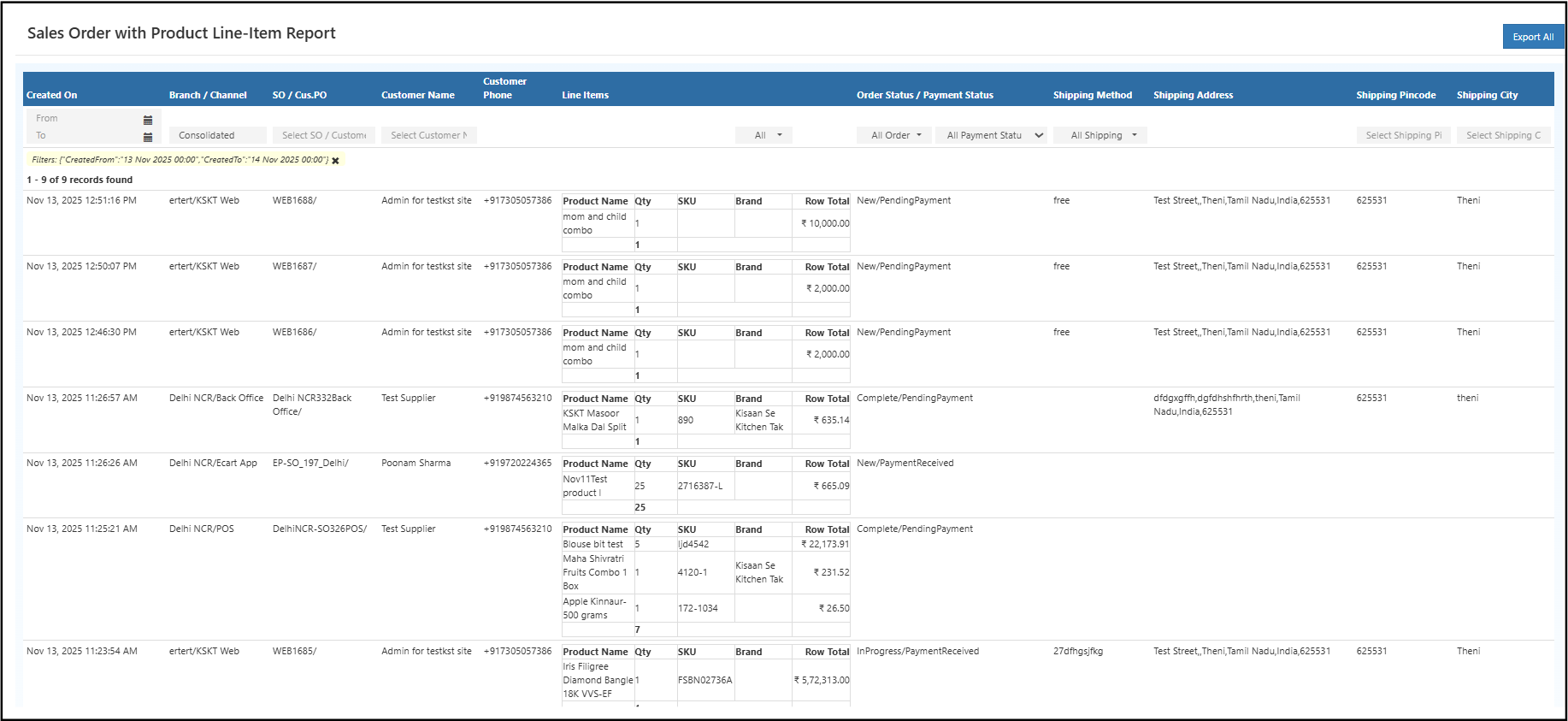
    The Sales Order with Product Line-Item Report in O2VEND Back Office displays complete details of sales orders and their respective product line items.
    It supports effective sales tracking, customer analysis, and performance evaluation at both order and item levels.


    Overview

    The report provides a structured breakdown of every sales order generated during the selected time frame.
    Each entry includes both order-level and item-level data for enhanced visibility into sales performance and customer activity.

    Key Columns

    Column Description
    Created On Displays the date and time when the order was created.
    SO / Cus. PO Shows the Sales Order or Customer Purchase Order number.
    Customer Name Name of the customer associated with the order.
    Customer Phone Customer contact number.
    Line Items Number of individual products within the order.
    Order Status Displays the current status of the order (e.g., In Process, Completed, Cancelled).
    Payment Status Indicates whether the payment is pending or received.
    Shipping Method The type of shipping used for delivery (e.g., Free, Courier).
    Shipping Address / Pincode / City Provides complete delivery address details.

    Navigation Path

    Reports → Order Reports → Sales Order with Product Line-Item Report Sales order product line item report in O2VEND Back Office


    Filters and Search Options

    The report includes dynamic filters and search tools for easier data analysis:

    • Date Range: View sales orders within a specified period.
    • Sales Order / Customer PO: Quickly locate specific order numbers.
    • Customer Name or Phone: Search by customer details.
    • Payment and Order Status Filters: Analyze orders based on financial or process status.
    • Pagination and Totals: Totals and page navigation appear at the bottom for better viewing and control.

    Report Actions

    • Export All / Export Current Page: Download the report in Excel or CSV format for auditing or further analysis.
    • Sorting & Search: Columns can be sorted, and quick search functions enable rapid access to order details.

    Business Benefits

    • Enhances visibility across sales and customer transactions.
    • Supports product-wise and order-wise performance evaluation.
    • Simplifies accounting reconciliation and sales auditing.
    • Provides actionable insights for retail decision-making.
    • Enables real-time tracking of sales and operational trends.

    Efficient Sales Performance Analysis

    The Sales Order with Product Line-Item Report simplifies sales performance tracking, providing comprehensive insights into order volume, customer activity, and fulfillment trends.
    It enables businesses to assess growth opportunities, monitor order progress, and optimize retail operations with data-backed clarity.


    In this article
    Back to top _includes/footer.html
    © 2019–2026 Jeyan Technologies Private Limited • www.o2vend.com • Create your own store