O2VEND Retail ERP
  • Getting Started
  • Ecommerce
  • Back Office
  • POS
  • Agent App
  • PIM
  • Communication
  • CMS
  • OMS
  • WMS
  • O2C
  • Accounting
  • Reports
  • Themes and Apps
Search Results for

    Show / Hide Table of Contents
    • Reports
    • Order Reports
      • Web Orders Progress Report
      • Back Order Items Report
      • Purchase Order Pending Item Report
      • Sales Order Pending Item Summary Report
      • Sales Shipping Status Report
      • Sales Order Summary
      • Sales Order Progress Report
      • Purchase Order Progress Report
      • Sales Order with Product Line Item Report
      • Sales Order Packing Sheet Report
      • Back Order Report
      • Purchase Order Summary
      • Sales Order Shipment Report
      • Sales Order Shipping Address Report
    • Sales/Purchase Reports
      • Sales Invoice Report
      • Sales Invoice Summary
      • Sales Items Summary
      • Purchase Invoice Report
      • Purchase Invoice Summary
      • Purchase Items Summary
      • Receipt Report
      • Daily Settlement Report
      • Contribution Margin Report
      • Agent Sales Report
      • Agent Report
      • Employee Sales Report
      • Employee Report
      • Employee Product Sales & Commission Report
    • Supplier Reports
      • Supplier Report
      • Supplier Purchase Report
      • Supplier Detail Report
    • Inventory Reports
      • Stock Summary
      • Stock Valuation Summary
      • Stock Ageing Report
      • Location Summary
      • Stock Ledger Report
      • Stock/Location Summary
      • Stock Movement And Valuation Summary
      • Stock Movement Summary Report
    • Products
      • Sold Product Categories
      • Product Category Summary
      • Product Sale Summary
      • Category Sale Summary
      • Brand Sale Summary
      • Reordering Stock Summary
      • Price Movement
      • Product Seasonal Demand
      • Product Stock Analysis Report
      • Stock Projection Report
    • Pos Reports
      • Cash Register Summary
      • Current Cash Registers
    • Account Reports
      • Day Book
      • Ledger
      • Cash Book
      • Sales Books
      • Purchase Books
      • Daily Sales and Payment Report
      • Balance Sheet
      • Profit and Loss Report
      • Trial Balance
    • Miscellaneous Reports
      • Output Detailed Tax Report
      • Output Tax Report Summary
      • Account Receivable Report
      • Gross Profit Report
      • Daily Tax Report
      • GSTR-1 Report
      • External API Logs
      • Benefit Usage
      • Offers Usage
      • Coupon Usage
      • Configuration Change History
      • VisitLog

    Sales Book Report – Monthly & Consolidated Sales Summary

    Learn how to use the Sales Book Report in O2VEND ERP. View monthly sales summaries, debit/credit balances, and consolidated reports. Export or print with one click.

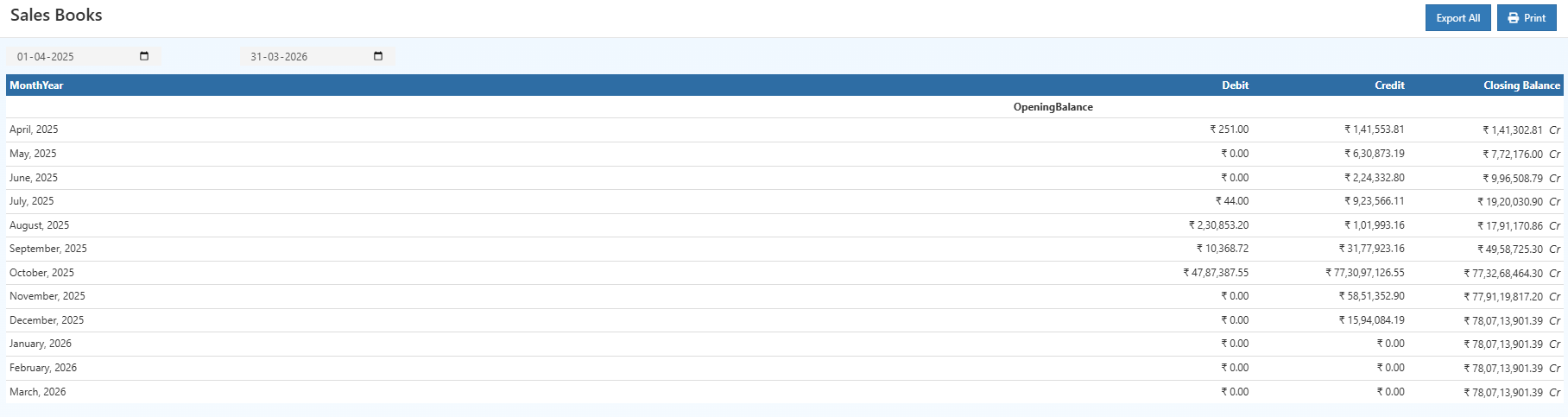
    The Sales Book Report in O2VEND ERP provides a structured, month-wise record of sales transactions within a selected period. It highlights opening balances, total monthly sales, debit and credit adjustments, and final closing balances. This report supports accurate financial tracking, GST compliance, and internal or external audit requirements.

    Designed for business owners, accountants, and auditors, the Sales Book offers a clear, uninterrupted view of sales activity across branches. Month-wise grouping and detailed credit–debit visibility ensure transparent reporting and reliable financial documentation.


    Purpose of the Sales Book Report

    The Sales Book Report enables:

    • Month-by-month monitoring of sales and financial balances
    • Comparison of credit and debit adjustments across periods
    • Tracking of opening and closing balances for financial analysis
    • Consolidation of multi-branch sales into a unified view
    • Verification of sales data during audits and monthly closures
    • Preparation of GST filings using accurate recorded sales
    • Identification of missing invoices or irregular adjustments

    This makes the report highly beneficial for businesses with multi-outlet operations or high transaction volumes.


    Accessing the Sales Book Report

    1. Open Back Office
    2. Navigate to the Reports section → Account Reports
    3. Select Sales Book
    4. Choose the Start Date and End Date
    5. Select a Branch or choose Consolidated
    6. The report updates automatically based on the selected filters
    Sales Book Report – Monthly & Consolidated Sales Summary

    Month-wise Sales Breakdown

    The Sales Book organizes data under Month-Year headings to present:

    • High and low-performing sales periods
    • Variations in debit adjustments
    • Changes in closing balances over time
    • Seasonal and business-cycle trends

    Each period includes:

    • Opening Balance – Carried from the previous month
    • Debit Entries – Returns or negative adjustments
    • Credit Entries – Total recorded sales for the month
    • Closing Balance – Net financial value after all entries

    This format supports detailed financial analysis and simplifies monthly reviews.


    Consolidated Financial Summary

    A consolidated summary at the bottom of the report includes:

    • Opening Balance
    • Total Debit Amount
    • Total Credit Amount
    • Closing Balance
    Sales Book Report – Monthly & Consolidated Sales Summary

    This summary is widely used for:

    • Monthly financial statements
    • GST and tax filing documentation
    • Internal or external audits
    • Management performance reporting

    Key Columns

    1. Month-Year

    Displays the chronological sales period.

    2. Opening Balance

    Represents the starting balance brought forward from earlier periods.

    3. Debit

    Lists negative adjustments, product returns, or corrections.

    4. Credit

    Represents the total sales for the period.

    5. Closing Balance

    Calculated after applying credits and debits.


    Useful Actions

    Tip

    Use the PRINT button to generate a PDF version of the Sales Book.

    Tip

    Select Export All to download the complete report in CSV format for Excel, accounting tools, or GST preparation.


    Related Reports

    • Purchase Book
    • Day Book Report
    • Receipt Summary Report
    • Ledger Report
    • Cash Book Report
    In this article
    Back to top _includes/footer.html
    © 2019–2026 Jeyan Technologies Private Limited • www.o2vend.com • Create your own store
