Contribution Margin Report
The Contribution Margin Report in O2VEND Back Office provides a complete profitability breakdown based on sales value, returns, discounts, cost of goods sold, payment gateway charges, and marketing expenses.
It helps measure actual profit after deducting direct and variable expenses across branches and sales channels.
Purpose of the Report
The report highlights:
- Gross Merchandise Value (GMV)
- Discounts applied
- Return deductions
- Cost of Goods Sold (COGS)
- Gross Margin
- Payment Gateway Charges
- Variable / Direct Expenses
- Marketing Costs
- Contribution Margin 1 (CM1)
- Contribution Margin 2 (CM2)
This report supports accurate profitability tracking and financial planning.
Navigation Path
- Open Back Office
- Go to Reports
- Select Accounts
- Click Contribution Margin Report
- Apply Date Range, Branch, and Channel filters
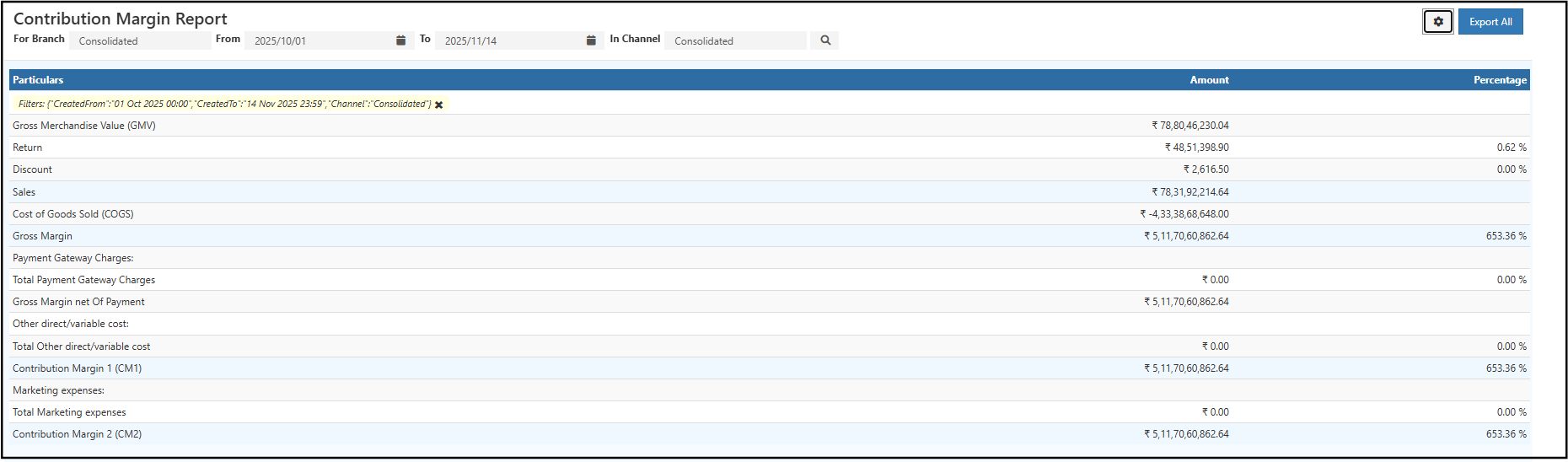
Filters in the Report
Branch Selection
Use this filter to view:
- Individual branch profitability
- Consolidated multi-branch performance
Channel Selection
View margins for:
- Offline store sales
- Webstore sales
- Marketplace integrations
- Other channels
Date Range
Shows margin analysis within the selected period.
Search
Loads the report with applied filters.
Report Breakdown
| Field | Description |
|---|---|
| Gross Merchandise Value (GMV) | Total order value before discount and return adjustments |
| Return | Value of returned products |
| Discount | Total discount given to customers |
| Sales | Net sales value after discount and return deductions |
| COGS | Purchase/production cost of sold products |
| Gross Margin | Sales – COGS |
| Payment Gateway Charges | Fees deducted by online payment providers |
| Other Direct / Variable Cost | Variable operational expenses tied to sales |
| Marketing Expenses | Advertising and promotional spend |
| CM1 | Gross Margin – Payment Gateway Charges |
| CM2 | CM1 – Marketing & Variable Expenses |
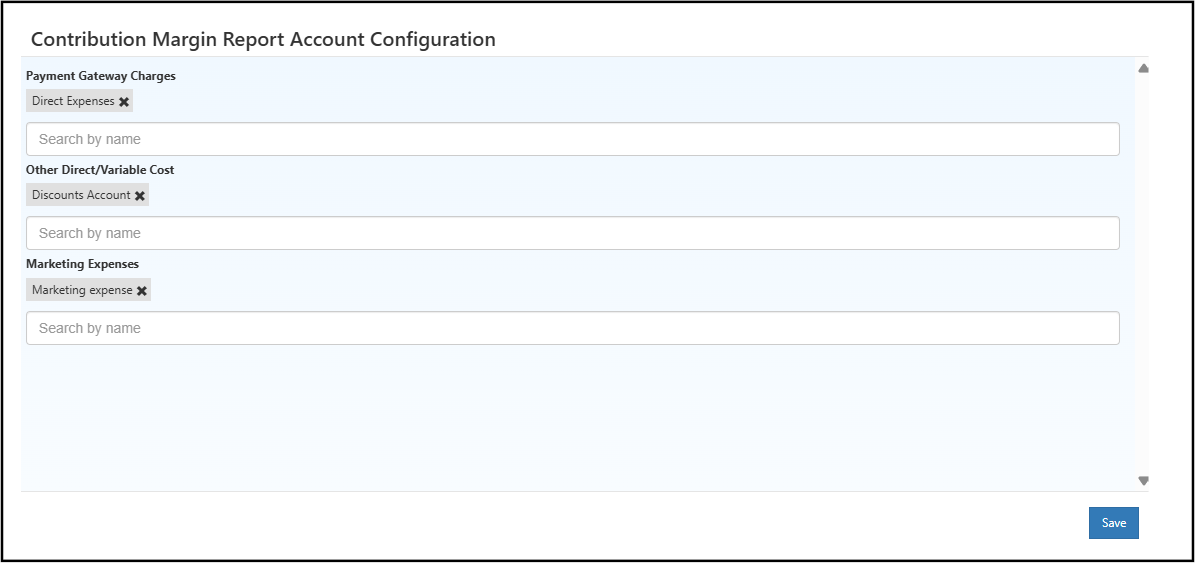
Contribution Margin Report Account Configuration
Click the Settings (gear) icon in the report to open the Account Configuration panel.
Navigation Path to Configuration
Back Office → Reports → Accounts → Contribution Margin Report → Settings Icon
Mappable Ledger Types
Payment Gateway Charges
Ledger accounts related to online transaction fees such as UPI, card payments, and net banking.Other Direct / Variable Cost
Variable operational expenses directly associated with sales.Marketing Expenses
Advertising, promotional, and campaign-related ledger accounts.
Saving Configuration
After updating the ledger mappings, select the Save button to apply and store the configuration changes.
This action ensures Contribution Margin values (CM1 and CM2) are calculated based on the configured ledger accounts.
This ensures the Contribution Margin Report automatically calculates CM1 and CM2 using the correct ledger mappings.
Benefits of the Contribution Margin Report
- Clear understanding of profit after direct expenses
- Branch-wise and channel-wise profitability comparison
- Accurate mapping of payment and marketing costs
- Insights for pricing, promotions, and financial planning
- Complete visibility into CM1 & CM2 for business decisions
Export Options
- Export All → Download report
- Print → Print-friendly format
- Email → Share report quickly
- Schedule → Enable automated periodic delivery
Insights Supported
- Branch-wise and channel-wise profitability visibility
- Impact of discounts and returns on final margins
- Influence of payment gateway fees on CM1
- Effect of marketing and variable expenses on CM2
- Actual net profit per reporting period
- Useful for financial planning, budgeting, and cost control