Daily Sales and Payment Report in O2VEND – Track Sales, Receipts, and Daily Cash Flow
Sales done. Payments received. But do the numbers match?
The Daily Sales and Payment Report consolidates sales, returns, and receipts into a single, easy-to-review summary.
Ideal for fast reconciliation and confident day-end closing.
The Daily Sales and Payment Report in O2VEND provides a clear, date-wise view of sales invoices, returns, and received payments.
It helps business owners and accountants reconcile daily revenue and monitor cash flow accuracy.
What is Daily Sales and Payment Report?
The Daily Sales and Payment Report is a finance-focused report that summarizes sales invoices, discounts, gross returns (GR), receipts, and balances for a selected period.
It displays transaction-level details with consolidated totals at the bottom for quick review.
Why Daily Sales and Payment Report Is Important
- Ensures accurate daily revenue tracking
- Helps reconcile sales vs payments received
- Supports auditing and financial verification
- Improves visibility into pending or mismatched payments
Why use this report?
- Verify daily sales collections
- Match invoices with receipts
- Identify missing or partial payments
- Track discounts and gross returns
- Support end-of-day and month-end closing
How to Access the Daily Sales and Payment Report
Navigation Path:
Back Office → Reports → Finance → Daily Sales and Payment Report
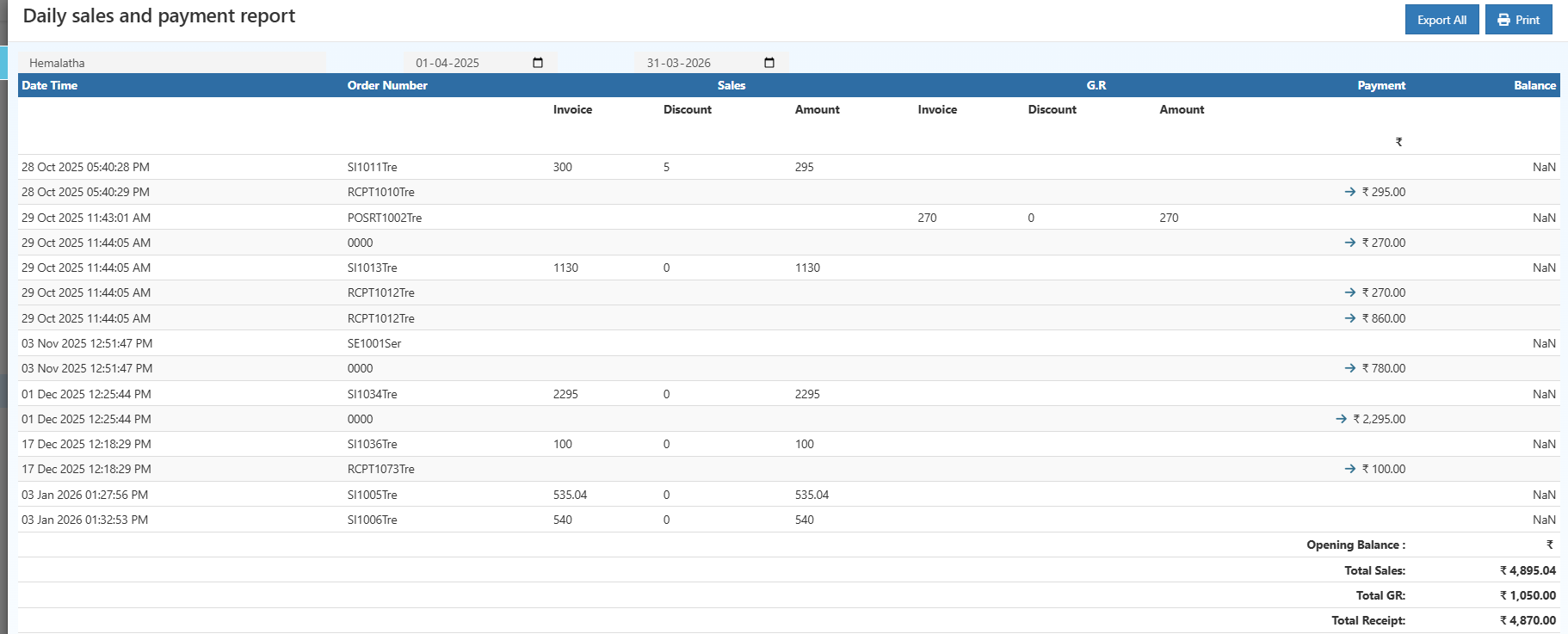
Filters & Controls
- Date Range – Select start and end dates
- User / Branch – Filter by cashier or location (if enabled)
- Export All – Download report data
- Print – Generate a printable view
Report View Explained
Summary Table
The table displays transaction-wise data with the following key sections:
- Date & Time – When the transaction occurred
- Order Number – Sales invoice or receipt reference
- Sales
- Invoice amount
- Discount applied
- Net sales amount
- G.R (Gross Return)
- Return invoice value
- Return discount
- Net return amount
- Payment – Amount received
- Balance – Outstanding or unmatched amount (if any)
At the bottom, the report shows:
- Opening Balance
- Total Sales
- Total GR
- Total Receipt
How to Use the Daily Sales and Payment Report
- Select the required date range
- Review sales invoices and receipts
- Verify discounts and return values
- Compare Total Sales vs Total Receipt
- Export or print for accounting records
Common Usage Scenarios
- Daily cash reconciliation
- Accountant review before posting to accounts
- Store manager end-of-day verification
- Audit preparation and compliance checks
Business Benefits
Improved Financial Accuracy
Ensures sales, returns, and payments are properly aligned.
Faster Reconciliation
Reduces manual effort in matching invoices and receipts.
Better Cash Flow Visibility
Provides clarity on actual cash received vs billed amounts.
Who Should Use This Report?
- Business owners
- Store managers
- Accountants
- Finance and audit teams
Frequently Asked Questions (FAQs)
1. Does this report include returns?
Yes, gross returns are shown under the G.R section.
2. Can I export this report?
Yes, use Export All to download the report.
3. Is this report useful for audits?
Yes, it provides transaction-level financial clarity.
4. Can I print the report?
Yes, a Print option is available.
Export & Print Options
- Export All – Download report data for offline analysis
- Print – Generate a physical or PDF copy for records