Sales Order Pending Item Summary Report | Track Pending Sales & Fix Stock Gaps Faster
Sales orders stuck due to stock shortages?
Customers waiting due to delayed fulfillment and stock unavailability?
The Sales Order Pending Item Summary Report in O2VEND helps instantly identify pending sales items, stock shortages, and exact reorder quantities.
Quick Insight:
Identify pending sales items, compare stock vs demand, and convert them into purchase orders – all from one screen.
This report helps operations and inventory teams manage pending sales orders caused by stock shortages.
What This Report Solves
- Shows which sales order items are still pending
- Highlights stock shortages by product, brand, and category
- Calculates how much quantity needs to be reordered
- Prevents order delays and lost sales
- Speeds up procurement and fulfillment decisions
Master POS Reports for Smarter Business Decisions
Understand key POS reports, what each report tells your business, and how to avoid common reporting mistakes. Turn POS data into clear insights for sales, inventory, and performance tracking.
Why Businesses Use This Report Daily
- Fix pending sales orders before customers follow up
- Detect low stock & shortages instantly
- Avoid manual stock checks & Excel tracking
- Create purchase orders in one click
- Improve on-time delivery & customer satisfaction
Where to Find This Report
Navigation Path:
Back Office – Reports – Order Reports – Sales Order Pending Item Summary
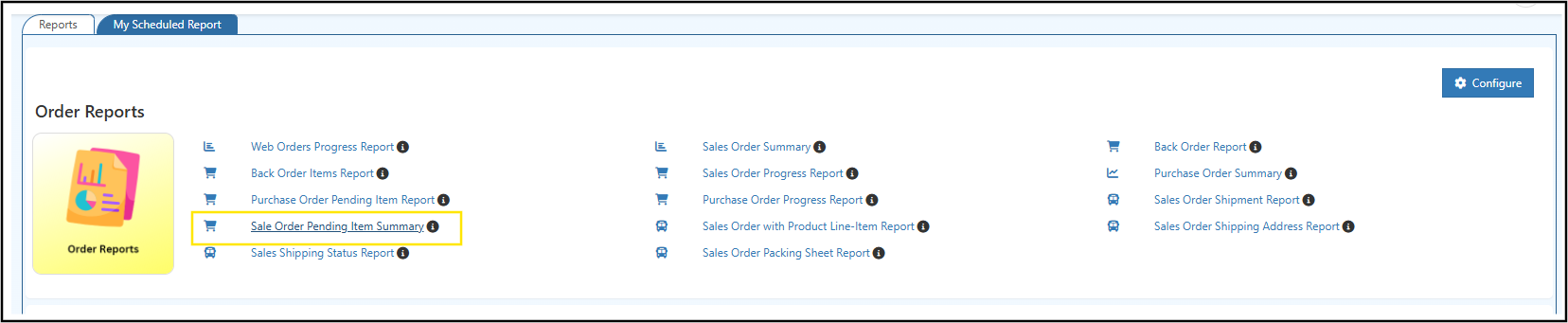
How to Use the Report (Step-by-Step)
- Login to O2VEND Back Office
- Go to Reports – Order Reports
- Open Sales Order Pending Item Summary
- Apply filters (Branch, Category, Product Name, SKU, GTIN, Brand)
- Review pending items & stock gaps
- Export results
- Create purchase orders instantly
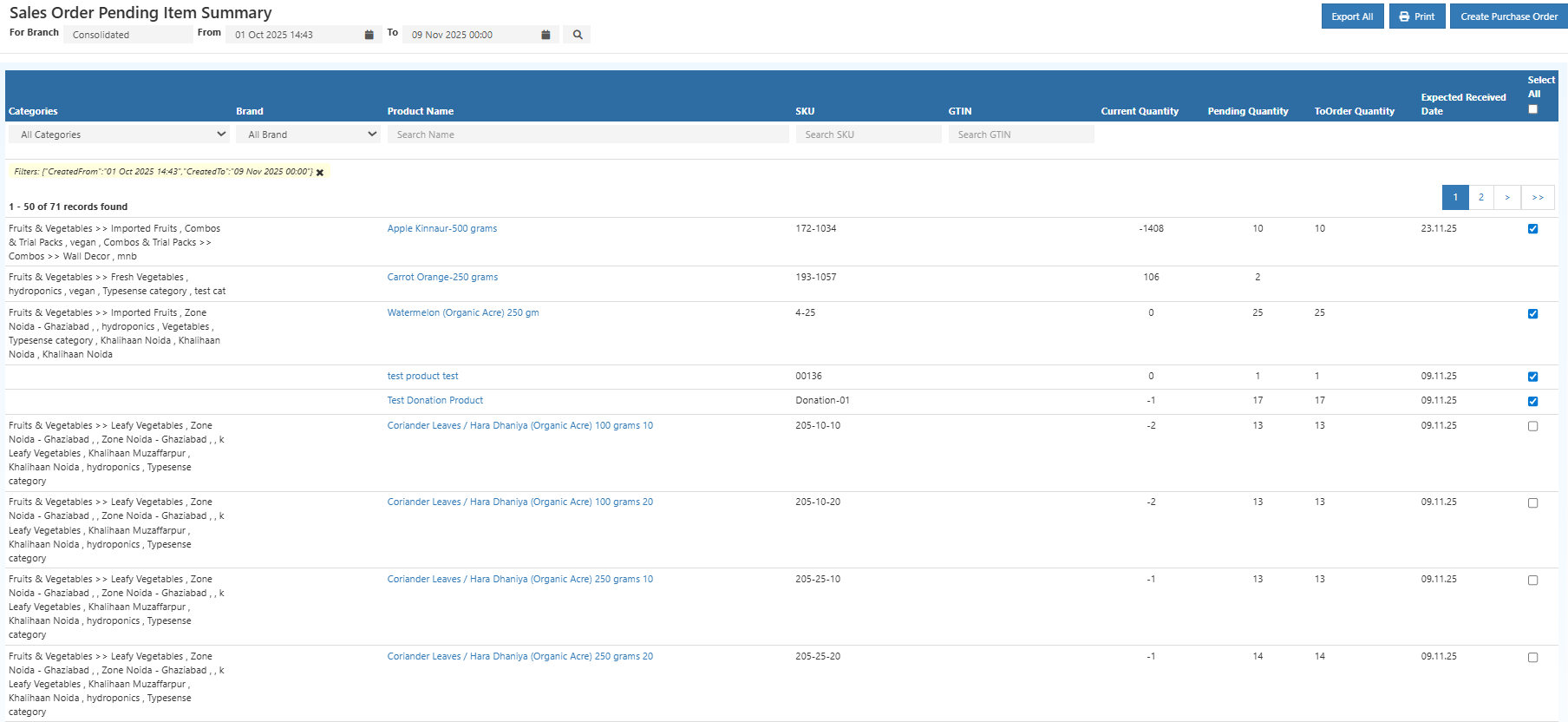
What Each Column Helps Decide
- Category – Identify shortage trends by product group
- Brand – Understand brand-wise pending demand
- Product Name – View items not yet fulfilled
- SKU – Accurate internal stock identification
- GTIN – Barcode-level product matching
- Current Stock – Available quantity right now
- Pending Quantity – Units still to be fulfilled
- To Order Quantity – Suggested reorder quantity
- Expected Received Date – Plan delivery commitments
- Select All – Bulk selection for fast PO creation
Export Tips
- Use Export All to download the complete dataset
- Use Export Current Page for sharing filtered views
Convert Pending Sales into Purchase Orders (1 Click)
Instead of manual calculations, this report lets pending items turn into ready-to-use purchase orders instantly.
How It Works
- Select items (or click Select All)
- Click Create Purchase Order
- The system auto-generates a draft Purchase Orders with:
- Product details
- Pending quantities
- Recommended reorder quantities
- Review supplier details, cost, and expected receiving dates
- Confirm and generate the Purchase Order to suppliers
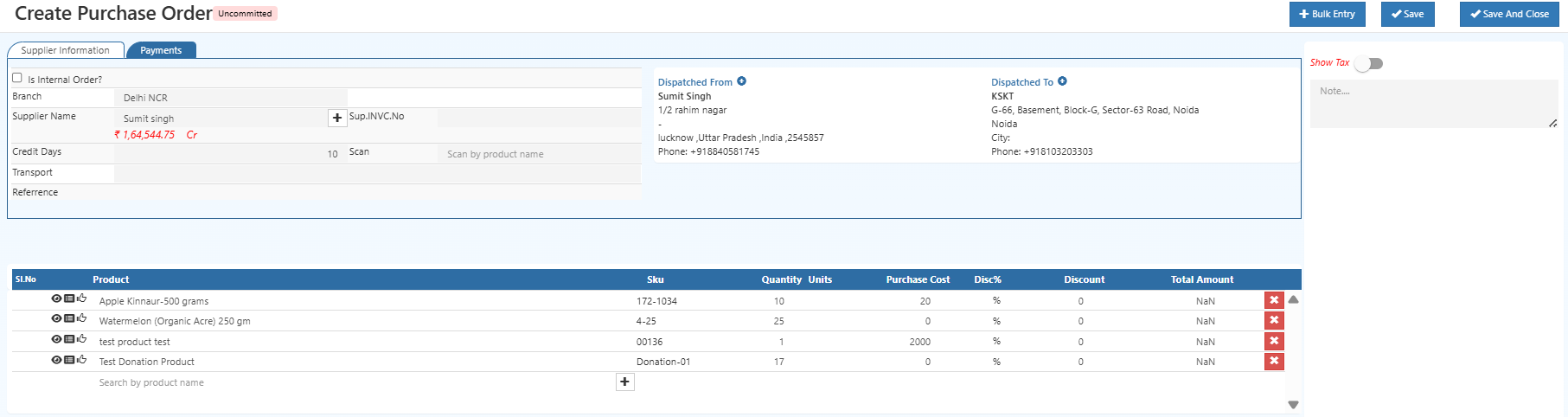
Create & Manage Purchase Orders with O2VEND
Quickly generate purchase orders from pending sales items, review suggested quantities, and streamline your procurement workflow all in one place.
Key Business Benefits
- Prevent stockouts & delayed deliveries
- Faster procurement decision making
- Reduced manual errors & Excel dependency
- Improved inventory control
- Better sales fulfillment rate
Best Practices
- Review this report daily
- Focus on high value and fast moving items
- Act quickly on zero or negative stock
- Create purchase orders immediately for critical SKUs
Reduce Stockouts & Overstocks with Simple Forecasting
Learn how simple demand forecasting balances stock levels, reduces stockouts, avoids overstocks, and improves fulfillment efficiency.
Related Reports
- Back Order Indent Report
- Purchase Order Pending Report
- Stock Movement Summary
- Sales Order Summary
- Stock Projection Report
Take Action Before Sales Are Lost
Pending sales and stock shortages should never delay customer orders. Track demand, identify shortages, and replenish stock faster with O2VEND.
Start using the Sales Order Pending Item Summary Report today to improve fulfillment speed and customer satisfaction!
Stop Pending Sales & Stock Shortages
Instantly identify pending sales order items, check stock shortages, and create purchase orders in one click with O2VEND.