O2VEND Retail ERP
  • Product
  • Solutions
  • Resources
    • Blog
    • Community
    • Partnership
    • Find Partner
    • Developer
  • Pricing
  • Docs
    • Getting Started
      • Channels
        • Sales Channel
        • O2VEND to O2VEND Channel
        • Shopify Integration Guide
    • Commerce
      • Ecommerce
      • POS
      • Agent App
      • CMS
      • Themes & Apps
      • Apps
        • Sales Navigator
    • Operations
      • OMS
      • WMS
      • O2C
      • Vendor Portal
      • Supplier Portal
    • Back Office
      • Accounting
      • Reports
      • PIM
      • Communication
      • Back Office
Search Results for

    Show / Hide Table of Contents
    • Warehouse Management
    • Stock Quantity
    • Stock History
    • Barcode Printing
    • Delivery Challan (DC)
    • Receipt Challan (RC)
    • Stock Transfer
    • Manufacturing Voucher
    • Stock Audit
    • Goods Inward (GRN)
    • Goods Dispatch (GDN)
    • Goods Receipt Note (GRN)
      • Incoming Packages - Columns & Functions
      • Step-by-Step GRN (Goods Receive) Creation in O2VEND ERP
      • General Tab - GRN Data Entry & Verification
      • Add Package Panel
      • Initiate GRN - Packages Tab
      • GRN Packages Tab & Package Material Handling - O2VEND ERP
      • Benefits of Using the Packages in O2VEND ERP GRN
      • Related Inventory & GRN Topics in O2VEND
    • Goods Dispatch Note (GDN)
      • GDN Meaning & Overview
      • How to Create GDN
      • GDN Module Guide (Goods Issue)
      • GDN Packages & Package Handling
      • Outward Route Configuration

    GRN Packages Tab & Package Material Handling - O2VEND ERP

    GRN Packages Tab - Overview

    The Packages tab is central to the warehouse inward process. It ensures all received goods are validated, tracked, and approved before updating inventory.

    This tab provides a complete view of packages, including sub-location, quantity, and product details, allowing transparent stock management.
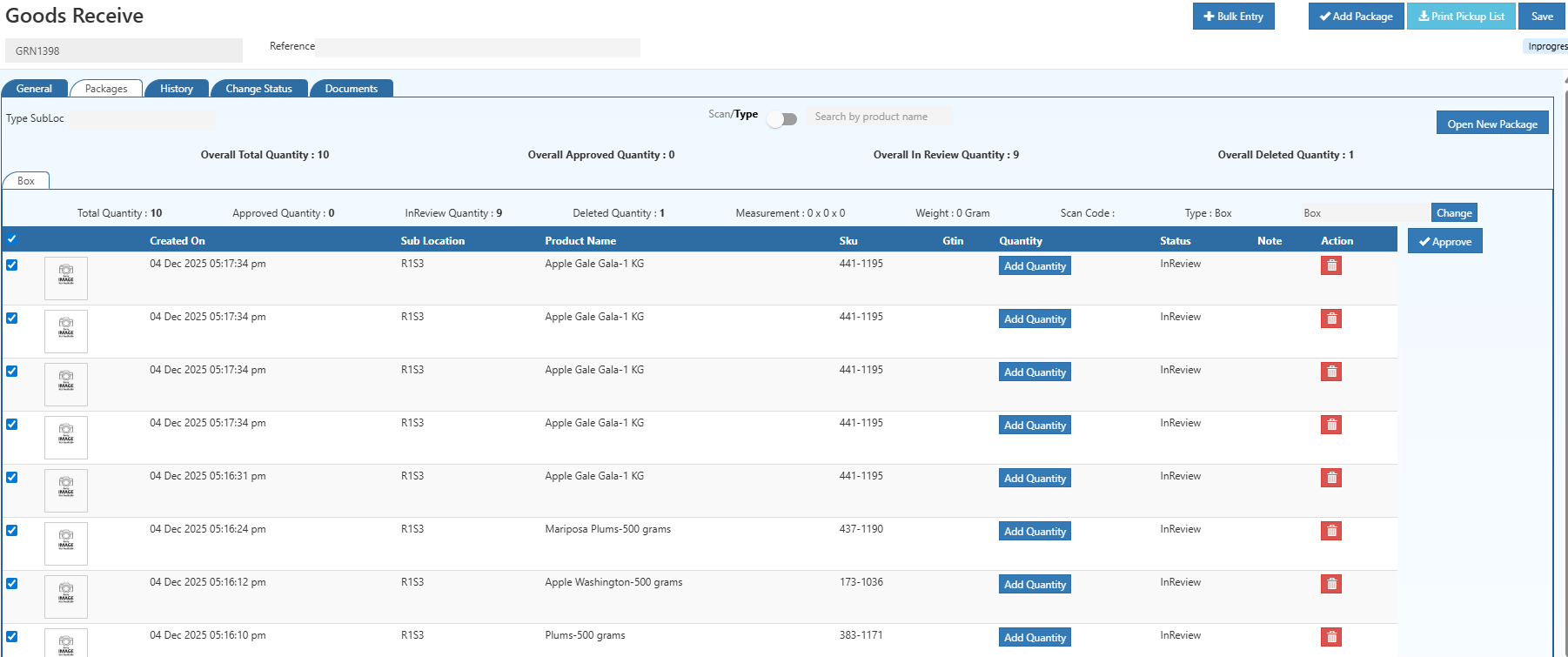
    GRN Packages Tab & Package Material Handling - O2VEND ERP

    Key Functions

    • Track received goods at the package level
    • Organize stock and assign products to packages
    • Approve or reject quantities before posting
    • Ensure accurate inventory updates

    The Packages tab activates once Goods Receive (GRN) is initiated.

    Package Management & Inspection Workflow

    1. View Packages

    • Displays all GRN packages with:
      • Sub-location
      • Total quantity
      • Approved, In-Review, and Deleted quantities
    • Provides clear inventory transparency at the package level

    2. Select Package Material

    • Choose predefined material (Small Box, Medium Box, Pallet)
    • New package materials can be added via Package Material Settings

    3. Add Products to Package

    • Scan barcodes or manually type product names
    • Enter quantities for each item
    • Status defaults to In-Review

    Only approved quantities will update inventory.

    4. Approve Product Quantities

    • Review items in the package
    • Approve received goods in good condition
    • Reject damaged or incorrect items
    • Guarantee inventory accuracy

    5. Save & Finalize GRN

    • Save all package entries
    • Click Approve to finalize the GRN
    • Warehouse stock is updated with verified quantities
    In this article
    © 2019-2026 Jeyan Technologies Private Limited • www.o2vend.com • Create your own store