O2VEND Retail ERP
  • Getting Started
  • Ecommerce
  • Back Office
  • POS
  • Agent App
  • PIM
  • Communication
  • CMS
  • OMS
  • WMS
  • O2C
  • Accounting
  • Reports
  • Themes and Apps
Search Results for

    Show / Hide Table of Contents
    • Warehouse Management
    • Stock Quantity
    • Stock History
    • Barcode Printing
    • Delivery Challan (DC)
    • Receipt Challan (RC)
    • Stock Transfer
    • Manufacturing Voucher
    • Stock Audit
    • Goods Inward (GRN)
    • Goods Dispatch (GDN)
    • Goods Dispatch Note (GDN)
      • GDN Meaning & Overview
      • How to Create GDN
      • GDN Module Guide (Goods Issue)
      • GDN Packages & Package Handling
      • Outward Route Configuration

    Inventory Stock History: Complete Stock Movement Tracking & Audit Trail

    Master complete inventory visibility with real-time stock movement tracking, lot & serial number monitoring, and comprehensive warehouse audit logs. Stay in control of every inventory transaction across purchases, sales, transfers, and adjustments.

    This guide walks you through Stock History in the O2VEND Inventory Module — your complete solution for inventory accountability and warehouse operations.

    Stock History delivers an end-to-end audit trail, enabling you to track stock movements, monitor lot and serial details, analyze SKU-level activity, audit warehouse actions, review adjustments, and link changes to their source transactions.

    Maintain perfect inventory accuracy, eliminate stock discrepancies, and streamline warehouse operations with confidence.

    What Is Inventory Stock History?

    Stock History is a real-time chronological record of all inventory activities — from purchases and sales to transfers, manufacturing, and stock adjustments.

    Get complete transparency into stock movement at SKU level with built-in traceability for audits, operational insights, and reliable inventory management.

    Track and monitor:

    • Real-time inventory movement and transaction logs
    • SKU-level tracking with complete traceability
    • Multi-warehouse stock records and visibility
    • Lot and serial number lifecycle tracking
    • Stock in/out history with complete details
    • Inventory adjustments and corrections audit trail
    • Quantity changes with full transparency
    • Inbound and outbound stock flow analysis
    • Reference-linked actions (GRN, GDN, transfers, vouchers)
    • Cross-branch and multi-warehouse stock movements

    Use Stock History as your centralized inventory movement hub, delivering clear visibility into product flow and accountability for every action. Warehouse managers, auditors, and operations teams rely on this report for compliance, accuracy, and operational excellence.


    How to Access Inventory Stock History

    1. Open Back Office
    2. Navigate to Inventory
    3. Select Stock History
    4. Review complete movement logs for all SKUs
    5. Apply filters by:
      • Date range
      • SKU
      • Product name
      • Lot number
      • Serial number
      • Location/Warehouse

    Result: Full Warehouse Stock Log view with audit-ready clarity.

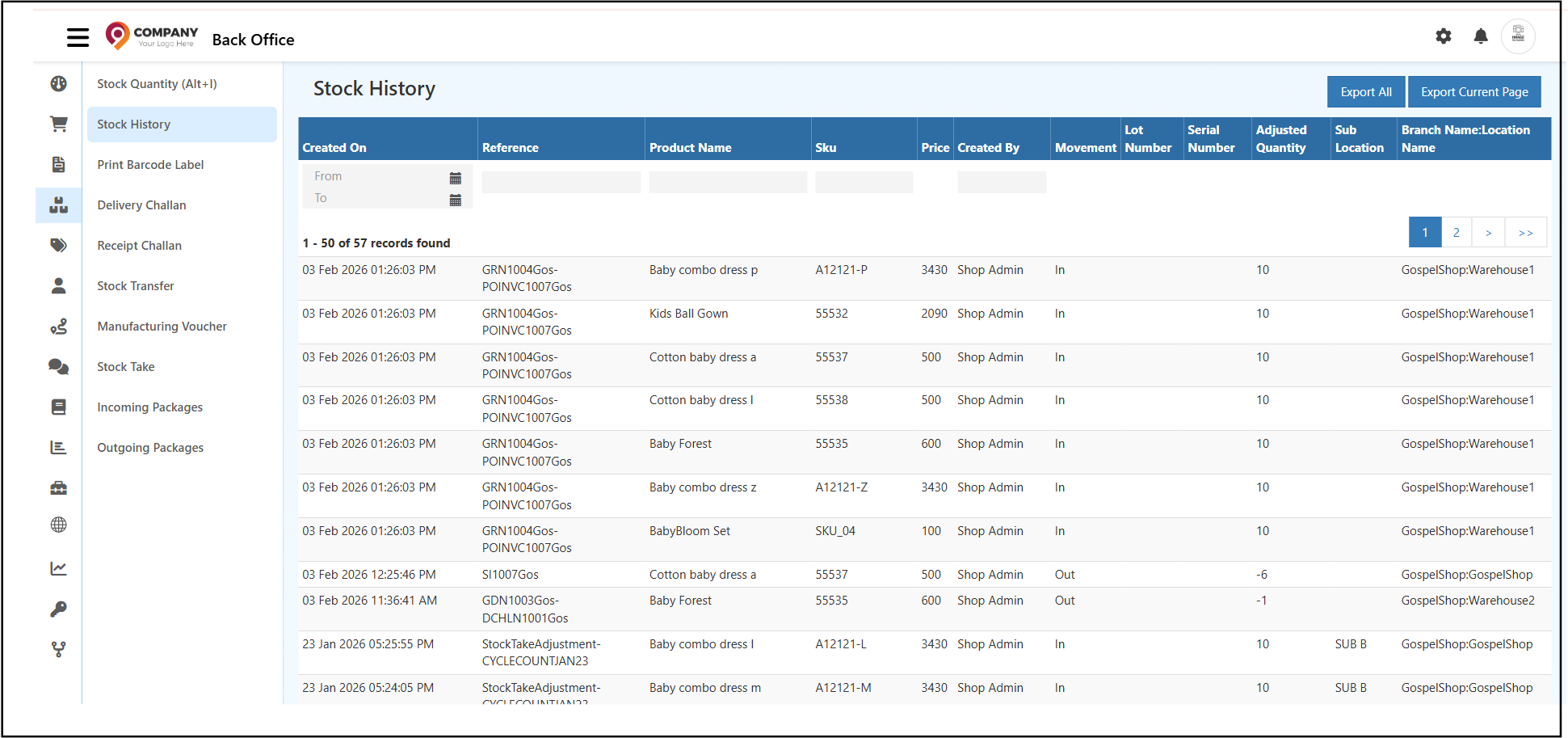
    Inventory Stock History Dashboard

    Complete stock movements with SKU, lot, serial, and warehouse location visibility.


    Understanding Stock History Fields

    Created On — Records the exact date and time of each stock movement.

    Reference — Shows the transaction source:

    • Sales orders
    • Purchase entries
    • Returns
    • Stock adjustments
    • Warehouse transfers

    Product Name — Identifies the product involved. Use search to drill down into specific items.

    SKU — Unique product identifier for precise item-level history tracking and traceability.

    Price — Current item price at time of movement.

    Created By — Administrator or employee who performed the action — key for accountability.

    Movement Type (IN / OUT)

    • IN — Stock additions to inventory
    • OUT — Stock removals from inventory

    Monitor incoming purchases, sales deductions, adjustments, and transfers with accurate Stock In/Out History for better forecasting.


    Lot Number Tracking: Batch-Level Inventory Control

    Monitor products by batch with Lot Number Tracking — essential for:

    • Expiry date management
    • Manufacturing batch control
    • Safety-sensitive items

    Achieve complete batch traceability as part of your Inventory Audit Trail.


    Serial Number Tracking: Individual Item Identification

    Assign unique identifiers to individual units with Serial Number Tracking:

    • High-value asset monitoring
    • Warranty management
    • Repair and replacement tracking
    • Product ownership history

    Trace every action on specific items from procurement through sale.


    Stock Adjustments & Quantity Corrections

    View manually adjusted quantities from:

    • Product pages
    • Stock inventory records
    • Admin corrections

    Maintain complete transparency in your Inventory Audit Trail.


    Sub Location & Warehouse Details

    Sub Location — Specific warehouse bin or rack location for precise inventory positioning.

    Branch/Location Name — Exact branch and warehouse where movements occurred. Critical for multi-warehouse accuracy and Warehouse Stock Log compliance.


    Smart Filters for Quick Analysis

    Refine Stock History with advanced filters:

    • Date Range — Period-based movement tracking
    • Reference — Locate specific GRN, GDN, MV transactions
    • Product — Analyze product-level movements
    • SKU — Pinpoint exact item traceability
    • Created By — Review entries by staff member

    Accelerate audits and inventory reconciliation tasks.


    Export & Reporting Options

    Download stock movement data:

    • Export Current Page — Download visible records
    • Export All — Complete movement history export

    Perfect for offline audits, MIS reports, and compliance documentation.


    When to Use Stock History

    Leverage Stock History for:

    • Investigating stock discrepancies or quantity issues
    • Conducting warehouse transaction audits
    • Tracking stock for compliance and reporting
    • Verifying lot/serial product flow
    • Reconciliation during stock takes or adjustments

    Why Stock History Matters

    ✓ Complete inventory visibility from purchase to sale ✓ Rapid issue detection — identify errors and duplicates ✓ Audit-ready documentation with full traceability ✓ Advanced lot/serial control for complex SKUs ✓ End-to-end accountability for every transaction ✓ Accurate valuations and seamless reconciliation


    Related Inventory Features

    • Inventory Barcode Printing
    • Manufacturing Voucher
    • Goods Receipt Challan
    • Inventory Stock Audit
    • Inventory Stock Transfer
    • Inventory Stock Quantity Overview
    In this article
    Back to top _includes/footer.html
    © 2019–2026 Jeyan Technologies Private Limited • www.o2vend.com • Create your own store