How to Attach Documents to Products in O2VEND | Specs, Certificates & Vendor Files
Learn how to use the O2VEND Documents tab to attach certificates, specs, and vendor files to catalog products. Centralize product documents for teams and vendors easily.
Keep all your product-related files in one place with the Documents tab in O2VEND. Attach certificates, specifications, vendor files, and operational documents directly to catalog products for fast access and streamlined workflows.
The Documents tab ensures that supporting files stay linked to a product throughout its lifecycle — enabling version-controlled, audit-ready documentation that helps internal teams and vendors access accurate, up-to-date information instantly.
Why Use the Documents Tab?
Attaching documents to products in O2VEND allows you to:
- ✅ Centralize all product reference files
- ✅ Maintain compliance and audit-ready product documentation
- ✅ Share technical or commercial files with vendors
- ✅ Streamline internal operations and product management
- ✅ Reduce manual file-sharing and email attachments across teams
Common Document Types
You can upload a variety of files, including:
- Product specification sheets (.pdf, .xlsx)
- Certificates and compliance documents
- Vendor data files and instructions
- Pricing or cost reference files
- Import/export reference documents
- Internal operational notes
- Product lifecycle and version control files
- Quality assurance and inspection reports
How to Add Documents
Follow these quick steps to attach a file:
- Click Add Document
- Upload your file (supported formats:
.xlsx,.csv,.pdf) - The document is linked to the product immediately
- Uploaded files appear in the Document List
- Remove outdated files using the delete (✕) option
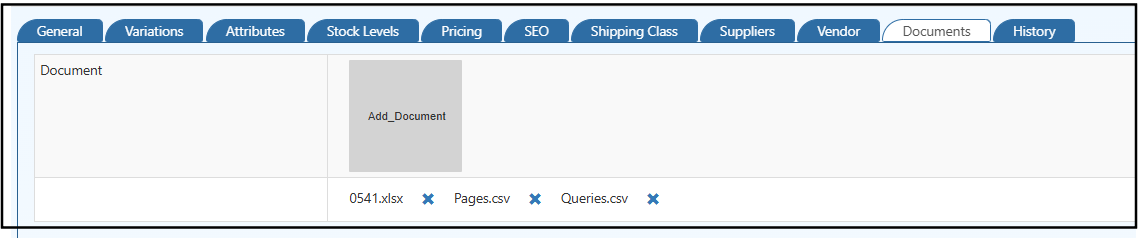
Access & Visibility
- Documents remain tied to the specific product
- Vendors can access relevant documents from their backoffice
- Internal teams can view files during pricing, stock, and order operations
Tip: Keep documents up-to-date to ensure vendors and internal teams always have the latest specifications and compliance files.
Note: Documents are for reference and operational use only — they do not impact pricing, inventory, or storefront display. All uploaded files are linked exclusively to the specific product and are not visible to end customers.
Frequently Asked Questions
What file formats can I upload in the O2VEND Documents tab?
You can upload .pdf, .xlsx, and .csv files directly to a product using the Documents tab.
Can vendors access product documents in O2VEND? Yes. Vendors can access relevant documents linked to products from their back office portal.
Does uploading a document affect product pricing or inventory? No. Documents are for reference and operational use only and do not impact pricing, stock, or storefront display.
How do I delete an old document in O2VEND? Use the delete (✕) option next to the file in the Document List to remove outdated files.
Where is the Documents tab located in O2VEND? The Documents tab is available inside the product catalog page under Product Information Management (PIM) in the O2VEND Back Office.
Why should I attach documents to products in ERP? Attaching documents centralizes all product-related files — spec sheets, certificates, and compliance records — reducing manual file sharing and ensuring teams always have accurate, audit-ready information.
Related Topics
Product Setup & Management
- Product General Section – Configure key details like product name, description, and identifiers.
- Product Attributes – Define characteristics and variations for better catalog organization.
- Product – Overview of product creation, editing, and management in O2VEND.
Optimization & Analytics
- Online Analytics – Track product performance and gain insights from O2VEND analytics tools.
- Search Engine Optimization in Product – Improve product discoverability with SEO best practices.
Pricing & Stock
- Stock Levels – Monitor and adjust product quantities efficiently across warehouses.
- Pricing – Manage pricing rules, discounts, and multi-channel pricing strategies.