Catalog Product History – Product Change Tracking & Audit Log Guide
Learn how to track catalog product changes, monitor update history, and maintain product audit logs using the History tab. This guide explains how to view product modification records, identify user actions, and monitor product lifecycle updates inside the catalog management module.
The History tab helps businesses maintain complete visibility over product edits, pricing updates, configuration changes, and vendor assignments. It ensures accountability, improves troubleshooting speed, and supports compliance tracking for catalog operations.
What Is Product History in Catalog Management?
The History tab provides a detailed audit trail of all updates made to a catalog product.
It records who modified the product, what changes were made, and when the update occurred, helping teams maintain transparency and operational control.
Why Product History Tracking Is Important
Product change tracking helps businesses:
- Monitor catalog updates and configuration changes
- Maintain audit logs for compliance and reporting
- Identify user-level product modifications
- Track product lifecycle updates across teams
- Reduce errors by reviewing past configurations
How to Access Product History
- Open Catalog → Products
- Select the required product
- Navigate to the History tab
- View all recorded product update logs
Product History Log Overview
Each entry in the History tab records detailed update information:
| Field | Description |
|---|---|
| Created On | Displays the exact date and time when the product update was performed |
| Updated By | Shows the user, admin, or role responsible for the change |
| Actions | Allows users to view detailed modification logs |
How to View Product Change Details
Click View Changes to compare product updates and review modification records.
This section displays:
- Modified field name
- Previous (Old) value
- Updated (New) value
Below is an example showing how product changes are tracked inside the catalog history module.
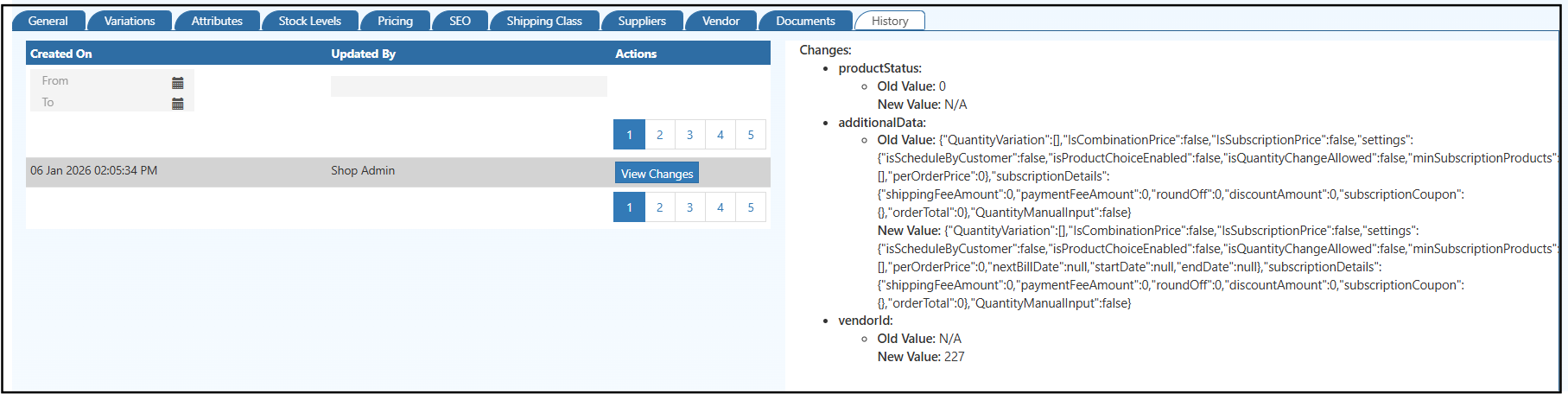
Figure: Product history audit log displaying change tracking, modified fields, and update comparison.
Examples of Changes Tracked in Product History
The History tab records multiple product-level updates including:
- Product status changes
- Pricing and configuration updates
- Subscription and ordering rule changes
- Vendor assignment modifications
- Additional product attribute updates
Filtering and Navigating Product History Records
Users can efficiently review update logs using built-in filtering options:
- Filter history records using From / To date range
- Navigate historical changes using pagination
- Review previous product configurations without affecting live data
Operational Benefits of Using Product History
The History tab helps businesses:
- Perform faster troubleshooting and rollback decisions
- Maintain clear accountability across catalog teams
- Improve collaboration between admin, catalog, and vendor management teams
- Ensure audit readiness for internal and compliance reviews
Note:
Product history records are automatically generated by the system and are read-only.
Existing history logs cannot be edited or deleted.