O2VEND Subscription Setup – Automate Recurring Billing & Delivery
O2VEND Subscription Module – Daily & Recurring Delivery Products
Learn how to set up the O2VEND Subscription Module to manage recurring deliveries, automated billing, and shipping for daily, weekly, or monthly subscription products.
The O2VEND Subscription Module is designed for businesses that deliver products or services on a daily, weekly, or monthly schedule—such as milk subscriptions, lunch/tiffin plans, water cans, groceries, newspaper delivery, and other recurring needs. It helps automate renewals, billing cycles, and delivery schedules online store.
Subscription – Create & Configure Subscription Products
Subscriptions in O2VEND support recurring delivery models such as daily, weekly, or custom schedules. Automated processing simplifies order creation, invoicing, payment handling.

This guide covers:
- Adding base products to a subscription
- Pricing, quantity, and selection rules
- Subscription frequency and scheduler settings
- Automated payment controls
- Offer and discount calculations
- Display of subscription products in eCommerce
1. Add Products to a Subscription
In the Products tab, multiple items can be added to the subscription plan.
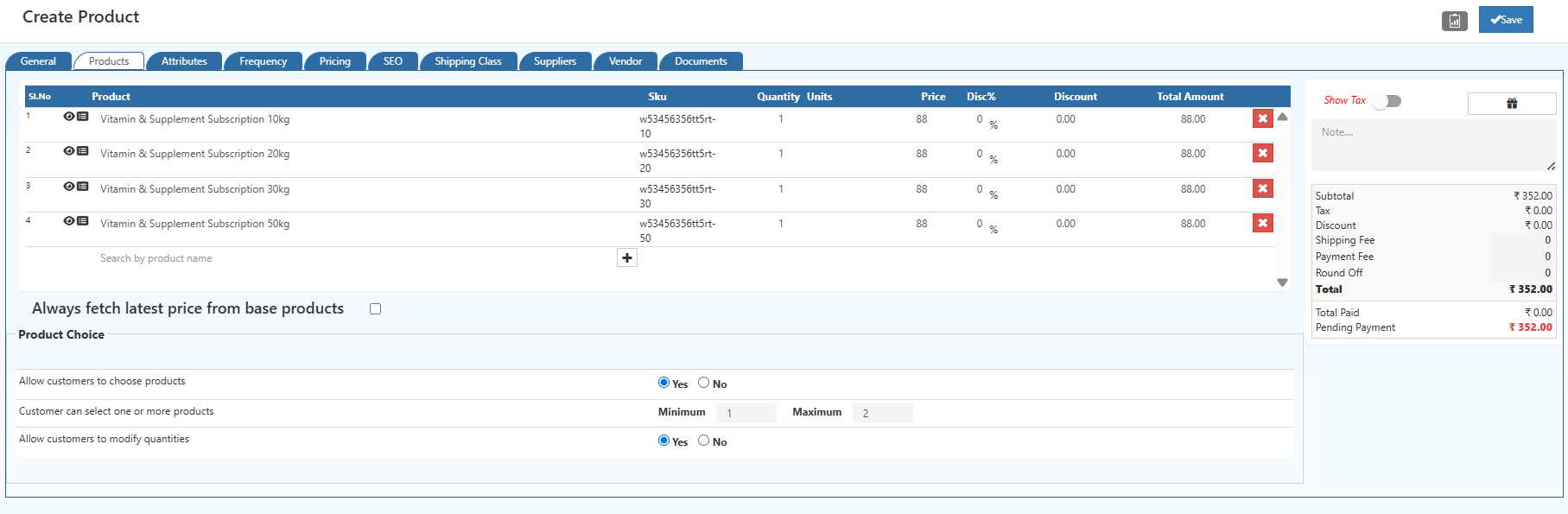
Key functions:
- Add items with SKU, Quantity, Units, and Price
- System auto-calculates the Total Amount for each product
- Products can be searched using the product search bar
- Unwanted items can be removed using the delete icon
- Enable Always fetch latest price from base products to update prices dynamically based on the master product
This structure allows creation of subscription bundles like groceries, household packs, services, or combination packages.
2. Product Choice Options
These settings define customer flexibility when subscribing via eCommerce:
Allow Customers to Choose Products
- Yes: Customers can select which products they want for each subscription cycle.
- No: Product selection is fixed by the business.
When set to No, the fields Customer can select one or more products and Allow customers to modify quantities will not be available, since the subscription uses a predefined set of items.
Customer Can Select One or More Products
- Available only if Allow Customers to Choose Products is set to Yes.
- Configure the minimum and maximum number of items a customer can select per subscription cycle.
Allow Customers to Modify Quantities
- Available only if Allow Customers to Choose Products is set to Yes.
- Determines whether customers can adjust the quantity of each selected product while subscribing.
3. Subscription Frequency & Scheduler
Configured in the Frequency tab:
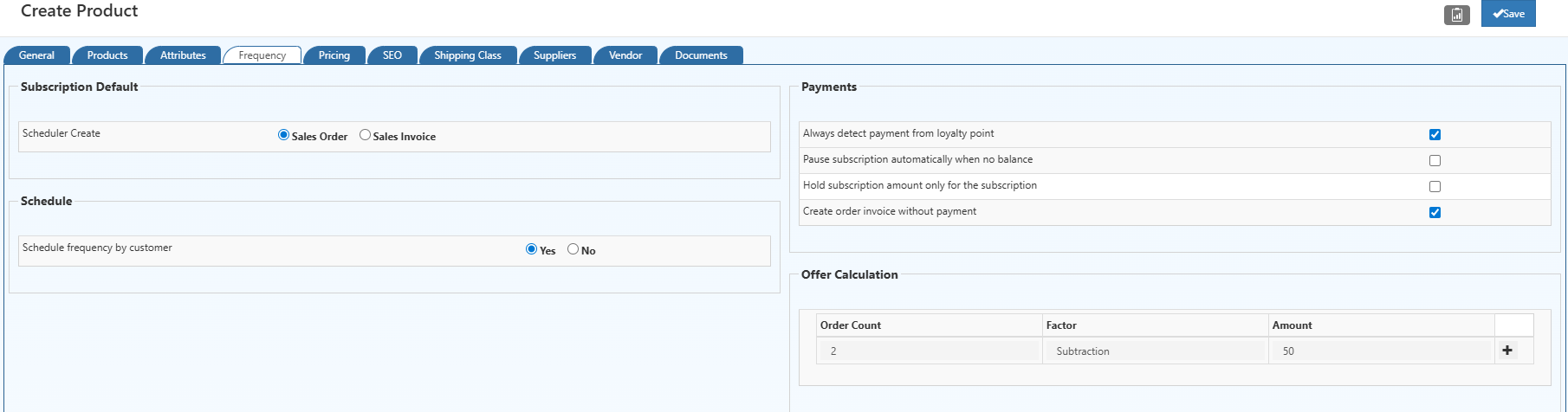
Subscription Default
Defines how recurring documents are generated:
- Sales Order – a sales order is created on each cycle.
- Sales Invoice – invoices are generated directly without an order stage.
Schedule
Schedule frequency by customer
- Yes – customers choose their preferred delivery frequency.
- No – frequency is predefined and fixed by the business.
This provides flexibility for subscription models such as milk delivery, meal plans, grocery packs, or weekly essentials.
4. Subscription Payment Settings
The Payments section controls automated billing behavior:
Always detect payment from loyalty points
Automatically uses available loyalty points for subscription charges.Pause subscription automatically when no balance
Subscription is paused until funds are topped up.Hold subscription amount only for the subscription
Ensures wallet balance is reserved exclusively for subscription payments.Create order invoice without payment
Allows invoice creation even if payment is pending.
These options ensure stable and controlled subscription revenue handling.
5. Offer Calculation for Subscriptions
Automated discounts or rewards can be applied based on order repetition and product count.
Example Configuration
| Order Count | Factor | Amount |
|---|---|---|
| 2 | Subtraction | 50 |
How it works:
- Suppose a customer subscribes for 2 days (2 separate orders).
- The total offer of ₹50 for every subscription cycle is split across orders:
- 1st order: ₹25 discount
- 2nd order: ₹25 discount
- If an order contains multiple products, the discount for that order is split equally among the products:
- Example: 1st order has 2 products → ₹25 ÷ 2 = ₹12.5 per product
- Same for the 2nd order if it also has 2 products → ₹12.5 per product
This ensures the discount is applied fairly across all orders and products in a subscription cycle, reflecting accurate billing and promotions.
1. Subscription Product Frequency & Scheduler(Predefined Schedule Mode)
In the Frequency tab of a subscription product:

Scheduler Create
- Sales Order: Automatically generate a sales order for each cycle.
- Sales Invoice: Automatically generate an invoice for each cycle.
Schedule Frequency by Customer
- No: Predefined schedule set by the business.
Select shipping Class
Select the Shipping class in the drop down menu.
Schedule & Number of Orders
- Define daily, weekly, or custom schedules.
- Set the total number of recurring orders.
Payment Settings
- Detect loyalty point usage automatically.
- Pause subscription if balance is insufficient.
- Hold amount exclusively for subscription.
- Generate invoice even without payment.
These settings ensure accurate delivery, recurring billing, and promotional automation.
2. Shipping Class Configuration for Subscription Products
To deliver subscriptions efficiently, Shipping Classes allow precise time-based and location-based delivery control:
Go to O2VEND Back office -> Online - store -> Set Up Shipping class
shippingProviders.md
Filters & Conditions
- Enable shipping class only for specific channel groups, delivery zones, or customer types.
Order Cut-Off Timing
- Set the time by which customers must place an order for same-day delivery.
Shipping & Delivery Timing
- Define the number of hours between order placement and actual delivery.
Price & Destination Settings
- Set minimum order amount for delivery.
- Configure shipping price per zone.
- Optional offers for specific locations.
Shipping Classes ensure that recurring products like milk, groceries, tiffins, and water cans are delivered on-time with accurate charges, avoiding manual scheduling errors.
Subscription Product on the eCommerce Store
After a subscription product is configured in the back office, it appears on the eCommerce storefront with all relevant subscription controls and item options.
Key elements on the subscription product page:
Product Variants & Options
- All base products included in the subscription are displayed with quantity selectors.
- Optional items can be enabled or disabled based on customer choice rules.
Delivery Frequency
- Customers can switch between Daily, Alternate, and Weekly delivery schedules.
- Frequency options are based on back-office configuration.
Delivery Preferences
- Start and end dates can be selected.
- System calculates the total number of deliverable days.
- Delivery mode (e.g., Today’s Subscription) can be chosen.
Price Estimation
- The estimated total is dynamically calculated based on chosen items, their quantities, and delivery frequency.
Additional Offers
- Active offer codes are displayed for quick access.
- Promotional tags enhance visibility.
Subscription Action
- A dedicated Subscribe button initiates the subscription order.
This interface provides a clear and intuitive subscription flow, allowing customers to configure their recurring purchases with ease.
Perfect for Daily & Time-Based Subscriptions
Typical subscription use cases include:
- Milk delivery subscription (daily / alternate days)
- Lunch or tiffin subscription with meal slots
- Monthly water can subscription
- Grocery or essentials subscription
- Home service packages (cleaning, maintenance, beauty)
- Membership or validity-based services
Benefits of Subscription Automation
- Automated subscription billing
- Reduced manual workload
- Improved customer retention
- Accurate renewal tracking
Related Topics
Explore other product types in O2VEND:
- Combination Product – Create products with multiple variants or options.
- Donation Product – Setup donation-based products for your catalog.
- Generic Product – Standard product creation and management.
- Manufacturing Product – Manage products produced in-house.
- Recharge Product – Setup prepaid or recharge-based products.
- Service Product – Add service-based offerings to your catalog.
Related Blogs
Explore more insights on product creation, optimization, and sales strategies through these related blog articles:
Maximize Sales and Efficiency: The Power of Combination Products
Learn how combination products help streamline inventory, increase average order value, and improve operational efficiency.Subscription Success: How to Design Products That Keep Customers Coming Back
Discover proven strategies for designing subscription-based products that improve customer retention and recurring revenue.Smart Ways to Take Professional Product Photos
Improve product presentation with professional photography techniques that build trust and drive conversions.Effective Methods for Organizing Retail Products by Category
Understand how structured product categorization enhances navigation, inventory control, and sales performance.AI Optimization for Product Visibility in 2025
Learn how AI-powered optimization improves product discoverability and search visibility in modern eCommerce.
💡 Tip:
Well-structured products, clear categorization, strong visuals, and AI-driven optimization together create a scalable and high-performing product catalog.