Product Attribute Categories
Product Attributes Groups are used to group the product attributes. A set of similar attributes can be grouped as a product attribute group.
Create Product Attributes Groups
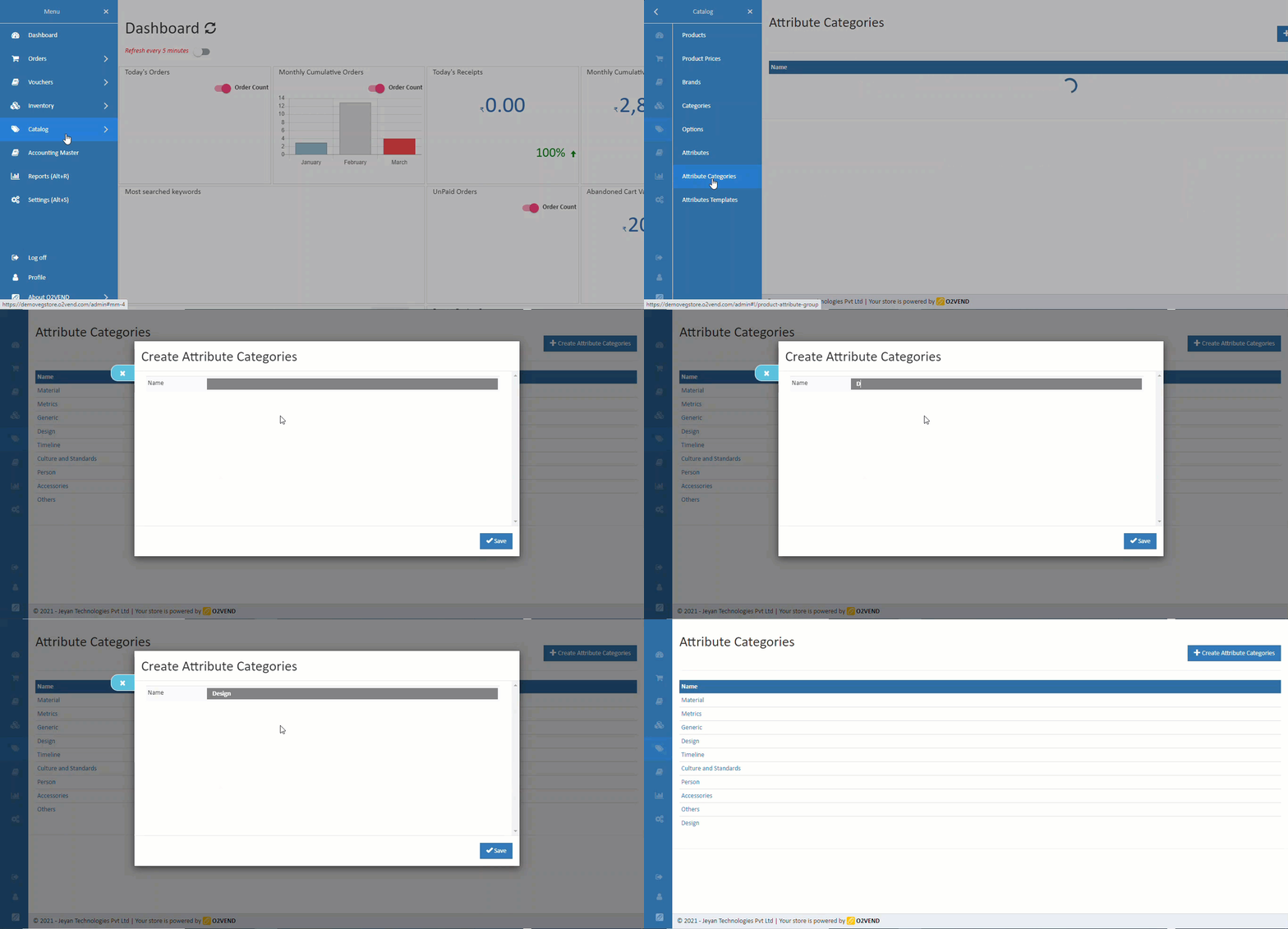
Create a product attribute group.
How to create Product Attribute Groups
- Open Back Office.
- Go to Catalog Menu.
- Click and open Product Attributes Groups section.
- A list of existing product attribute groups will be shown.
- Click Create Product Attribute Group Button in the top right corner.
- Enter Name of the group.
- Press Save button.
Modify a Product Attributes Group
Modify an existing Attribute group.
How to modify Product Attribute Groups
- Open Back Office.
- Go to Catalog Menu.
- Click and open Product Attributes Groups section.
- A list of existing product attribute groups will be shown.
- Click Edit button against the product attribute group to be modified.
- Update the group Name
- Click Save to save the updated information.
Related Blogs
Want to improve catalog visibility, inventory handling, and search performance?
Explore these related articles:
How to Create a Printable Product Catalog
Learn how to create and share printable product catalogs for easy offline and customer-friendly product presentation.Best 10 Wholesale eCommerce Platforms for Businesses
Explore the top wholesale eCommerce platforms and choose the right solution for scaling your business operations.Wholesale eCommerce Explained: 10 Best Platforms for Wholesale
A detailed guide to wholesale eCommerce models and the best platforms to manage bulk selling efficiently.Easily Manage Your Inventory Using the Import Products Option
Discover how bulk product import simplifies inventory setup and saves time when managing large product catalogs.Understanding Meta Descriptions: Importance and Basics
Understand how meta descriptions improve product visibility, search rankings, and click-through rates.Essential Tips for Writing SEO-Friendly Website Titles
Learn how to write effective, SEO-friendly titles that attract clicks and improve search engine performance.