User Creation and Management
The User section in O2Vend allows efficient creation and management of different user types based on specific roles and access levels.
Each role defines a unique set of permissions that control which operations a user can perform within the system.
User Roles
O2Vend supports multiple user categories such as Administrator, Customer, Employee, and Vendor.
Each role determines system accessibility and the functions assigned to the respective user.
- Administrator: Full access to system modules, user management, and configuration settings.
- Customer: Access to customer-specific features and purchase information.
- Employee: Handles store, billing, cashier, or delivery operations depending on the assigned type.
- Vendor: Manages supplier-related data and product sourcing details.
Creating a New User
Follow the steps below to create a new user record in O2Vend:
- Open the Back Office.
- Navigate to the Settings menu.
- Select Users → Users.
- Click Create User in the top-right corner.
- Fill in the required information such as:
- Full Name
- Username
- Email Address
- Password and Confirm Password
- Phone Number
- User Type (Administrator, Customer, Employee, or Vendor)
- Click the Save button to store the details.
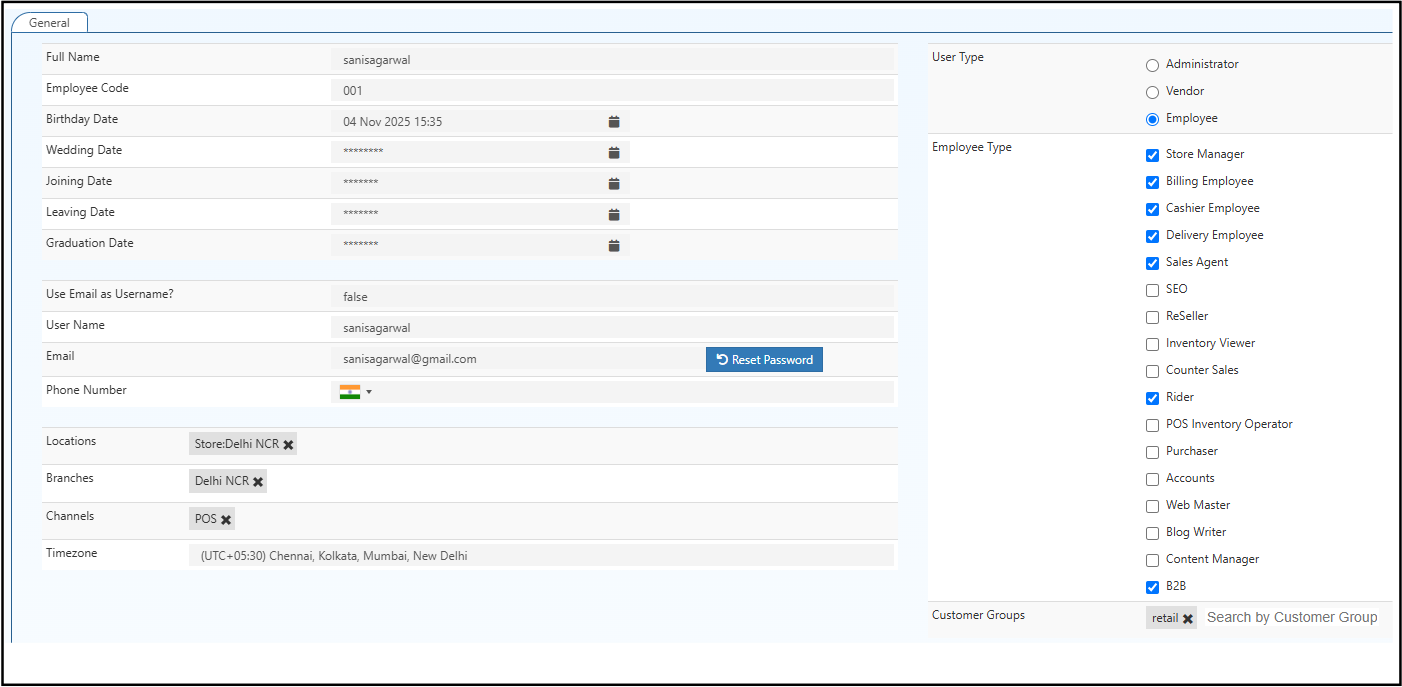
General Information Fields
Full Name
Specifies the complete name of the user displayed throughout the Back Office and reports.
Employee Code
A unique identifier assigned to each employee for internal reference and record tracking.
Birthday Date
Captures the user's date of birth if the Birthday Date option is enabled under User Date Setup.
Login and Contact Details
Use Email as Username
When enabled (True), the user’s email address functions as the system login username, replacing a separate username field.
Specifies the registered email address for communication, password recovery, and authentication purposes.
Phone Number
Captures the contact number of the user, including the country code. This number may be used for alerts or notifications.
Additional Configuration
Locations
Specifies the warehouse or store locations assigned to the user.
Locations can be managed under Inventory → Warehouse.
Branches
Defines the branch or outlet linked with the user for activity tracking and report generation.
Channels
Represents the sales or operational channel associated with the user.
For example, online store, retail outlet, or distributor network.
Timezone
Specifies the regional timezone associated with the user’s location to ensure accurate time-based records and reports.
User Type
Determines the category under which the user operates. Each type offers specific access permissions and modules.
- Administrator – Complete access to all system modules and configuration options.
- Vendor – Access to vendor-specific menus such as product supply, pricing, and purchase records.
- Employee – Assigned to one or more operational roles within a store or branch.
Administrator Role
Administrators have complete system control.
They can create, edit, or delete users, manage permissions, and configure store settings.
Employee Type
Defines the functional role of the employee within the system. Multiple employee types can be selected if the role overlaps across departments.
| Employee Type | Description |
|---|---|
| Store Manager | Oversees store operations, manages employees, and monitors sales performance. |
| Billing Employee | Handles billing operations and manages payment entries. |
| Cashier Employee | Processes customer payments and manages cash receipts. |
| Delivery Employee | Manages product deliveries from warehouse to customer or store. |
| Sales Agent | Engages in sales operations, manages leads, and tracks order fulfillment. |
| SEO | Manages search engine optimization tasks within O2Vend or related platforms. |
| ReSeller | Handles reseller accounts and manages third-party product distribution. |
| Inventory Viewer | Provides read-only access to stock and inventory data. |
| Counter Sales | Conducts over-the-counter sales transactions. |
| Rider | Responsible for delivery or logistics-related operations. |
| POS Inventory Operator | Manages product stock and transactions within the Point-of-Sale (POS) system. |
| Purchaser | Handles procurement of goods from suppliers or vendors. |
| Accounts | Manages financial records, expenses, and payment reconciliation. |
| Web Master | Maintains online store settings and technical configurations. |
| Blog Writer | Creates and updates website content and product-related blogs. |
| Content Manager | Oversees digital content, including descriptions and promotional material. |
| B2B | Operates business-to-business sales and handles corporate customer accounts. |
Edit User
The Edit User section in O2Vend allows modification of existing user information, role assignments, and access permissions.
This configuration ensures that every employee, vendor, or administrator has appropriate access levels and associated data such as branch, location, and timezone.
Reset Password
Allows the administrator to reset a user’s password.
Click Reset Password to generate a new secure login credential.
Customer Groups
Displays the customer group search option that allows linking a user with specific customer segmentation for targeted sales or reporting.