Subscription Management | Create, Schedule and Manage Recurring Orders
Learn how to create and manage subscriptions in O2VEND ERP. Set up recurring orders, configure delivery frequency, manage payments, and track subscription status for your customers.
The Subscription module in O2VEND lets you set up recurring orders for your customers. Instead of placing a new order every day or week, a subscription automatically creates a sales order or invoice at the schedule you define — daily, weekly, or as needed.
This is ideal for businesses that deliver products on a repeat basis — such as milk, groceries, meal kits, or any regular supply service.
Navigation Path
Back Office → Orders → Subscription
What is a Subscription?
A subscription is a pre-configured recurring order linked to a customer. Once set up, O2VEND automatically generates sales orders or invoices based on the frequency and schedule you define — without any manual action needed each time.
Subscriptions in O2VEND help you:
- Automate daily, weekly, or custom recurring orders
- Reduce manual order entry for repeat customers
- Track active, paused, and stopped subscriptions in one place
- Manage recurring billing and payment collection
- Link subscriptions to specific products, pricing, and shipping class
- Generate sales orders or invoices directly from the subscription schedule
Subscription List Page
The Subscription list shows all subscriptions created in the system.
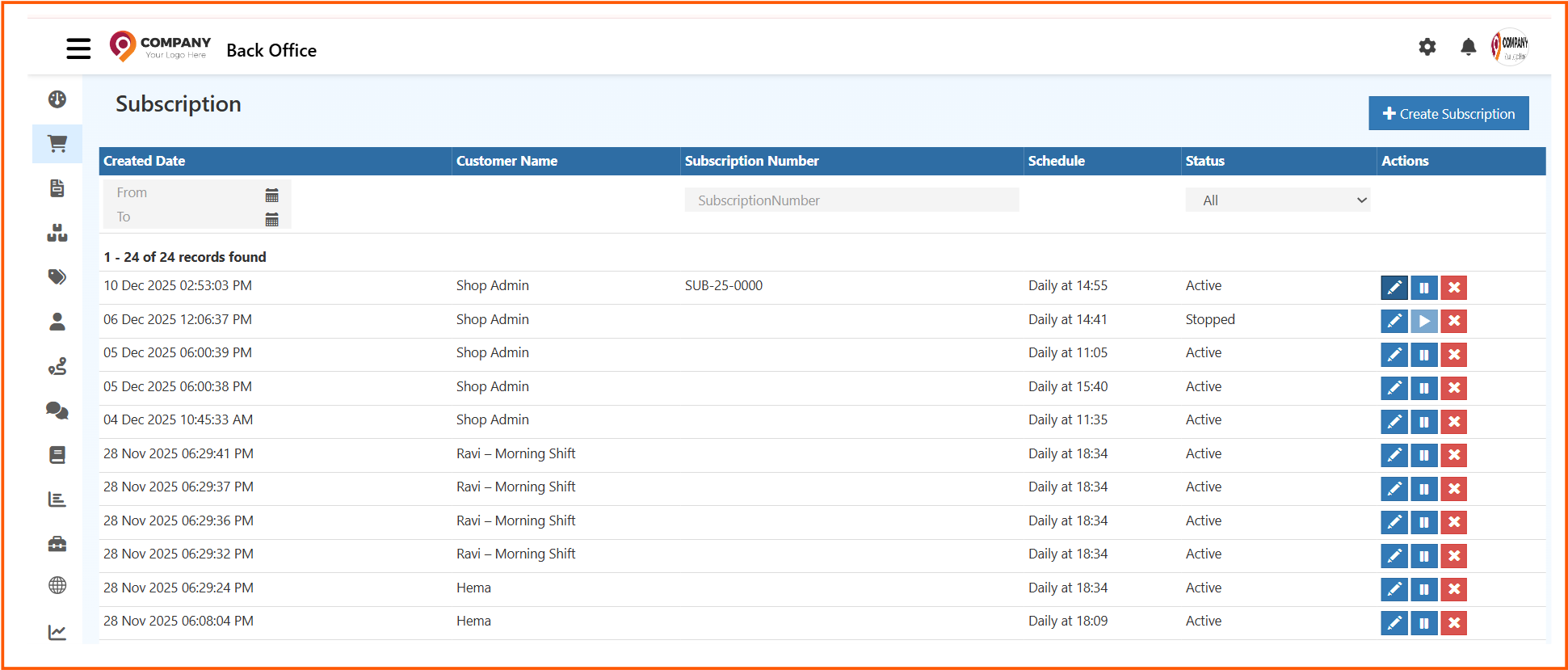
Each row in the list shows:
- Created Date — date and time the subscription was created
- Customer Name — the customer this subscription belongs to
- Subscription Number — unique reference number (for example, SUB-25-0000)
- Schedule — the recurring frequency (for example, Daily at 14:55)
- Status — current state of the subscription — Active, Stopped, or Paused
- Actions — quick action icons on each row
Row Action Icons
Each subscription row has three action icons on the right:
- ✏️ Edit (blue) — open and edit the subscription details
- ⏸ Pause (blue) — pause an active subscription temporarily
- ▶️ Resume (blue) — resume a stopped or paused subscription
- ✕ Cancel (red) — cancel and remove the subscription
Filters
Use the filter bar to search by created date range, subscription number, or status (All, Active, Stopped).
Click + Create Subscription at the top right to add a new subscription.
How to Create a Subscription
Click + Create Subscription to open the subscription form.
The Create Subscription form has two tabs — General and Frequency.
General Tab — Customer and Product Details
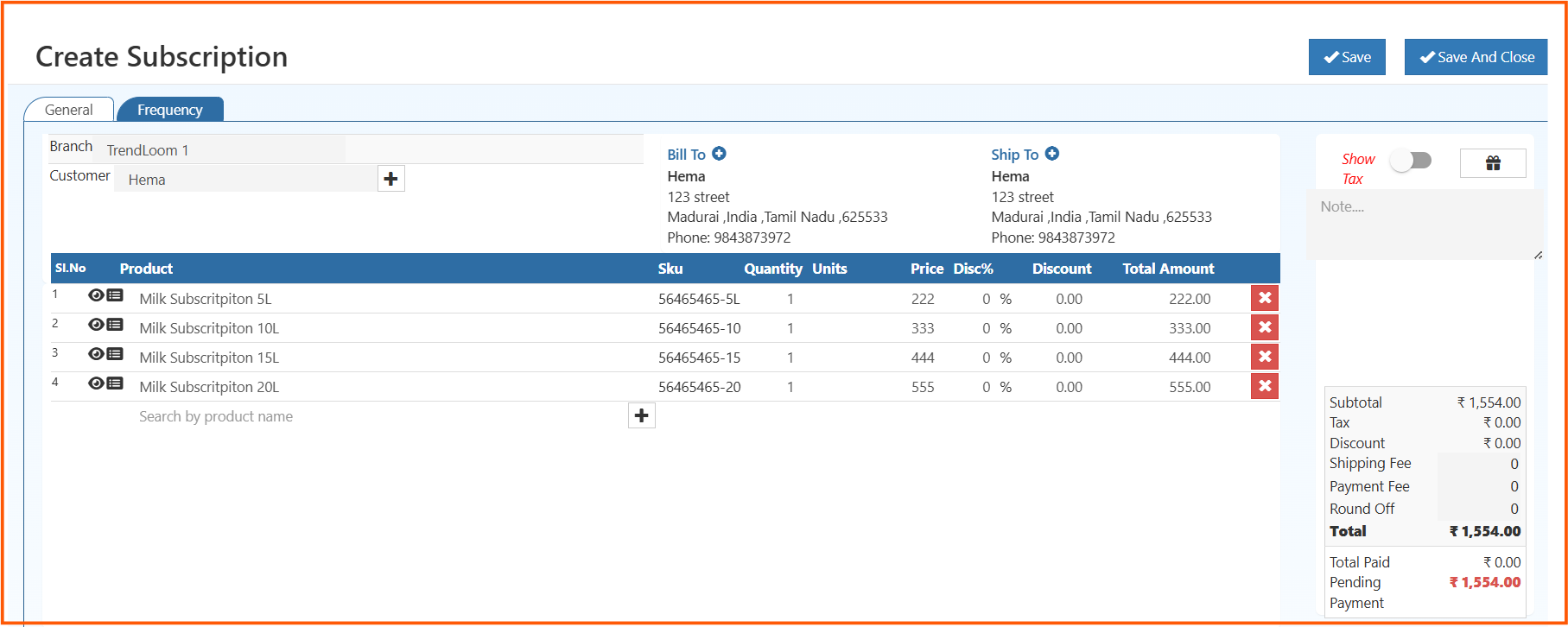
Branch — select the branch handling this subscription. For example, TrendLoom 1.
Customer — search and select the customer for this subscription. Click the + icon to add a new customer directly.
Bill To — the customer's billing address. Auto-filled from the customer record. Click + to update if needed.
Ship To — the delivery address for each recurring order. Auto-filled from the customer record. Click + to update.
Show Tax toggle — turn on to include tax in the subscription order totals.
Note — add any internal remarks about this subscription.
Adding Products to the Subscription
In the product table, search by product name to add items. Each row captures the product name, SKU, quantity, unit, price, discount percentage, discount amount, and total amount. The line total is calculated automatically.
Click the red ✕ to remove a product row. Use the + button at the bottom of the table to add more products.
Order Summary Panel
The right side shows the subscription order value:
- Subtotal — total of all product lines
- Tax — auto-calculated if Show Tax is enabled
- Discount — total discount across all lines
- Shipping Fee — delivery charge per order cycle
- Payment Fee — any payment processing fee
- Round Off — minor rounding adjustment
- Total — final value per recurring order
- Total Paid — amount already collected
- Pending Payment — outstanding balance shown in red
Frequency Tab — Schedule and Payment Settings
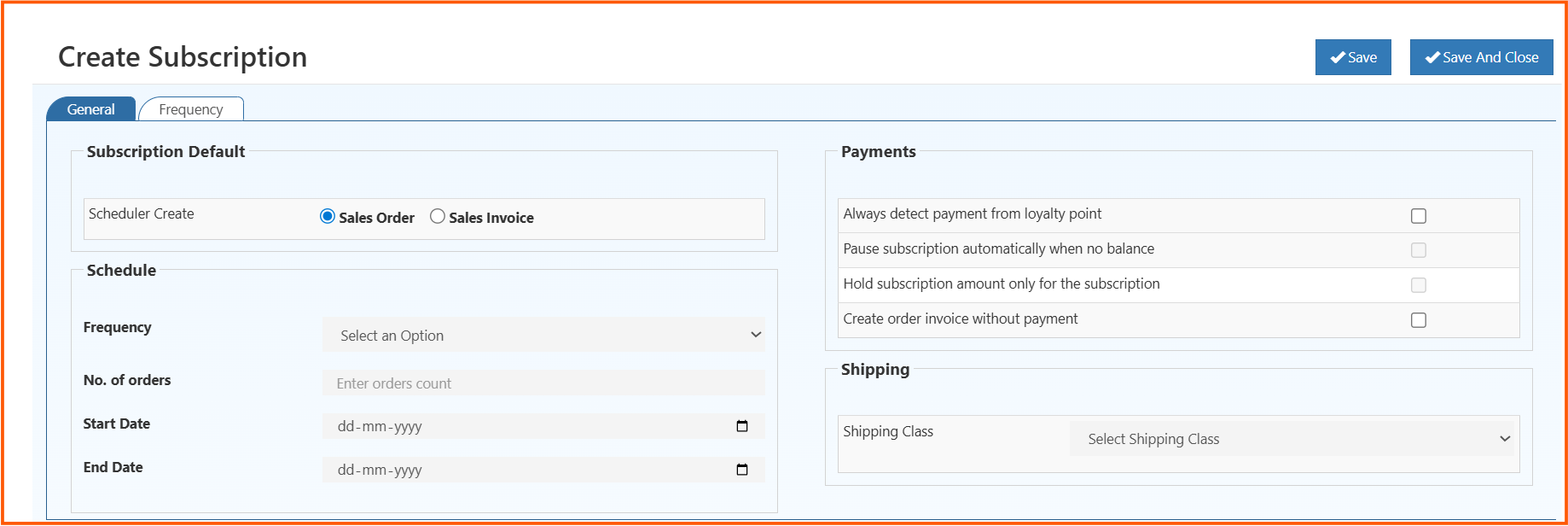
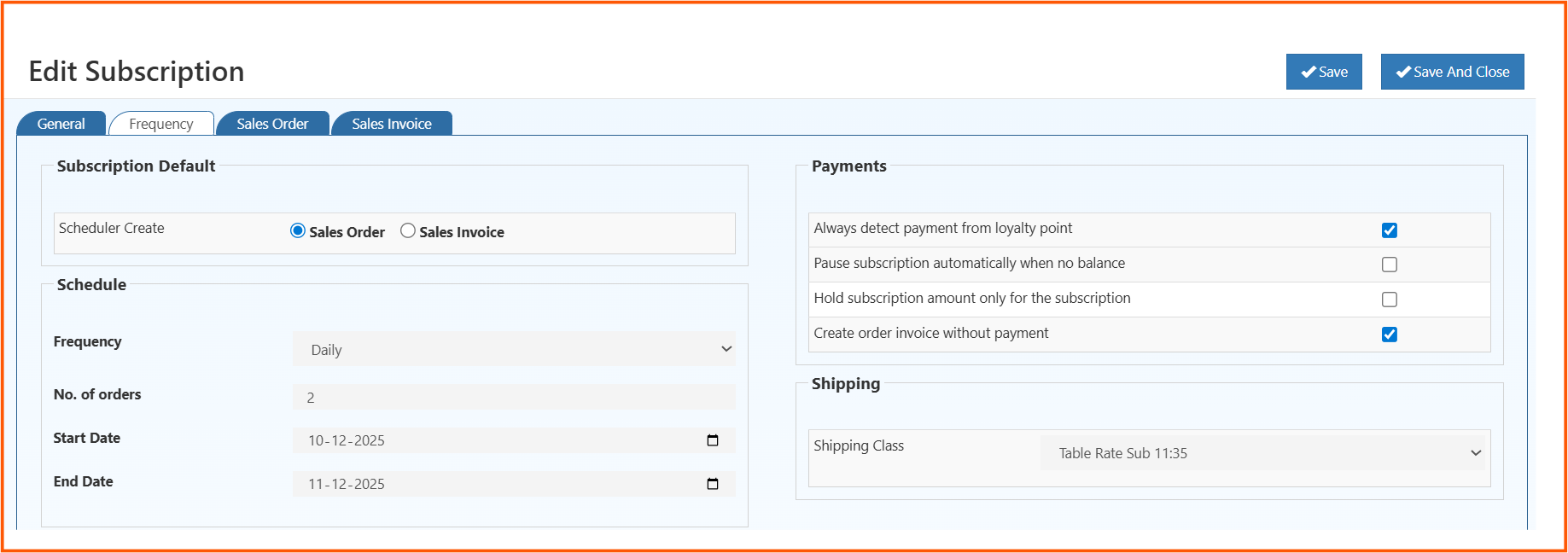
The Frequency tab is where you define how and when the subscription runs.
Subscription Default
Scheduler Create — choose what the system should automatically generate on each cycle:
- Sales Order — a new sales order is created at each scheduled interval
- Sales Invoice — a sales invoice is created directly at each interval
Schedule
Frequency — select how often the subscription repeats. Options include Daily, Weekly, Monthly, and custom intervals.
No. of Orders — enter the total number of order cycles for this subscription. For example, entering 2 means two recurring orders will be created.
Start Date — the date from which the subscription starts running.
End Date — the date on which the subscription ends.
Payments
Four payment options are available as checkboxes:
- Always detect payment from loyalty point — if enabled, the system automatically applies the customer's loyalty points toward each subscription payment
- Pause subscription automatically when no balance — if the customer has no payment balance, the subscription pauses automatically instead of failing
- Hold subscription amount only for the subscription — reserves the subscription payment amount exclusively for this subscription
- Create order invoice without payment — creates the order or invoice even if payment has not been collected yet
Shipping
Shipping Class — select the shipping class to apply for each recurring delivery. For example, Table Rate Sub 11:35.
Click Save to save the subscription, or Save And Close to return to the list.
Editing a Subscription
Click the ✏️ Edit icon on any subscription row to open the Edit Subscription page.
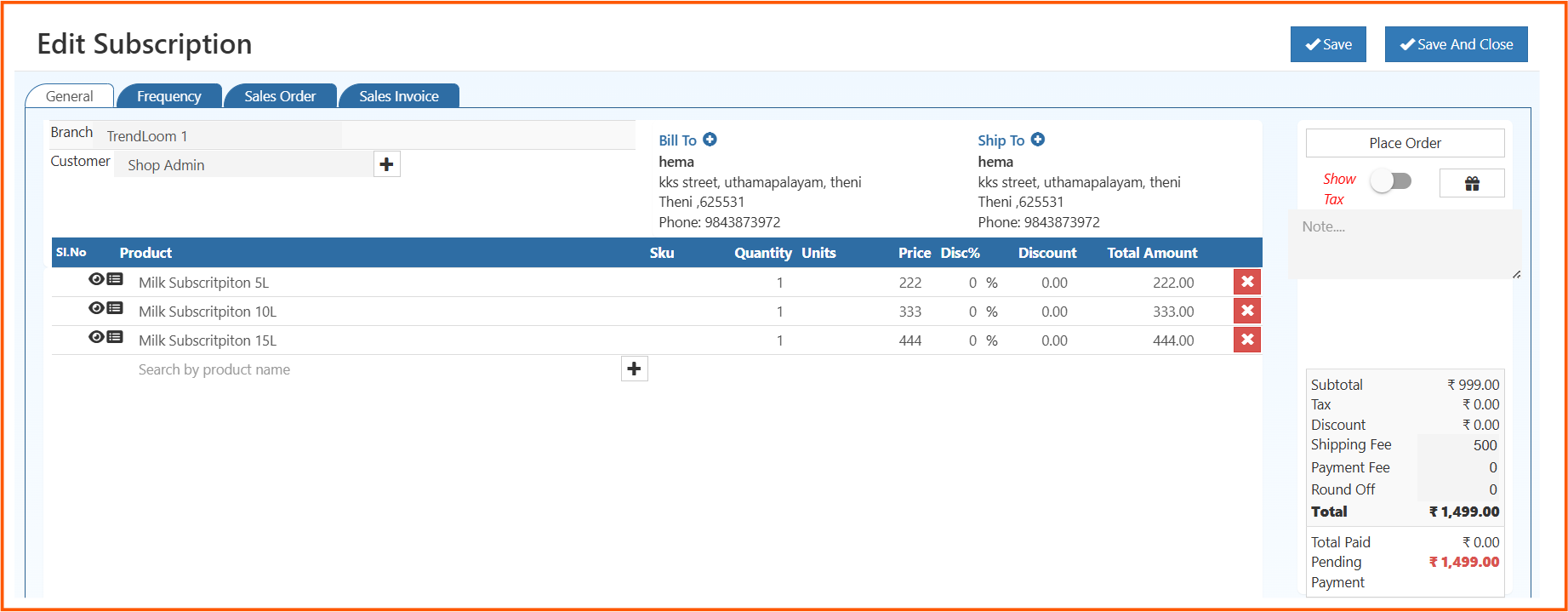
The Edit Subscription form has four tabs — General, Frequency, Sales Order, and Sales Invoice.
The General tab shows the same fields as the create form — branch, customer, products, billing and shipping addresses, and the order summary panel.
The Frequency tab shows the current schedule settings — frequency, number of orders, start and end dates, payment options, and shipping class.
The right panel on the edit page shows a Place Order button — use this to manually trigger a subscription order outside the automatic schedule.
Show Tax toggle and Note field are also available on the right panel.
Sales Order Tab
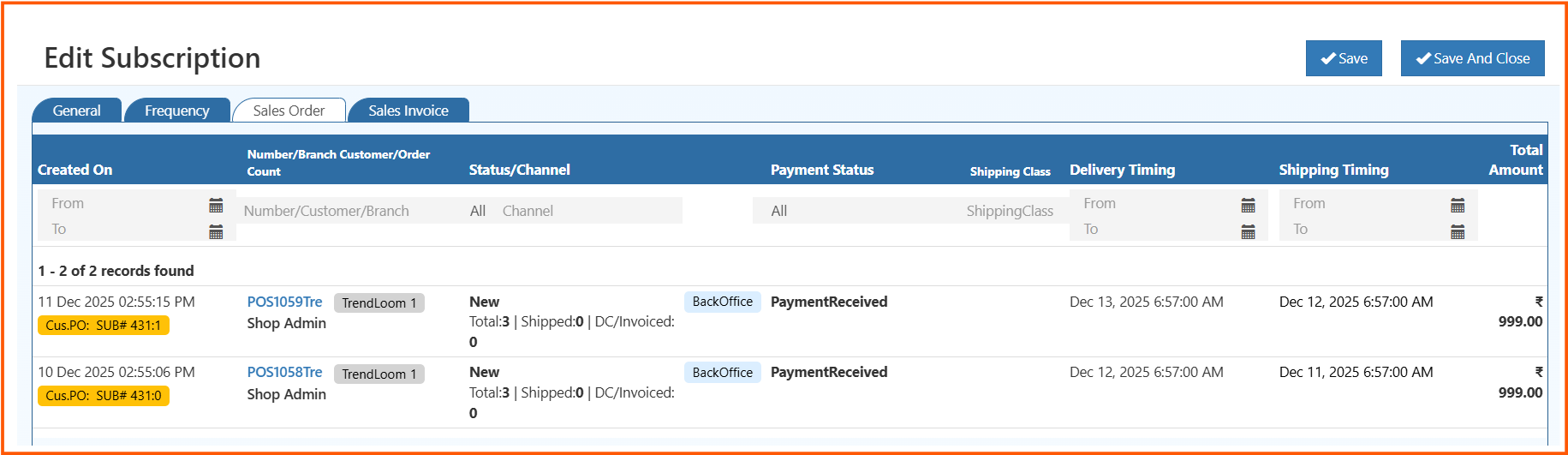
The Sales Order tab shows all sales orders generated by this subscription. Each row displays:
- Created On — date and time the order was generated
- Number / Branch / Customer / Order Count — order reference, branch, customer name, and item count with shipped and invoiced summary (for example, Total: 3 | Shipped: 0 | DC/Invoiced: 0)
- Status / Channel — order status and channel (for example, New, BackOffice)
- Payment Status — PaymentReceived, PendingPayment, etc.
- Cus.PO — customer PO reference linked to this subscription order (for example, SUB# 431:1)
- Shipping Class — shipping method applied
- Delivery Timing — scheduled delivery date and time
- Shipping Timing — scheduled shipping date and time
- Total Amount — value of each generated order
Use the filter row at the top to search orders by date, number, customer, status, channel, or payment status.
Sales Invoice Tab
The Sales Invoice tab shows all invoices generated from this subscription — same column structure as the Sales Order tab.
Subscription Status Reference
| Status | Meaning |
|---|---|
| Active | Subscription is running and orders are being generated on schedule |
| Paused | Subscription is temporarily stopped — no orders generated until resumed |
| Stopped | Subscription has been stopped and is no longer active |
| Cancelled | Subscription has been cancelled and removed |