POS Order Fulfillment for Retail | Convert Orders to Bills Instantly
Learn how O2VEND POS turns pending orders into instant bills with real-time inventory & automatic delivery. Streamline your store now!
Turn every pending order into a completed POS bill in seconds — save time, avoid errors, and start automatic delivery instantly with O2VEND Cloud POS.
Once saved, the system automatically triggers delivery, making orders ready for dispatch instantly. Get a complete order-to-bill-to-delivery experience, streamline store operations, and delight your customers effortlessly.
This guide covers the end-to-end workflow — from new orders to final billing — using the O2VEND POS interface.
5 Steps to Fulfill Orders in O2VEND POS
Order Fulfillment in O2VEND POS allows store staff to:
- View new POS & online orders
- Verify customer and order details
- Convert orders into POS billing
- Complete checkout and payment
- Update order status automatically
This ensures fast order processing, zero stock mismatch, and clean accounting.
Why Order Fulfillment Is Important in POS Operations
Without a proper fulfillment flow, businesses often face:
- Missed or delayed orders
- Wrong item dispatch
- Inventory mismatch
- Manual billing errors
O2VEND POS solves this by offering a centralized order fulfillment screen connected directly to ERP inventory and billing.
Order Fulfillment List – Screen Overview
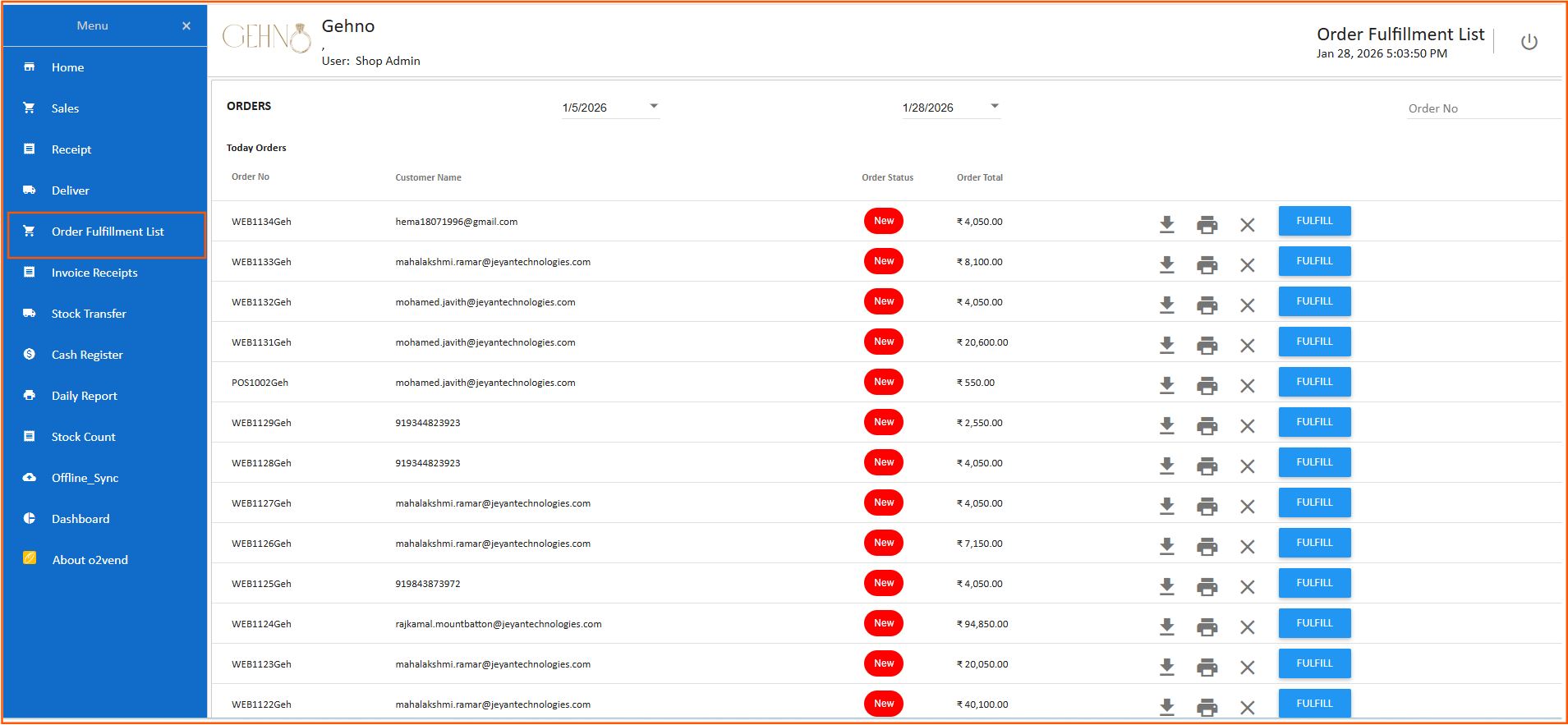
The Order Fulfillment List displays all pending and new orders that are ready for processing.
Key Details Shown on This Screen
- Order Number – Unique reference ID
- Customer Name / Contact – Buyer information
- Order Status – New / Pending
- Order Total – Total bill amount
- Action Buttons – Fulfill, Print, Download, Cancel
💡 This screen helps staff quickly identify new orders that need billing or dispatch.
Order Status – What “New” Means
Orders marked as New indicate:
- Order has been successfully placed
- Inventory is reserved
- Order is pending billing or fulfillment
These orders are ready for the next step — Fulfillment.
Fulfill Button – What Happens When You Click It?
Clicking the FULFILL button opens the POS Sales Billing Screen, where the order is converted into a bill.
This ensures:
- Accurate item mapping
- Correct pricing and tax
- Real-time stock deduction
POS Sales Screen – Order Converted to Billing
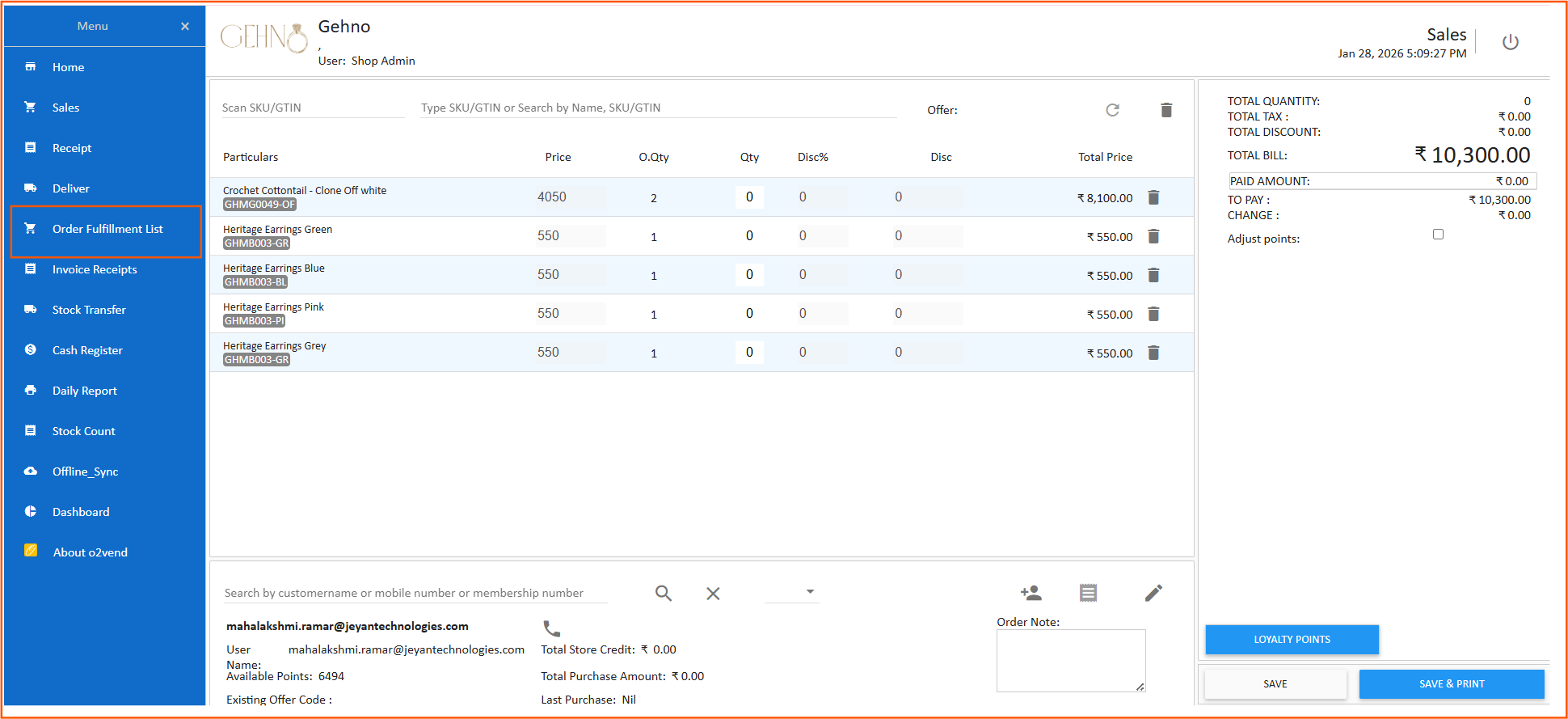
Once the order is fulfilled, the system redirects to the Sales Billing Screen.
Learn More: POS Features
Sales Billing Screen – Detailed Explanation
Product & Item Details
- Items from the order are auto-loaded
- SKU / Product name displayed clearly
- Quantity and price are pre-filled
Quantity & Discount Controls
- Modify quantity if needed
- Apply item-level or order-level discounts
- Ensure pricing accuracy before checkout
Live Bill Summary Panel
- Total Quantity
- Total Tax
- Total Discount
- Final Bill Amount
- Paid Amount & Balance
This helps cashiers verify billing before payment.
Customer Details & Loyalty Integration
The POS screen also shows:
- Customer name or email
- Available loyalty points
- Purchase history
💡 Loyalty points can be adjusted or redeemed during billing to improve customer retention.
Payment & Final Checkout
After verifying all details:
- Select payment method (Cash / Card / UPI / Wallet)
- Enter paid amount
- Confirm payment
- Save or Save & Print invoice
The system automatically:
- Updates order status
- Deducts inventory
- Records payment
- Syncs data with ERP(O2VEND Back office)
Benefits of Using Order Fulfillment in O2VEND POS
- Faster order processing
- Accurate billing and tax calculation
- Real-time inventory sync
- Reduced manual work
- Better customer experience
This makes it ideal for:
- Retail stores
- Multi-branch businesses
- Online + offline sales
- Franchise operations
Who Should Use POS Order Fulfillment Software?
• Retail stores
• Supermarkets
• Pharmacy billing systems
• Multi-branch franchise businesses
• E-commerce + offline hybrid stores
Common Use Cases
- Converting online orders to POS billing
- Processing click-and-collect orders
- Handling high-volume daily sales
- Managing centralized order fulfillment
Related POS Guides
- How to Use O2VEND Point of Sale – Complete Guide
- POS Reports Made Simple – Sales & Cash Insights
- How to Set Up Payment Methods in O2VEND POS
Final Summary
O2VEND Cloud POS Order Fulfillment simplifies how businesses process orders — from order listing to final billing — with complete accuracy and speed.
By combining order management, POS billing, and ERP inventory sync, O2VEND POS helps businesses scale efficiently while delivering a seamless checkout experience.