POS Invoice Receipts – Record Pending Invoice Payments in O2VEND
Looking to collect pending invoice payments fast? O2VEND POS Invoice Receipts ensures accurate tracking, partial payments & instant updates.
Easily record customer payments for pending sales invoices and credit invoices using the O2VEND POS Invoice Receipts screen. Update invoice status instantly, manage partial payments, and ensure accurate accounting in real time.
The Invoice Receipts module helps retail stores collect dues, clear outstanding balances, and maintain proper financial tracking inside the POS system.
What is Invoice Receipts in POS?
Invoice Receipts is used to:
- Add payment to pending sales invoices
- Record payments against credit invoices
- Accept partial or full payments
- Update invoice status automatically
- Sync payments with ERP / Back Office
Once payment is saved, the invoice status changes to Payment Received.
How to Record Invoice Payment in O2VEND POS
Follow these simple steps to collect payment for a pending invoice:
- Open O2VEND POS
- Click Invoice Receipts from the left menu
- Enter the Invoice Number
- Press Enter or click the search icon
- The invoice details will appear below
- Select or enter the Payment Amount
- Choose the Payment Mode
- Click Save or Save & Print
After saving:
- Invoice status updates automatically
- Payment is recorded in reports
- Customer balance is adjusted
- Accounting entries are updated
Invoice Receipts Screen Overview
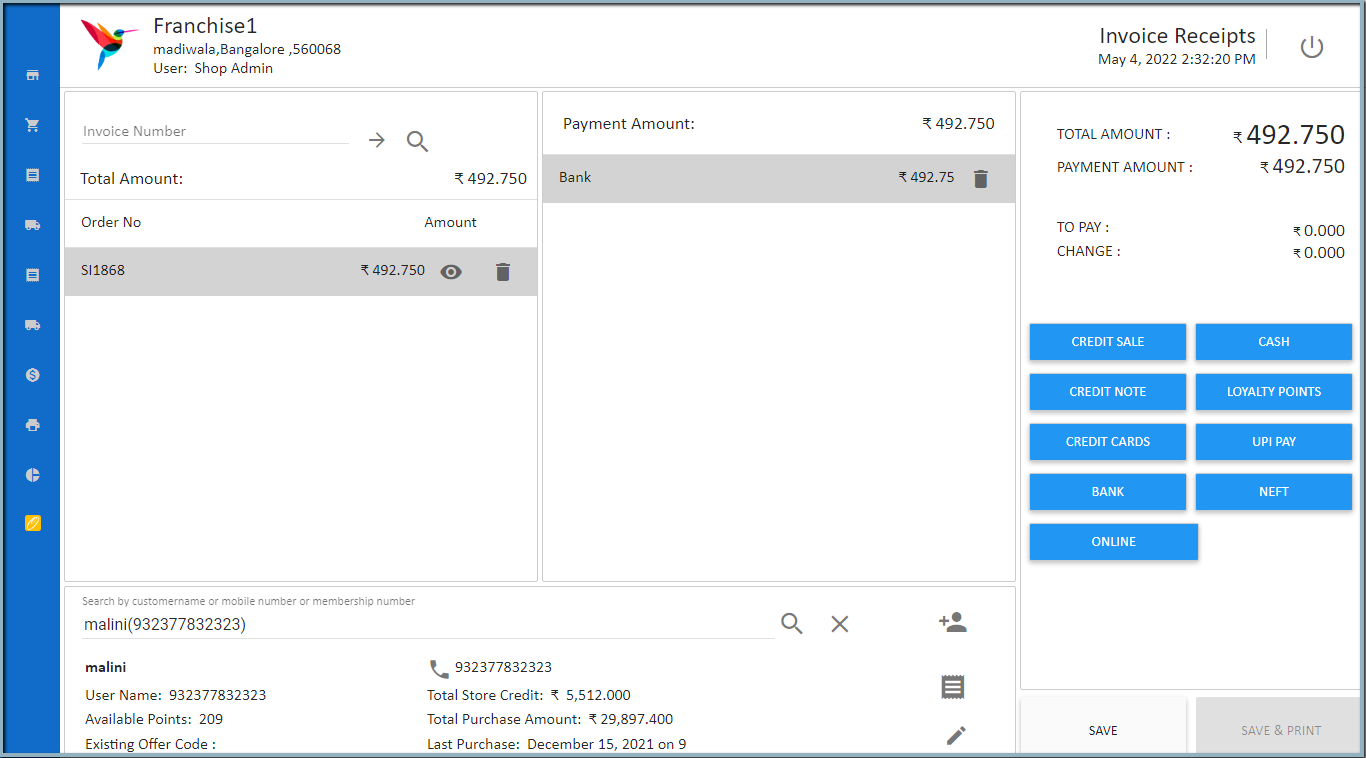
Key Sections Available
1️⃣ Invoice Search Panel
- Search by invoice number
- View total amount
- See pending balance
2️⃣ Payment Mode Panel
Multiple payment options supported:
- Cash
- Card
- UPI / GPay
- Cashfree
- Credit Note
- Debit Note
- Loyalty Points
- Coupon
- Gift Voucher
3️⃣ Payment Summary Section
- Total Amount
- Payment Amount
- Balance To Pay
- Change Amount
This ensures clear payment tracking before confirmation.
Supported Payment Scenarios
Full Payment Collection
Customer clears entire invoice amount in one transaction.
Partial Payment
Customer pays part of the invoice. Remaining amount stays as pending.
Credit Invoice Adjustment
Credit note amount can be adjusted against pending invoice.
Why Invoice Receipts Is Important in Retail POS
Without proper invoice receipt tracking, stores may face:
- Outstanding balance confusion
- Payment mismatch
- Manual accounting errors
- Incorrect revenue reporting
O2VEND POS ensures:
- Accurate payment tracking
- Real-time invoice status update
- ERP sync
- Clean financial records
Common Use Cases
- Collecting dues from B2B customers
- Adjusting credit invoices
- Clearing pending retail invoices
- Recording delayed payments
- Multi-mode payment collection
Related POS Tutorials
- POS Order Fulfillment - Convert Orders to Bills Instantly
- How to Perform Delivery in O2VEND POS
- Cash Register Management in POS
Final Summary
The Invoice Receipts feature in O2VEND POS simplifies payment collection for pending invoices and credit invoices. With multi-payment support and automatic status updates, it ensures fast, accurate, and professional retail billing operations.