Edit Sales Order in O2VEND | Update Order Details, Items, and Actions
Learn how to edit a Sales Order in O2VEND, update customer and product details, review totals, and perform actions like goods issue, invoicing, and order tracking.
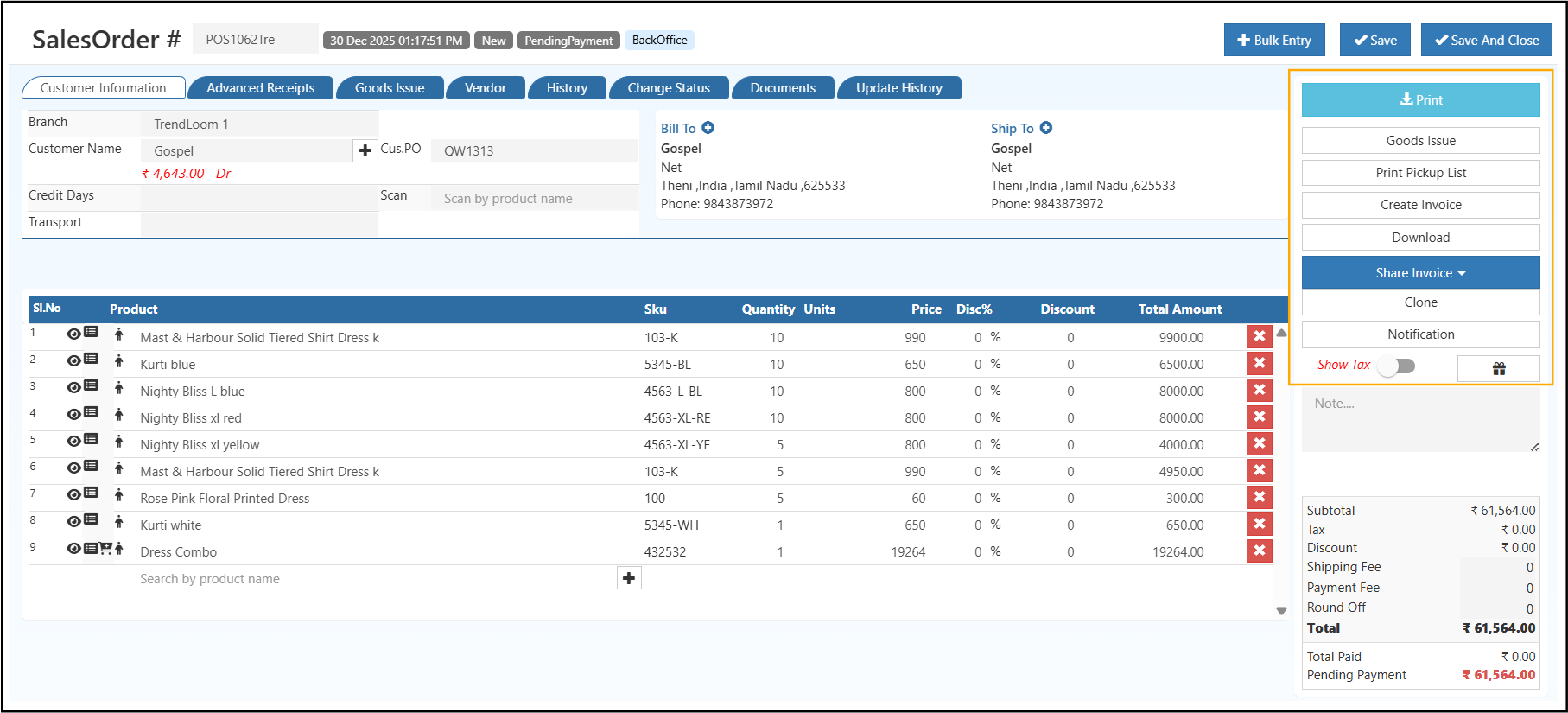
After a Sales Order is created, you can open it from the Sales Orders list and update the order details as needed. The edit screen helps you review customer information, change line items, adjust totals, and continue the order for fulfillment, invoicing, and payment tracking.
This page explains the main sections available while editing a Sales Order in O2VEND and what each option is used for.
Navigation Path
Back Office -> Orders -> Sales Order
Why Edit a Sales Order?
Editing a Sales Order is useful when:
- the customer requests a quantity change
- pricing or discount needs correction
- billing or shipping details must be updated
- transport or reference information was missed earlier
- the order is being prepared for goods issue or invoicing
Updating the order before the next processing step helps maintain accurate stock, billing, and customer records.
How to Open a Sales Order for Editing
- Go to Back Office -> Orders -> Sales Order
- Find the required order from the list
- Open the Sales Order details page
- Review the existing order information
- Update the required fields or line items
- Save or update the order if your setup provides that option
What You Can Do in the Edit Screen
From the Sales Order detail screen, you can:
- review customer and order details
- update line items
- print the order
- issue goods
- create an invoice
- download the order
- clone the order
- send notifications
- review history and related tabs
Sales Order Header Information
The top part of the screen shows the main order information.
Sales Order Number
This is the unique number for the sales order.
It helps identify the order across reports, invoices, and inventory records.
Order Date and Time
This shows when the sales order was created.
It is useful for audit tracking and reviewing the order timeline.
Order Status
This shows the current stage of the order.
Common statuses include:
- New
- Complete
- OverComplete
- InProgress
- Delivered
- ReadyToPickUp
- Void
The status may change when actions like Goods Issue or Create Invoice are completed.
Customer Information Section
This section contains the main customer-related details that can be reviewed or updated.
Branch
Shows the branch handling the order.
This affects stock allocation, reporting, and branch-level control.
Customer Name
Shows the customer linked to the order.
This customer selection may affect pricing, tax rules, credit rules, and address details.
Customer PO
This is the customer's purchase order reference.
It is useful for matching records, reconciliation, and internal tracking.
Credit Days
This shows the allowed payment period for the customer.
It is used for payment follow-up and due-date tracking.
Transport
This field is used for delivery or logistics-related reference details.
It helps when coordinating shipment or dispatch planning.
Billing and Shipping Details
This section shows where the order is billed and where it will be delivered.
Bill To
Shows the customer billing address and contact details.
This is used for invoice generation and tax-related details.
Ship To
Shows the delivery address and contact details.
This is used during fulfillment and delivery processing.
Product and Order Items Section
This is the main area where you review and update the products included in the Sales Order.
Product List
Each line item usually includes:
- product name
- SKU
- Quantity
- Unit Price
- Discount
- Line Total
Edit Line Items
You can update the order items by:
- changing quantity
- adjusting discounts
- reviewing pricing
- removing products using the delete icon
When changes are made, totals are recalculated automatically.
Add More Products
If the customer wants to include additional items, you can add more products directly from the order screen.
This is useful when the order is expanded after the initial entry.
Bulk Entry
Use Bulk Entry when you want to add many products quickly.
This is useful for large orders or repeat orders.
Order Summary and Payment Details
This section helps you review the financial details of the order.
Subtotal
Shows the total item value before tax and extra charges.
Tax
Shows the tax amount based on the selected tax rules.
This may depend on the Show Tax option.
Discount
Shows the total discount applied across the order.
Shipping Fee
Shows any additional shipping or delivery charge.
Round Off
Adjusts the final amount automatically when required.
Total
Shows the final payable amount.
Payment Status
Shows the payment condition of the order.
Common examples:
- Total Paid
- Pending Payment
- Partially Paid
Right Panel Actions
The action buttons help you continue the order process after reviewing or updating the order.
Prints the Sales Order for reference or sharing.
Goods Issue
Issues stock from inventory for the sales order.
This reduces stock quantity and is an important step before delivery for physical goods.

Print Pickup List
Generates a picking list for warehouse or fulfillment use.
Create Invoice
Converts the Sales Order into an Invoice.
This is used when the order is ready for billing.
Download
Downloads the Sales Order document for record keeping or sharing.
Share and Utility Actions
These actions help with reuse and communication.
Share Invoice
Used to share the invoice through available communication methods.
Clone
Creates a copy of the Sales Order.
This is useful for repeat orders or regular customers.
Notification
Sends order-related updates to the customer or internal users.
Show Tax Toggle
This option controls whether tax is shown in the order view.
It is useful when working with tax-inclusive or tax-exclusive pricing.
Tabs for Advanced Control
The lower tabs or related tabs help you manage additional order details.
Advanced Receipts
Used to manage advance payments or partial payments.
Goods Issue
Shows issued stock details and movement information.
Vendor
Shows vendor-related details when the order is linked with a vendor.
History
Shows what changes happened in the order over time.
Change Status
Used to manually update the order status when needed.
Documents
Used to attach supporting files such as delivery proofs or related documents.
Update History
Shows the complete audit trail for the order.
After updating the required details, the Sales Order remains available for the next steps in the process, such as goods issue, invoicing, payment follow-up, document tracking, and reporting.