Store Themes | Theme Marketplace and Theme Editor in O2VEND
Learn how to open themes, browse the O2VEND theme marketplace, and use the Theme Editor in O2VEND Online Store. This tutorial explains how to access the theme section, what you can do inside the Theme Editor, and how theme editing helps you manage your storefront design.
What Is Store Themes?
The Store Themes section helps you manage the design and appearance of your online store.
It is useful for:
- choosing a theme for your store
- opening the theme marketplace
- editing storefront sections visually
- customizing layout and design blocks
- managing theme publishing and updates
O2VEND Themes Marketplace
You can browse available O2VEND themes here: O2VEND Themes
In the Theme Marketplace, you can browse available themes and download the one that best fits your store design. After downloading a theme, you can open it in the Theme Editor, make the required changes, and then publish it to make it live on your online store.
This helps you:
choose a theme based on your business style download and review new theme designs customize the selected theme before going live publish the final theme for customers to use
Navigation Path
Back Office -> Online Store -> Open Editor
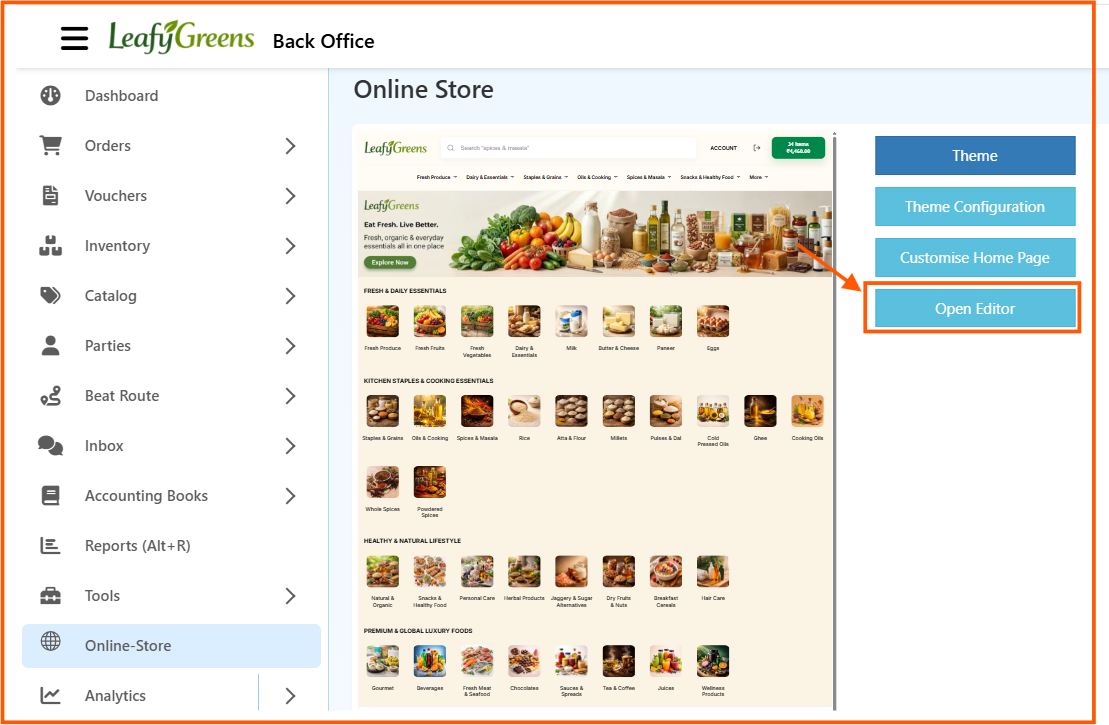
From the Online Store page, click Open Editor to open the Theme Editor.
How to Open the Theme Editor
- Open Back Office
- Go to Online Store
- Click Open Editor
- The Theme Editor page opens
- Select the required theme, page, and screen mode
- Start editing the storefront layout
Theme Editor Page Overview
The Theme Editor screen is used to edit the storefront layout visually.
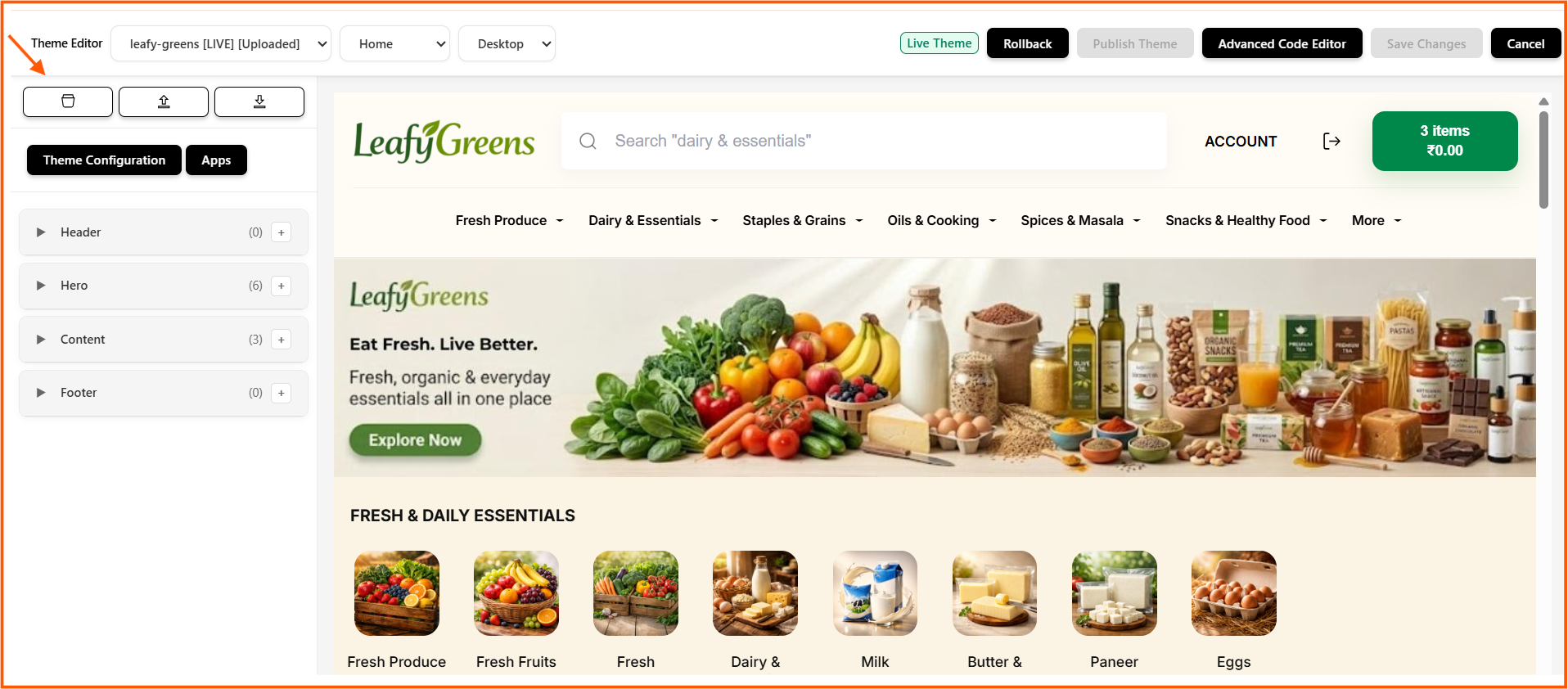
The page is divided into two main areas:
- the left panel for theme controls and sections
- the right preview area for live storefront preview
This makes it easy to edit the design while seeing how the store page looks at the same time.
Top Bar in Theme Editor
The top section of the editor includes the main theme controls.
Theme Selector
This dropdown shows the current theme.
Example: leafy-greens [LIVE] [Uploaded]
It helps you identify which theme is currently active or being edited.
Page Selector
This dropdown lets you choose the page to edit.
Example: Home
Screen Mode Selector
This dropdown helps you view the page in a selected mode.
Example: Desktop
Live Theme
This label shows that the current theme is the active live theme.
Rollback
Use Rollback if you need to return to an earlier version of the theme.
Publish Theme
Use Publish Theme to make the updated theme live.
Advanced Code Editor
Use this option when code-level editing is needed.
Save Changes
Click Save Changes to save theme updates.
Cancel
Click Cancel to exit without continuing the current action.
Left Panel in Theme Editor
The left panel helps you manage theme sections and tools.
Theme Configuration
Use Theme Configuration to manage general theme-related settings.
Apps
Under the Apps section in the Theme Editor, you can view the list of available apps connected to your store. These apps can be used to add extra features or integrations to your storefront.
Widget Section
The editor shows grouped storefront sections such as:
- Header
- Hero
- Content
- Footer
Each section can be expanded and managed separately.
Add Button
The + button beside a section helps you add items or blocks inside that section.
This makes the editor useful for layout customization without needing direct code changes.
Live Preview Area
The right side of the Theme Editor shows a live storefront preview.
This preview helps you:
- check menu layout
- review banners and hero sections
- view category blocks
- understand how the theme looks on the selected page
- confirm visual changes before saving or publishing
The preview area makes theme editing easier because you can see the storefront structure while updating the design.
Theme Marketplace View
The marketplace view allows users to browse available themes.
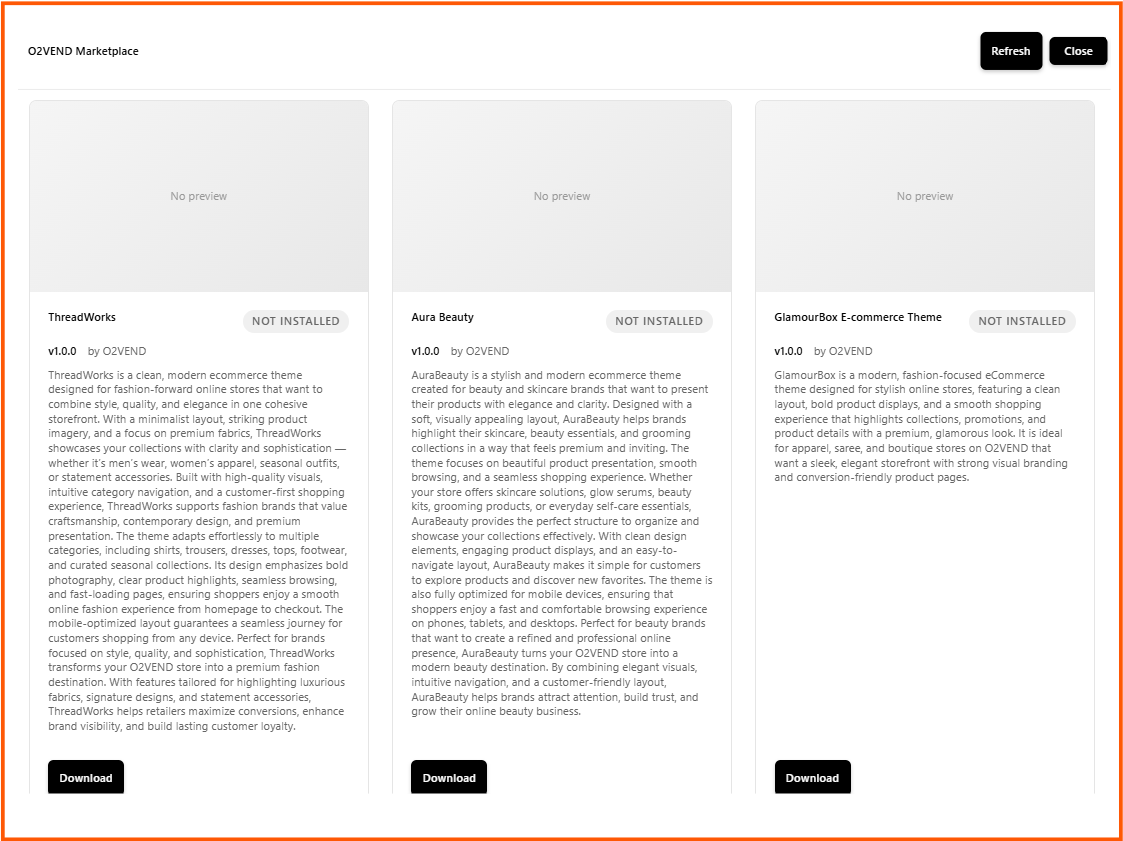
From the screenshot, each theme card typically shows:
- theme name
- version
- author or publisher
- short description
- install status
- download action
This helps users compare themes before choosing one for the store.
Benefits of Store Themes and Theme Editor
Using Store Themes in O2VEND helps you:
- choose a theme that matches your business style
- edit store sections visually
- manage theme updates from one place
- preview design changes before publishing
- improve storefront appearance in an organized way