Sales Agent App – Products Overview & Management Guide
The Sales Agent App provides a centralized platform for managing products, monitoring stock, and streamlining sales operations. Designed for efficiency, the app enables agents to search, filter, and manage product inventory directly from mobile or desktop interfaces.
Products Overview Screen
The Products Overview screen serves as the central hub for monitoring all products within the store. It allows quick access to inventory, filtering, and searching functionalities.
Store Information (Top Left) Displays the store name and store type, providing clarity in multi-store operations.
Header Section (Top Right) Shows the current page title, date, and time for reference. Includes session control and status indicators.
Search and Filters
- Search Box: Locate products using product name, SKU, or GTIN.
- Category Filter: Narrow down the product list by specific categories.
- Price Range Filter: Display products within a selected price range for focused management.
Product Count Provides an overview of total products available, offering quick insights into inventory size.
Scan/QR Code Icon Facilitates barcode or QR code scanning to access product details instantly.
Purpose Enables agents to quickly identify products, monitor inventory, and manage product visibility efficiently.
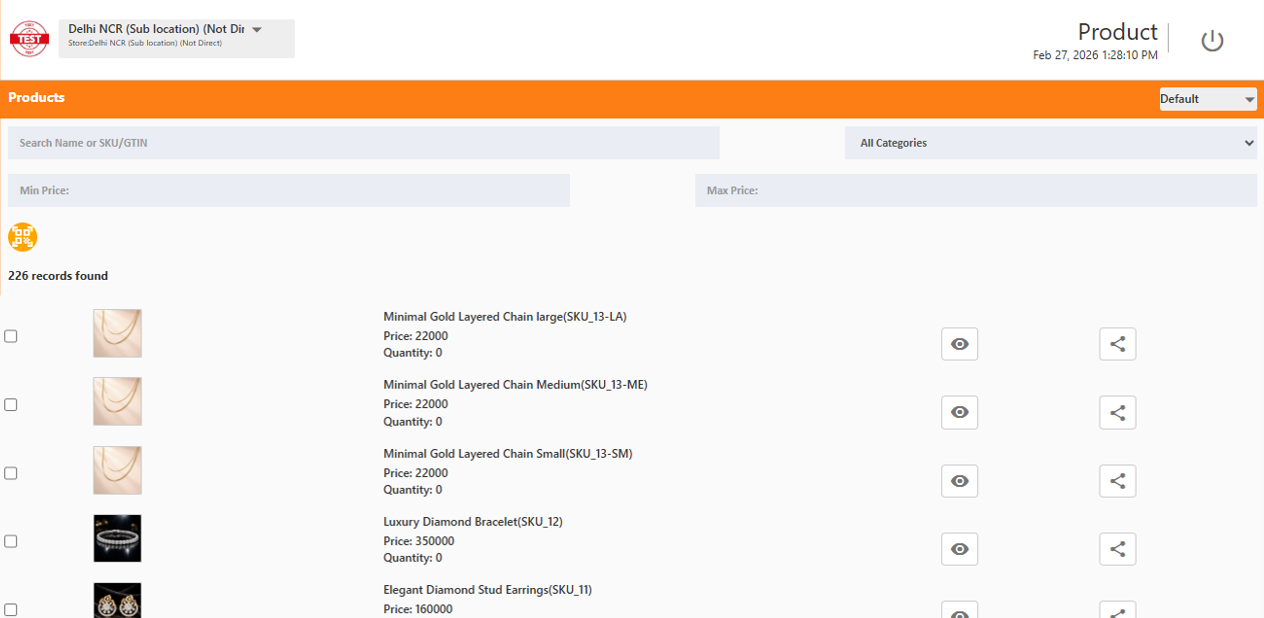
Product List Screen
The Product List screen provides a detailed view of all products, including pricing, stock levels, and management actions.
Product Thumbnail (Left Column) Visual representation of each product for easy identification.
Product Details (Middle Column)
- Product Name and SKU: Complete identification of products.
- Price: Displayed in local currency.
- Quantity: Shows available stock. Zero indicates products that are out of stock.
Action Icons (Right Column)
- Preview Icon: Access detailed product information.
- Share Icon: Share product information with colleagues or customers.
Example Products
- Minimal Gold Layered Chain (Large/Medium/Small) – ₹22,000, stock 0
- Luxury Diamond Bracelet – ₹350,000, stock 0
- Elegant Diamond Stud Earrings – ₹160,000, stock 0
- Sparkle Diamond Necklace – ₹420,000, stock 0
Purpose Supports inventory monitoring, product visibility, and sharing of product details. Out-of-stock products can be quickly identified for restocking or sales planning.
Operational Tips
- Search products efficiently using name, SKU, or GTIN.
- Apply category and price filters to focus on relevant product segments.
- Monitor stock levels to identify products that require restocking.
- Use action icons to preview or share product details instantly.
- Scan QR codes or barcodes for rapid product lookup.