Online Store Setup in Minutes
Launch your omnichannel retail store today — eCommerce + POS billing + GST invoicing + Inventory Management, all in one free cloud ERP built for retailers.
O2VEND combines POS billing software, ecommerce platform, and inventory management system in one cloud retail ERP — trusted by retailers, SMEs, and MSMEs.
| What you get | |
|---|---|
| ✅ GST-compliant billing | IGST / CGST / SGST auto-calculated, e-invoicing ready |
| ✅ UPI, card, cash & digital wallet | Payments at POS and eCommerce checkout |
| ✅ Multi-store branch management | All branches from one Back Office login |
| ✅ Real-time inventory tracking | Stock visibility across all locations |
| ✅ Omnichannel retail | Online store + physical store, unified |
Start Selling Online & Managing POS — Today
Create your store, generate GST invoices, track inventory, and manage multiple locations — all from one free cloud ERP for Indian retailers.
Ready to try? Create your free store now – it takes only minutes.Create your free store and access POS billing, inventory & ecommerce in minutes.
No credit card required • Free to start • Cancel anytime
Begin O2VEND Store Setup
Login to O2VEND Account
Creating a free online store or logging into the O2VEND Cloud ERP dashboard is fast and simple. Just enter an email address and verify it using the OTP sent to the inbox.
Watch: O2VEND Login & Store Setup Walkthrough
This short video shows:
- OTP login process
- Store creation flow
- Dashboard access after setup
How to Login or Create a Free O2VEND Store
Follow these steps to create a new store or log in to an existing O2VEND account:
- Click "Create Your Free Store" or "Login" from the main menu.
- New users: Select Create Your Free Store to begin the omnichannel retail setup. Existing users: Select Login to access your Back Office dashboard.
- Enter a valid, active email address — used for verification and important notifications.
- Check for any spelling errors to avoid login or registration issues.
- Open your inbox and locate the OTP (One-Time Password) sent by O2VEND.
💡 Tip: After OTP verification, you land directly on the O2VEND Back Office — where eCommerce, POS billing software, and inventory management are all accessible from a single login. No separate apps needed.
If the OTP Is Not Received
- Check Spam, Junk, or Promotions folders.
- Ensure the email address entered is correct.
- Allow a few moments for possible network delays.
Enter the OTP before it expires. If the OTP is incorrect or expired, request a new one.
After verification, your store dashboard is ready — with eCommerce, POS billing, GST invoicing, and inventory management all accessible from one login.
O2VEND Platform Modules
Explore all O2VEND modules from one centralized retail ERP dashboard:
Product Modules
- POS Billing Software – Fast GST-compliant billing & checkout with UPI support
- Ecommerce Platform – Online store, orders & omnichannel selling
- Back Office Dashboard – Central control for multi-store retail operations
- Inventory Management System – Real-time stock & multi-location tracking
Learn the Essentials of E-commerce!
This blog explains what e-commerce is, how it works, and how to start selling products online successfully.
Read the Full BlogBusiness Growth & Support
- Find a Partner – Local implementation support
- Partnership Program – Grow with O2VEND
- O2VEND Community – Discussions, help & updates
Store Creation & Management Tutorial
A complete guide to creating, managing, and controlling stores in the O2VEND Back Office. This tutorial helps retail businesses, SMEs, and MSMEs set up branches, access POS billing software, ecommerce, inventory management, and GST billing from a single cloud retail ERP.
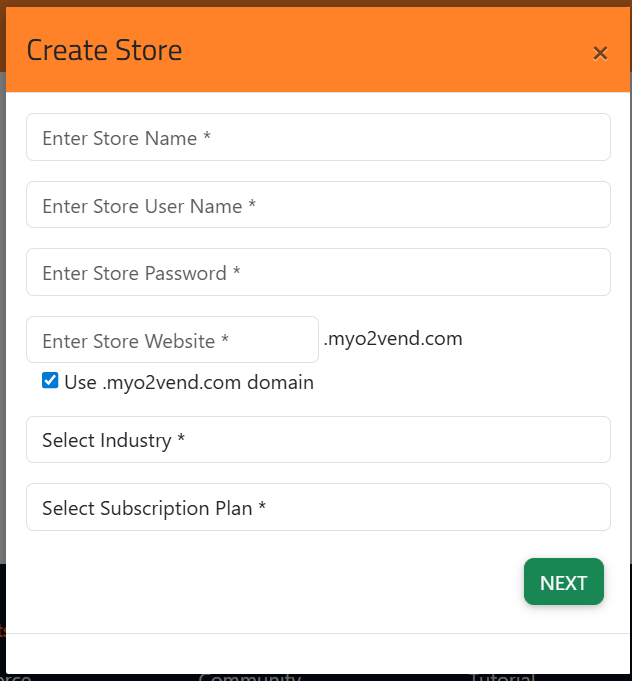
Create Store – Store Details
Store Details Form
? Create Store – Store Details
- Store Name – Display name of your online store and ecommerce storefront
- Store User Name – Login ID for Back Office and retail ERP dashboard
- Store Password – Secure admin password
- Store Website – Default domain ends with
.myo2vend.com - Use .myo2vend.com Domain – Enables system-generated domain (custom domain available in paid plans)
- Select Industry – Business category: retail, grocery, fashion, electronics, pharmacy, FMCG, and more
- Select Subscription Plan – Free or paid plan to activate store features
NEXT button moves to the next step.
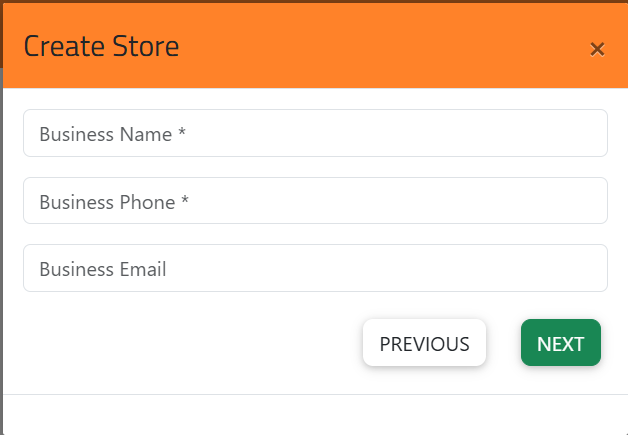
Business Information
This step captures your official business contact details — used on GST invoices, customer emails, and compliance documents.
- Business Name – Legal business name (appears on GST-compliant invoices)
- Business Phone – Primary contact number
- Business Email – Receives order notifications and billing alerts
- PREVIOUS – Go back and edit store details
- NEXT – Continue to address configuration
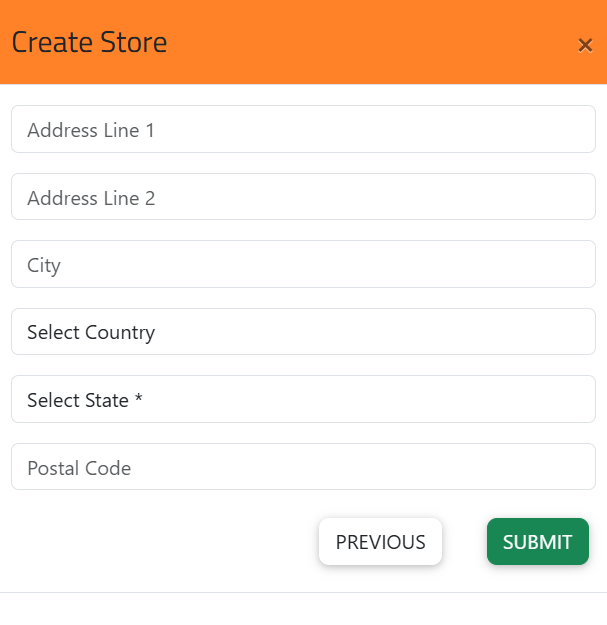
Address Configuration
Defines the physical location of your store. Used for GST compliance, e-invoicing, delivery rules, and city-wise reporting.
- Address Line 1 – Primary store address
- Address Line 2 – Optional extended address
- City – Used for city-wise sales reports and logistics
- Country – Aligns tax rules and currency settings
- State (Mandatory) – Required for GST/VAT and GSTIN-based billing
- Postal Code – Used for delivery partner integration and invoice generation
- PREVIOUS – Return to previous step
- SUBMIT – Complete store creation
📌 Why is State mandatory? O2VEND automatically applies the correct IGST, CGST, or SGST rate based on your store's registered state and the customer's location. This ensures every invoice from your POS billing software and eCommerce platform is GST-compliant and e-invoice ready from Day 1.
My Stores – Store List & Access URLs
All created stores appear in the My Stores dashboard — your central hub for multi-store retail management.
Each store displays:
- Store Name
- Back Office URL – Admin & configuration for your retail ERP
- POS URL – GST billing interface with UPI and card payment support
- eCommerce URL – Customer-facing omnichannel storefront
- Sales Agent App URL – Field sales and retail agent access
💡 Managing multiple retail branches? O2VEND's multi-store management lets you run each branch independently — with shared inventory visibility, unified GST reporting, and central admin access across all locations. Ideal for retail chains, franchise networks, and MSME businesses scaling across cities.
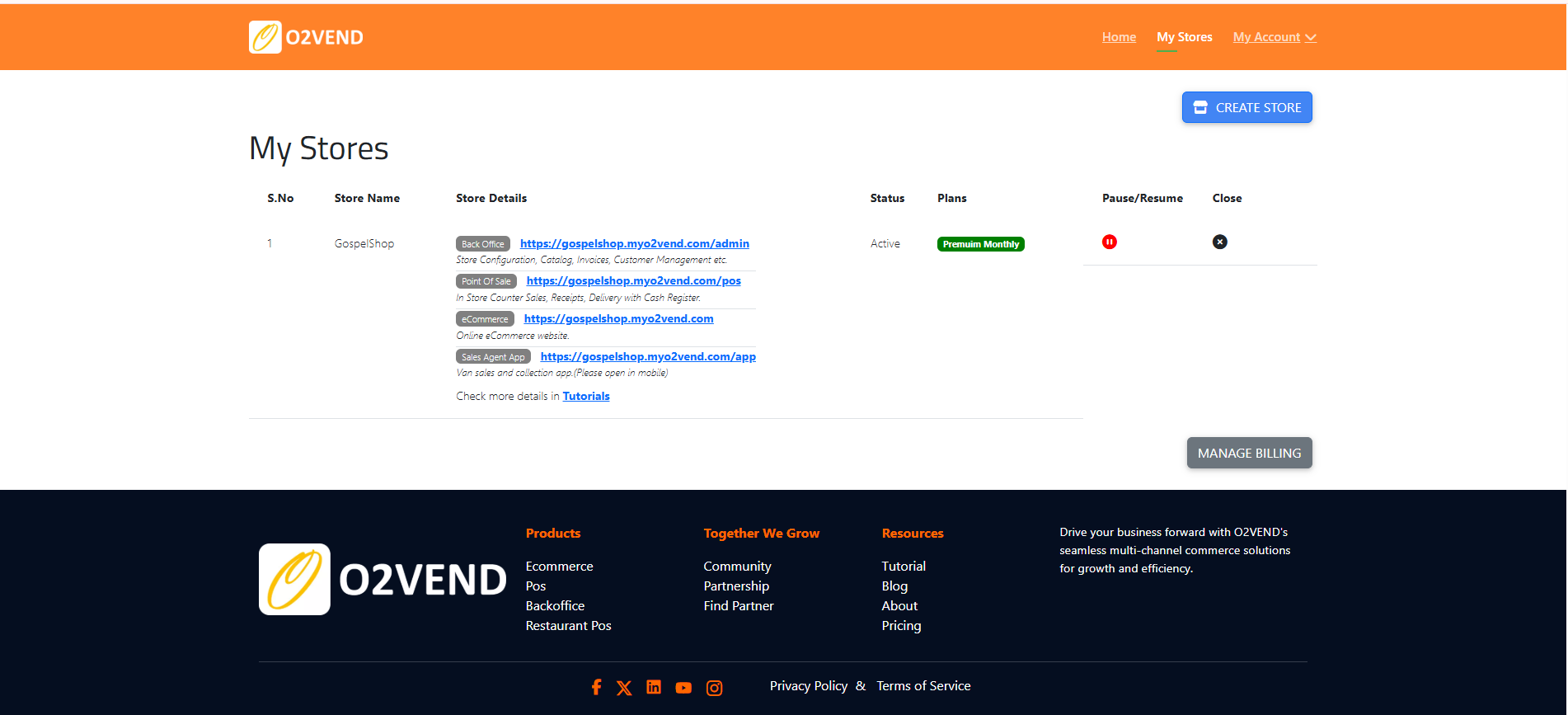
Store Status & Subscription
- Status – Active, Paused, or Closed
- Plans – Subscription type and feature limits (Free, Growth, Enterprise)
Pause / Resume Store
Temporarily disables store operations without deleting data.
Used during:
- Store renovation or relocation
- Temporary shutdown or seasonal business pause
- Ownership transition period
Close Store
Permanently closes a store when:
- A branch is shut down
- Ownership changes
- Operations are consolidated across locations
Manage Billing
Access subscription and payment management:
- Upgrade or downgrade plans
- Add payment methods
- View billing history
- Check renewal dates
After Store Setup — Start Selling in 5 Steps
Your omnichannel retail store is live. Complete these steps to go fully operational:
- Add your product catalog — upload products with images, prices, HSN codes, and stock quantity in PIM (Product Information Management)
- Configure GST tax classes — set IGST / CGST / SGST slabs (0%, 5%, 12%, 18%, 28%) for each product category; enable e-invoicing if applicable
- Set up POS billing — configure payment modes: Cash, UPI, Card, and digital wallets; print GST-compliant receipts
- Configure delivery settings — add pincode zones, shipping rates, and courier partner integrations for eCommerce orders
- Go live — publish your eCommerce storefront and share your store URL across WhatsApp, Instagram, and Google
Frequently Asked Questions
Q: Is O2VEND free to use?
Yes. O2VEND offers a Free plan that includes full access to eCommerce, POS billing software, and inventory management — no credit card required. Cancel anytime. Paid plans unlock features like custom domain, multiple staff users, priority support, advanced reports, and higher order limits.
Q: Does O2VEND support GST billing and e-invoicing?
Yes. O2VEND is fully GST-ready for Indian businesses including MSMEs and retail chains. It automatically calculates IGST, CGST, and SGST based on your registered state and the customer's delivery location. All invoices include your GSTIN and are GST-compliant out of the box. E-invoicing (IRN generation) is also supported for businesses required to comply with India's e-invoice mandate under GST.
Q: Can I manage multiple store branches?
Yes. O2VEND supports multi-store management for retail chains, franchise networks, and MSME businesses with multiple outlets. Create separate stores for each branch — manage all of them from a single Back Office login. Stock levels, orders, GST reports, and sales analytics are visible across all locations in real time.
Q: Does O2VEND support UPI payments?
Yes. O2VEND integrates with UPI, card payments, cash, and digital wallets at both the POS billing terminal and eCommerce checkout. QR code-based UPI billing is supported, and you can configure which payment modes are enabled per store or per cashier.
Q: Is O2VEND suitable for small retail shops, kirana stores, and MSMEs?
Yes. O2VEND is purpose-built for SMEs and MSMEs — including kirana stores, grocery shops, fashion boutiques, electronics retailers, pharmacies, and multi-branch retail chains. The free plan is designed for small businesses getting started with cloud POS billing software and online selling.
Q: How long does store setup take?
Initial store creation takes less than 5 minutes. A fully working store — with products added, POS billing configured, GST tax classes set, and eCommerce storefront live — can typically be completed within 30 to 60 minutes using O2VEND's built-in setup guides.
Q: Can O2VEND work offline?
O2VEND POS billing software supports basic offline billing mode during internet disruptions. Transactions sync automatically once connectivity is restored — so your store never stops billing even during network outages. The eCommerce store and Back Office require an active internet connection.
Check the O2VEND Community for the latest updates.
Contact Jeyan Technologies
For business enquiries, partnership discussions, product information, or any other related details, reach out to our team for clear assistance.
Email Our TeamRelated Topics
Once your store is created, continue with: